
AI Tools 101
Granola Review: How This App Saves Hours from Messy Meetings

Unite.AI is committed to rigorous editorial standards. We may receive compensation when you click on links to products we review. Please view our affiliate disclosure.

Have you ever walked out of a meeting and forgotten everything that happened?
A study from Atlassian shows that the average professional spends an average of 31 hours a month in unproductive meetings. This is often because key takeaways get lost in messy notes or endless transcripts.
That’s why I decided to try Granola AI, an AI meeting notes app designed for anyone tired of juggling between typing, listening, and trying to stay present.
From the moment I used it, Granola felt different. Instead of flooding me with walls of transcribed text like traditional tools, it helped me stay focused by letting me take my own notes while the AI quietly added structure and context in the background.
The result? Clear, actionable notes that I could actually use later (without spending half an hour cleaning them up).
In this Granola review, I’ll discuss the pros and cons, what it is, who it’s best for, and its key features. Then, I’ll show you how I used Granola AI to transcribe and share a meeting with AI.
I’ll finish the article by comparing Granola with my top three alternatives (Fathom, MeetGeek, and Otter.ai).
If you’ve ever wished your meeting notes made sense days later (or that your meetings didn’t feel like a blur), Granola might just be the upgrade your workflow needs.
Verdict
Granola AI successfully streamlines note-taking by enhancing meeting notes with AI. However, the free plan has limited meeting note viewability, and the summaries and transcripts may need to be reviewed.
Pros and Cons
- Take your own notes while Granola adds context and structures them
- Records audio from your device (no meeting bots required)
- Automatically generates actionable, structured summaries with AI
- Customize notes for any meeting type
- Connect with Slack, HubSpot, Notion, Zapier, and more to streamline workflows
- Organize and access notes by project, client, or team for easy collaboration
- The free plan offers limited meeting note viewability
- Focuses on notes and AI enhancement, not complete audio/video transcription
- Summaries and transcripts may need review for accuracy, especially in noisy or complex meetings
- You may need time to adjust to hybrid human/AI note-taking
What is Granola?
Granola is an AI meeting notes application for professionals who are tired of scrambling to write everything down and reading through massive walls of AI-generated transcribed text. Rather than purely transcribing online meetings, Granola automatically provides structure and context.
Granola AI vs. Traditional Tools
Here’s where Granola really stood out to me. Rather than just recording and transcribing your meetings like Otter or similar tools, it combines your own raw notes with AI-enhanced transcription.
For example, you jot down the key points during the meeting, and Granola’s AI fills in the gaps with context from the actual conversation. By the end of the meeting, your notes will actually make sense when you look back at them even days later.
Company & Mission
Granola is pretty new, founded in 2023 by a team that was frustrated with existing meeting solutions. Their whole mission revolves around making meeting documentation as useful as possible.
They’re not trying to eliminate human involvement, which I appreciate. Instead, they’re focused on making your natural note-taking process better through AI assistance.
Granola lets you trust your notes again without spending 30 minutes after every meeting cleaning them up.
Who is Granola Best For?
Here’s who Granola AI is best for:
- Founders, startup executives, and venture capitalists can use Granola AI to take automatic, structured notes that combine their input with AI for clearer insights.
- Freelancers and consultants can use Granola AI to capture real-time transcripts and notes quickly without a bot joining their calls.
- Small teams in tech, sales, marketing, recruiting, and operations can use Granola AI to organize, collaborate, and share knowledge with manually written notes enhanced by AI.
- Privacy-conscious professionals can use Granola AI to record and take notes directly from their device, avoiding awkward bots or technical issues.
- Anyone can use Granola AI to automatically transcribe and improve notes.
Granola Key Features
Here are Granola AI’s key features:
- Human-AI Hybrid Note Enhancement: Combine your notes with AI-generated context from meeting transcripts to clarify and expand your notes.
- Local Audio Capture: Capture audio locally from your device (no meeting bots required), making Granola less intrusive than alternatives.
- Structured Summaries: After the meeting, Granola generates a structured summary that blends your input with AI. No need to manually clean up transcripts.
- Searchable, Collaborative Knowledge Base: Granola organizes meetings into customizable folders to manage and retrieve knowledge across clients, projects, or departments.
- Meeting AI Chat & Verification: In Granola’s portal, you can share notes and have AI answer follow-up questions from the transcript. You can also zoom in on any bullet to see where it came from in the audio.
- Automations & Integrations: Integrates with platforms like HubSpot, Slack, Notion, and Zapier to automate workflows.
How to Use Granola
Here’s how I used Granola to transcribe and share a meeting with AI:
- Download Granola AI
- Start a Meeting
- Generate Transcript Summaries
- Access the Transcript
- Access the Templates
- Apply a New Template
- Share Your Notes
Step 1: Download Granola AI
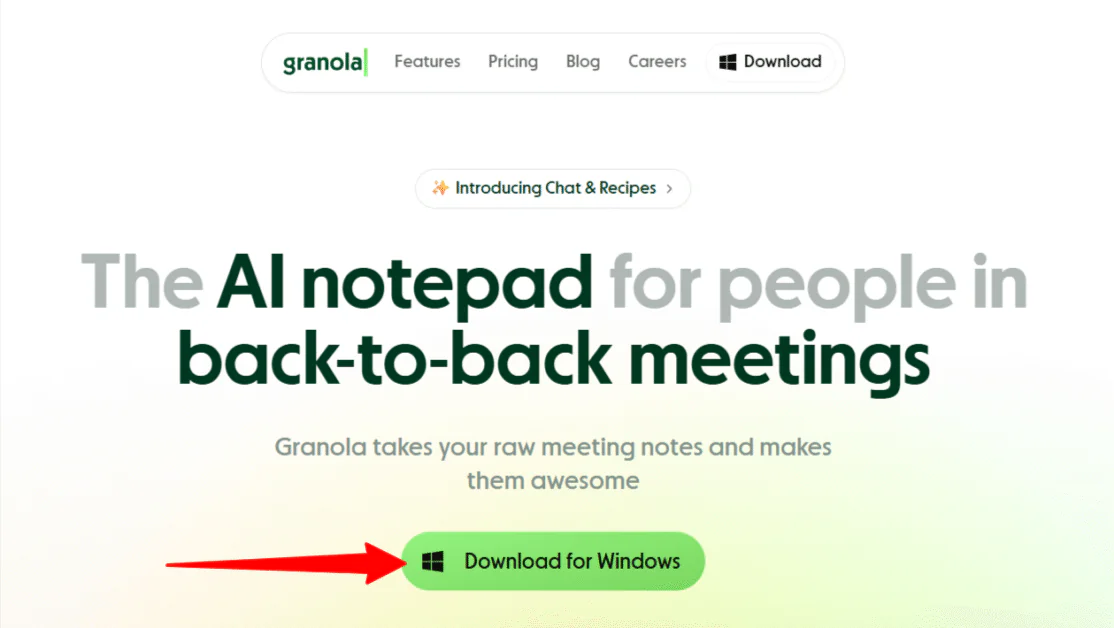
I started by going to granola.ai and selecting “Download.”
Step 2: Start a Meeting

After downloading Granola, signing in, and answering a few questions about my organization, I was taken to “My notes.” I decided to try the demo meeting at the top to get a feel for things.

Immediately, Granola began playing a video of one of the Founders explaining the features.
Step 3: Generate Transcript Summaries

Once the video was over, Granola generated a summary of the meeting. Each bullet point had a magnifying glass I could click to create a transcript summary.
During the meeting, feel free to take manual notes here. Granola will use AI to enhance it after the meeting.
Step 4: Access the Transcript

At the bottom was the transcript, which recorded what was being said in the meeting in real time.
Step 5: Access the Templates
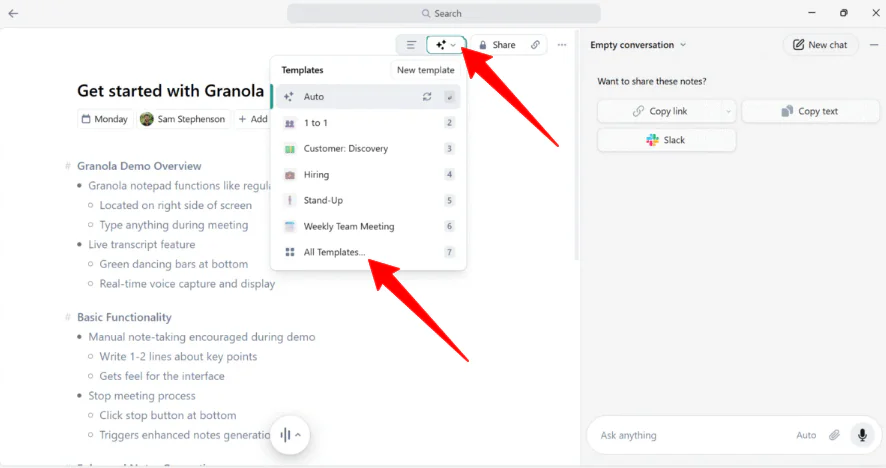
An automatic template will be applied to the meeting summary. However, Granola offers 29 meeting note templates that can be applied to various contexts, which can be accessed at the top:
- Commercial
- Leadership
- Product
- Recruiting
- Team
- VC
Step 6: Apply a New Template
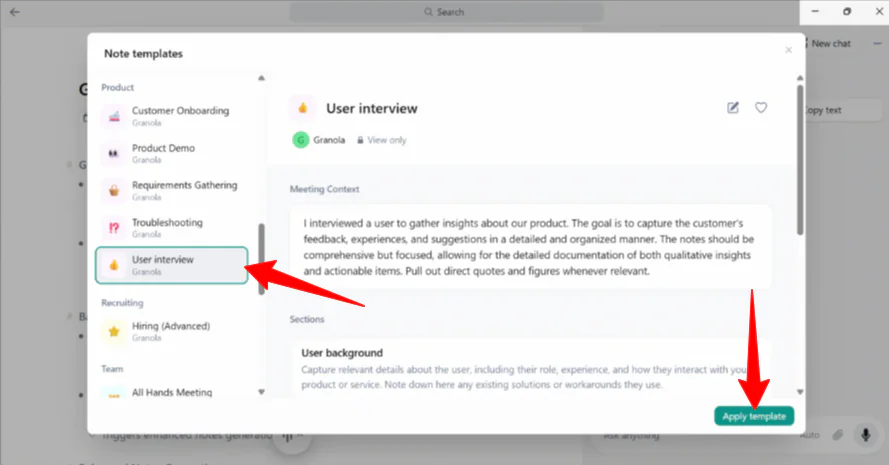
I selected the “User Interview” template, which breaks down notes into the user background, current product usage, positive feedback, pain points, etc.
Step 7: Share Your Notes

Granola immediately generated a new meeting script using the “User Interview” template I had selected. I could share these notes on the right by copying the link, the text, or sharing directly on Slack.
Overall, Granola AI made note-taking during meetings effortless and structured. I liked how quickly it generated summaries, provided templates, and let me easily share my notes with a click.
Top 3 Granola Alternatives
Here are the best Granola AI alternatives.
Fathom

The first Granola alternative I’d recommend is Fathom. Fathom is an AI note-taker that generates accurate transcripts, summaries, and action items to stay focused. It connects with tools like Slack, Salesforce, HubSpot, Notion, and Asana.
Both Granola and Fathom use AI to save time with meeting summaries. However, Granola stands out with its human-AI hybrid notepad. Take AI-enhanced notes with different templates, while capturing audio without bots.
Meanwhile, Fathom offers more detailed meeting information and is better tailored for sales and marketing teams. Plus, Fathom’s integration ecosystem is strong, though it has a less manual note-taking approach.
Choose Granola for a private, flexible AI notepad. Otherwise, choose Fathom for more detailed automated transcriptions and CRM updates.
Read my Fathom review or visit Fathom!
MeetGeek
The next Granola alternative I’d recommend is MeetGeek. It automatically records, transcribes, and summarizes meetings with AI insights.
On the one hand, MeetGeek stands out with its team collaboration and automation. It automatically joins meetings across multiple platforms (Zoom, Google Meet, Teams, etc.) to generate transcripts, create context-aware summaries, and integrate with over 10,000 apps.
Meanwhile, Granola is a bot-free notepad that enhances your notes with AI context. It stands out for its private approach, customizable templates, and AI chat for meeting follow-ups.
Choose Granola for private, user-controlled note-taking. Otherwise, choose MeetGeek for automated, team-focused note management.
Read my MeetGeek review or visit MeetGeek!
Otter.ai
The final Granola alternative I’d recommend is Otter.ai. It’s an AI meeting assistant with live transcription, collaboration, and highlighting.
Otter.ai uses a meeting bot that joins calls as a visible participant. It also provides speaker identification and collaborative editing for interactive note-taking during meetings.
Meanwhile, Granola focuses on background transcription (no meeting bot required) for optimal productivity and privacy. You can even take live notes, which AI augments post-meeting. As a result, you’ll get highly accurate transcripts and structured summaries without interrupting the meeting flow.
Choose Granola if you value privacy, minimal disruption, and accurate post-meeting notes. Otherwise, Otter.ai works best for teams needing real-time collaboration.
Read my Otter AI review or visit Otter AI.
Granola Review: The Right Tool For You?
Thanks to Granola AI, my meetings felt much more productive. What stood out to me the most was the human/AI notetaking hybrid (taking my own notes while the AI added context, structure, and actionable summaries), without a meeting bot intruding.
Plus, the templates and easy sharing features saved me time. I was also happy to find my notes readable days later, which is the most frustrating part about notetaking.
For someone who values privacy, control, and clarity in post-meeting notes, Granola is the perfect fit. Otherwise, you might want to try one of these alternatives:
- Fathom is best for sales and marketing teams to generate transcripts and summaries.
- MeetGeek is best for teams prioritizing full meeting note automation and collaboration.
- Otter.ai is best for teams needing live transcription, interactive collaboration, and speaker identification during meetings.
Thanks for reading my Granola review! I hope you found it helpful.
Granola offers a plan to start generating AI meeting notes for free. Try it for yourself and see how you like it!
Frequently Asked Questions
Is Granola AI safe to use?
Yes, Granola AI is safe to use. It records audio on your device without requiring meeting bots, prioritizes user control over data, and implements secure practices to protect your meeting notes and transcripts.
What is Granola AI used for?
Granola AI is used for capturing, organizing, and enhancing meeting notes by combining human note-taking with AI transcription to create structured summaries.
Can Granola record phone calls?
Granola AI does not record phone calls, but it can transcribe phone calls made through your Mac using Apple’s Continuity feature or WhatsApp calls on Mac.
What does Granola AI do?
Granola AI is an AI note-taking app that automatically transcribes and summarizes your meetings, while enhancing your own live notes with context from the transcript.
Is Granola AI free to use?
Granola AI offers a free plan, but your meeting notes are only viewable and searchable for a limited time.
Is AI note-taking legal?
AI note-taking is legal as long as all parties involved in the meeting are informed and give their consent to be recorded and transcribed. The use of AI transcription must also comply with relevant privacy, data protection, and recording laws in the applicable jurisdictions.



