
AI Tools 101
Skylum Aperty Review: This AI Portrait Editor Feels Magic

Unite.AI is committed to rigorous editorial standards. We may receive compensation when you click on links to products we review. Please view our affiliate disclosure.

If you’ve ever spent hours retouching portraits, you’ll understand why AI photo editors are changing everything. I’ve tried many of them myself, including Luminar Neo (Skylum’s all-in-one photo editor).
That’s what made me curious about Skylum Aperty (Skylum’s first software built only for portraits). After testing it, I found it does exactly what many tools miss: it enhances faces realistically without that over-edited look.
In this Skylum Aperty review, I’ll discuss the pros and cons, what it is, who it’s best for, and its key features. Then, I’ll show you how I used it to quickly remove the wrinkles on a portrait of a woman effortlessly in an instant:

I’ll finish the article by comparing Aperty with my top three alternatives (Skylum’s Luminar Neo, Photoleap by Lightricks, and Aftershoot). By the end, you’ll know if Skylum Aperty is right for you!
Verdict
Skylum Aperty is a fast AI portrait editor that creates natural results for beginners and professionals. It’s a bit expensive and missing some advanced tools, but its simplicity and realistic results make it great for high-quality edits.
Pros and Cons
- Automatically smooths skin and removes blemishes
- Uses AI for natural retouching
- A beginner-friendly interface
- Supports RAW files for professional image quality
- Fast performance with instant edit previews
- Works offline or as a plugin for Lightroom and Photoshop
- Realistic AI lighting and creative presets
- Batch processing for multiple images
- 7-day free trial with a 14-day money-back guarantee
- It may be expensive for casual users
- Lacks some advanced features
- Some AI edits may need manual correction
- It can take a long time to download
- Occasionally lags with larger files
What is Skylum Aperty?

Skylum Aperty is a specialized AI portrait photo editor developed by Skylum (the same company behind Luminar Neo. It launched in November 2024 as a tool for portrait photographers who want natural, high-quality retouching with less editing time.
Aperty is built for portrait, wedding, headshot, and fashion photographers who want fast, professional face and skin retouching. It focuses on AI portrait enhancement with customizable tools for natural-looking results.
Aperty is a Specialist, Not a Generalist
Aperty is Skylum’s first software built exclusively for portrait editing. While Luminar Neo tries to handle landscapes, architecture, product photography, and portraits all in one package, Aperty focuses on making people look good.
That specific focus on portrait editing is Aperty’s biggest strength. With Aperty, every feature is designed around retouching human faces and skin with no distractions or extra clutter.
Aperty vs. Luminar Neo
If you’re already using Luminar Neo, you might be wondering if Aperty is redundant. It’s not: Luminar Neo has some portrait tools built in, but they’re pretty basic compared to what Aperty offers.
For example, Neo gives you skin smoothing and eye enhancement. Aperty gives you separate controls for wrinkle removal, lip smoothing, individual teeth whitening, iris enhancement, eyeball color correction, facial contouring, digital makeup application, and body skin retouching. Aperty’s portrait tools are much more specific for accurate results.
The AI technology in Aperty is also more advanced for face detection specifically. It can identify multiple people in a group shot and let you edit each person’s face separately.
If you’re choosing between the two, Aperty is the clear winner for portrait work.
Aperty’s AI Technology
What I appreciate about Aperty’s approach is that the AI does the heavy lifting, but you still have complete control over the final result.
The face detection AI identifies skin areas, facial features, and even blemishes or wrinkles. From there, you decide how much correction to apply with the sliders.
For example, if you want to keep some laugh lines but smooth out temporary blemishes, you can do that. Or if you want to enhance eyes without whitening teeth, that’s possible too.
This balance between automation and control is huge for professional work because every client has different preferences. Some people want minimal retouching, others want the full treatment.
Device Compatibility (macOS & Windows)
Aperty works on both macOS and Windows as a standalone application, which already puts it ahead of some competitors that are Mac-only.
Additionally, it offers plugin support for Photoshop and Lightroom Classic. That workflow integration saves a lot of time compared to exporting, retouching, saving, and reimporting.
Aperty + Julia Trotti
Skylum collaborated with Julia Trotti to develop Aperty. If you don’t know who she is, she’s a portrait photographer from Australia with over 650K YouTube subscribers. She’s been shooting professionally for years and really understands what working photographers need.
This collaboration shows in the presets. I tried using some of them myself, and they’re not over-the-top or unrealistic. They’re practical editing styles that you’d actually use for client work.
Having a professional photographer involved in the development meant they avoided a lot of the “engineer thinking” that makes some software frustrating to use.
Who is Skylum Aperty Best For?
Here are the types of people Aperty is best for:
- Professional Photographers can use Aperty for high-quality retouching for studio, fashion, wedding, and headshot work.
- Enthusiasts and Semi-Pros can use Aperty to access powerful AI photo editing without the complexity of Photoshop.
- High-Volume Shooters can use Aperty to batch edit multiple portraits and maintain consistent results.
- Photographers short on time can use Aperty to smooth skin, remove blemishes, and fix color faster while maintaining natural results.
Skylum Aperty Key Features
Here are Aperty’s key features:
- AI Face Mesh: Maps up to 4,000 facial points for accurate 3D editing that keeps natural depth and contours.
- Face & Body Segmentation: Detects up to 30 zones of face and body parts for targeted edits, preventing over-processing.
- Skin Retouching: Smooths skin while keeping texture and removes blemishes.
- Makeup Tools: Adds realistic blush, contour, and highlights with adjustable intensity.
- Color Correction: Fixes uneven skin tones and lighting issues with one slider.
- Studio Light: Simulates up to five light sources per image for custom lighting effects.
- Mask Layers: Uses AI masks and brushes to edit specific areas with control.
- Batch Editing: Applies consistent edits across many photos, adapting automatically to each face.
- Editing Tools: Offers full control over exposure, contrast, saturation, curves, and more.
- Reshape Tool: Sculpt the perfect facial structure and achieve a slimmer face with a single slider.
- Eye Editor: Effortlessly retouch eyes precisely with AI technology.
- Wrinkle Remover: Remove wrinkles in specific areas with AI technology.
- Interface & Workflow: Simple layout with hotkeys, cropping, and fast importing for a smooth experience.
How to Use Skylum Aperty
Here’s how I used Aperty to apply a preset and remove wrinkles from a portrait:
- Download Aperty
- Upload Photos
- Access the Presets
- Apply the Preset
- Retouch
- Remove Wrinkles
Step 1: Download Aperty

I started by going to aperty.ai and selecting “View Plans.”

Immediately, Aperty began downloading to my device.
Step 2: Upload Photos

Once I had Aperty downloaded and installed, I signed in and was asked to upload photos.

I uploaded a single photo of a woman (photo by Ravi Patel on Unsplash) and was taken to the editor.
Step 3: Access the Presets
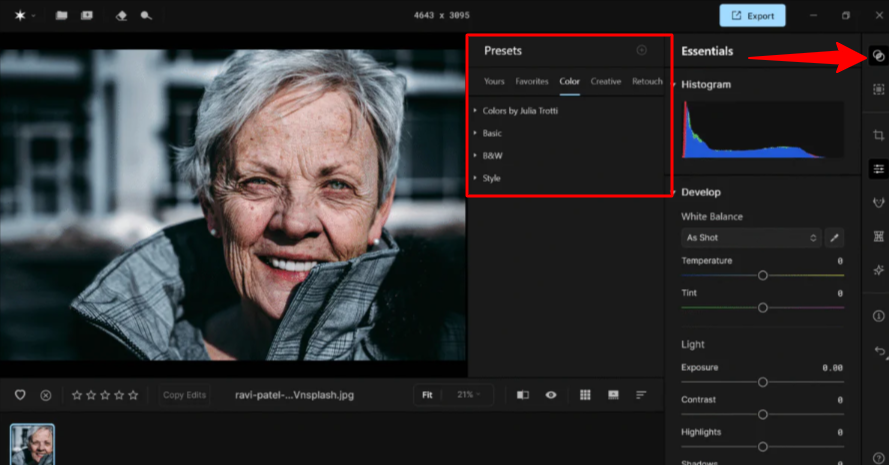
The nice thing about Aperty is that it comes with presets that make editing photos quick and easy. The Presets in Aperty can be accessed from the top right (or Shift + P), which will open the Preset panel.
Step 4: Apply the Preset

The presets were organized into categories, which made it easy for me to find what I was looking for. I went with “Ocean Breeze.”
A few seconds later, the preset was applied with a slider to adjust the intensity. I was impressed by how professional the preset looked and how it brought the photo to life. Even with the toggle at its full intensity, it didn’t look over-edited.
Step 5: Retouch

Once the preset was applied, I headed to the key editing tools on the right. I selected the Retouch (R) tool to edit specific parts of the face (skin, eyes, and mouth).
Step 6: Remove Wrinkles
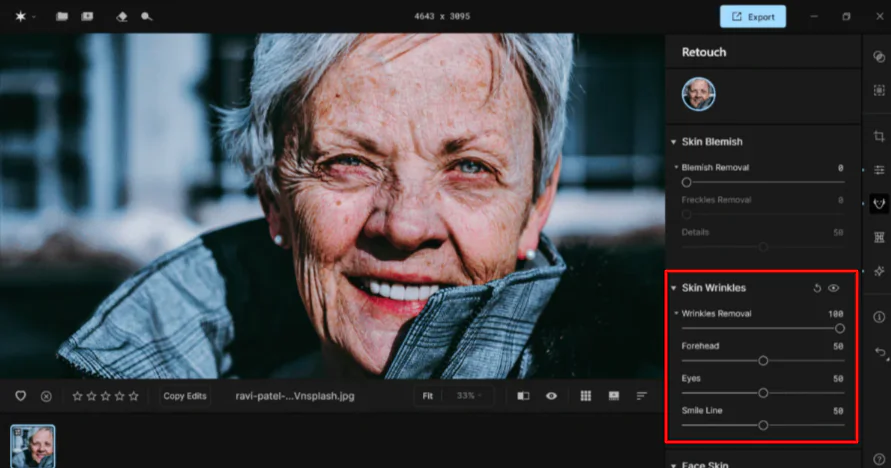
I decided to remove the skin wrinkles by moving the toggle.
It did a good job removing some of the main wrinkles, but not all of them. However, I liked that I had control over wrinkles in specific areas like the forehead, eyes, and smile line. It also didn’t look overly airbrushed.
Overall, Aperty made portrait retouching fast and simple. I easily applied presets and fine-tuned details. I liked how the AI handled wrinkle removal naturally while still giving me control over each area of the face.
Top 3 Skylum Aperty Alternatives
Here are the best Skylum Aperty alternatives:
Skylum’s Luminar Neo
The first Skylum Aperty alternative I’d recommend is Luminar Neo. It’s an AI photo editor that lets photographers creatively edit everything from portraits to landscapes and products.
Both platforms are built by Skylum with AI photo editing tools for Mac and Windows users. They emphasize intuitive workflows, fast processing, and non-destructive editing.
However, Luminar Neo is more of an all-purpose photo editor. It offers tools like EnhanceAI, GenErase, SupersharpAI, and NoiselessAI for everything from noise reduction to sky replacement. It also supports layers, masking, and batch editing, making it perfect for editing both portraits and full photo compositions.
Meanwhile, Skylum Aperty is specific to portrait editing, using 3D face mesh tech with up to 4,000 facial points, skin retouching, and precise masking. It also offers blemish removal, makeup enhancements, and consistent batch edits, making it ideal for fashion, wedding, and studio photographers.
For photo editors looking for all-in-one tools and advanced effects, choose Luminar Neo. For portrait photographers focused on detail and speed, choose Skylum Aperty.
Read my Skylum’s Luminar Neo review or visit Skylum’s Luminar Neo!
Photoleap by Lightricks
The next Skylum Aperty alternative I’d recommend is Photoleap by Lightricks. Photoleap is an AI mobile photo editor that makes editing fast and creative. It improves image quality, removes objects, and changes backgrounds automatically.
Both platforms focus on simplifying complex editing with artificial intelligence. However, their core audiences and workflows differ significantly.
Skylum Aperty works on a desktop and is a professional portrait editor built for photographers specializing in people-based work (like portraits, fashion, and weddings). It comes with features like 3D face mesh mapping, skin and blemish correction, makeup tools, and batch editing.
Meanwhile, Photoleap is an iOS-only app for quick, creative edits. It’s great for making stylized art, applying AI filters, and creating social media visuals on your phone.
Professional photographers benefit from Aperty’s precise facial mapping. It’s perfect for realistic client portraits. Meanwhile, content creators and casual users prefer Photoleap for its user-friendly AI tools and creative options. It’s best for quick, shareable results.
Choose Skylum Aperty for professional portrait retouching and consistent results. Otherwise, choose Photoleap for mobile creativity and fast AI photo edits.
Read my Photoleap Review or visit Photoleap!
Aftershoot
The final Skylum Aperty alternative I’d recommend is Aftershoot. Aftershoot is an AI tool that helps photographers speed up culling, editing, and exporting. It automates post-shoot tasks so photographers can focus more on shooting and clients.
Both Aperty and Aftershoot use AI to save editing time, but their focus is different: Aperty specializes in portrait retouching, while Aftershoot speeds up the entire workflow for high-volume photographers.
Aperty excels at realistic portrait edits, using 3D face mapping, masking, and tools for skin, blemish, and lighting adjustments. It’s best for portrait, fashion, and wedding photographers seeking natural results.
Meanwhile, Aftershoot focuses on high-volume workflows, with AI culling and style-adapting edits. It’s perfect for photographers handling large shoots like weddings or events.
Choose Aperty for precise retouching. Otherwise, choose Aftershoot for speed and efficiency on big projects.
Read my Aftershoot Review or visit Aftershoot!
Skylum Aperty Review: The Right Tool For You?
Using Skylum Aperty has made portrait editing surprisingly fast and intuitive. I loved how the AI handled skin, wrinkles, and lighting while letting me fine-tune details with simple sliding toggles.
Aperty is perfect for client work where natural results matter. Its presets are not over-the-top, and batch editing saves lots of time applying the same edits to multiple images.
For anyone focused on professional portraits, fashion, or wedding photography, Aperty will deliver. But if you’re curious about the best Aperty alternatives, here’s what I’d recommend:
- Skylum Luminar Neo is best as an all-in-one photo editor for landscapes, portraits, and creative effects.
- Photoleap by Lightricks is best for content creators and casual users looking for fast, mobile-friendly AI edits.
- Aftershoot is best for high-volume photographers who want automated culling, style-adapting edits, and faster workflow management.
Thanks for reading my Skylum Aperty review! I hope you found it helpful.
Skylum Aperty offers a 7-day free trial with a 14-day money-back guarantee. Try it for yourself and see how you like it!
Frequently Asked Questions
Is Aperty any good?
Skylum Aperty is widely praised for its powerful AI portrait retouching. It gives photographers fast, natural, and detailed results with full control. Its focused tools and smooth workflow make it ideal for portrait, fashion, and wedding photographers who want quality and speed.
What is the difference between Neo and Aperty?
The key difference is that Luminar Neo is an all-in-one photo editor for any type of photography with broad creative tools and AI effects. Meanwhile, Skylum Aperty focuses only on portraits, providing fast, detailed, and natural retouching. Luminar Neo focuses on versatility, while Aperty is best for portrait photographers who need precision and speed.



