
AI Tools 101
SciSpace Review: Deep Search That’s Stupidly Smart

Unite.AI is committed to rigorous editorial standards. We may receive compensation when you click on links to products we review. Please view our affiliate disclosure.

A staggering 3 million+ scientific papers are published every year (that’s one roughly every 10 seconds). For the average researcher, keeping up feels less like a pursuit of knowledge and more like trying to sip from a firehose.
But have you heard of SciSpace? It’s built for serious academics, turning hours of tedious searching and cross-referencing into a smooth AI workflow.
In this SciSpace review, I’ll discuss the pros and cons, what it is, who it’s best for, and its key features. Then, I’ll show you how I used it to conduct in-depth research (using its “Deep Search” feature) on “the efficacy of microplastics filtration in urban wetlands.”
I’ll finish the article by comparing SciSpace with my top three alternatives (Paperguide, NotebookLM, and Liner). By the end, you’ll know if SciSpace is right for you!
Verdict
Overall, SciSpace is a smart AI tool that makes finding, understanding, and writing research papers much faster. It handles everything from searches and summaries to citations and PDF chats all in one place.
Pros and Cons
- Faster literature reviews
- Supports 75+ languages
- Smart paper research
- Easy PDF summaries
- Fewer tabs needed
- Built-in writing tools
- Simple citation creation
- Clean data extraction
- Podcast summaries
- Real source links
- AI agents
- Requires human review for accuracy
- The sources it generates may be unrelated
- Limited free plan
- Some tools lag
What is SciSpace?
SciSpace is an AI research tool that helps academics, students, and researchers find, understand, and write scientific papers faster.
However, SciSpace wasn’t always called “SciSpace.” It started as “Typeset,” which was mainly focused on formatting manuscripts for journal submission.
However, the team behind it realized that formatting was just one small piece of the research puzzle. So they pivoted and transformed it into a comprehensive AI research platform that does much more than just make your references look pretty.
SciSpace uses advanced AI models to understand research papers. When you upload a paper, the AI can explain concepts, summarize findings, and answer questions in plain English.
Does SciSpace Deliver?
The core promise of SciSpace is that it’ll automate the time-consuming parts of research. For example, spending 6 hours reading abstracts to find 3 relevant papers, or formatting citations for the 47th time.
From my experience, it delivers. The literature search functionality connects with major databases like PubMed, arXiv, Google Scholar, and others, so you’re getting comprehensive coverage. You’ll find papers through SciSpace that you would have completely missed in any manual search.
SciSpace handles the entire research workflow seamlessly. Everything stays in one place instead of being scattered across different tools and browser tabs.
Who is SciSpace Best For?
SciSpace is not best for casual learners or high school students, but rather for serious academics:
- Researchers and scientists can use SciSpace to quickly search 200+ million papers, spot research gaps, and generate structured reports.
- Graduate students can use SciSpace to chat with PDFs, manage citations, and write faster with AI.
- Faculty and professors can use SciSpace to prep classes, write grants, and stay up to date with quick topic summaries.
- Industry research and development teams can use SciSpace to analyze patents, review trials, and turn complex data into presentations.
SciSpace Key Features
Here are SciSpace’s key features:
- Agent Gallery: Customizable AI agents for research tasks like literature reviews, data analysis, writing, and deep research.
- AI Writer: Find, edit, and cite over 280 million papers with AI assistance. It offers five templates: Research Proposal, Literature Review, Abstract Writing, Thesis Statement, and Essay Writing.
- Chat with PDF: Upload PDFs, ask questions, get citation-linked answers, clear summaries, and smart follow-ups in seconds. It supports more than 75 languages.
- Literature Review: Finds standard, high-quality, and deep literature reviews based on your search topic.
- Find Topics: Extract topics to go deeper within research papers.
- Paraphraser: Rewrite academic text to humanize AI content in over 75 languages while keeping citations intact.
- Citation Generator: Generate accurate in-text APA citations and references instantly.
- Extract Data: Pulls tables of data like stats from research PDFs.
- AI Detector: Detects AI-generated text (ChatGPT, GPT-4, Gemini, Llama, and Claude) with 96% accuracy.
How to Use SciSpace
Here’s how I used SciSpace to do in-depth research:
- Sign Up for SciSpace
- Explore the Research Methods
- Give SciSpace a Research Task
- Clarify What to Research
- Generate the Research
- View the AI Process & Live Activity
- View the Outputs
- Access the References
Step 1: Sign Up for SciSpace

I started by going to scispace.com and selecting “Sign Up” on the bottom left.
Step 2: Explore the Research Methods

After creating an account, I was taken to my homepage with the AI assistant to automate my research tasks. At the top, I could write a research task.

Alternatively (below the AI assistant), I could build my task by choosing what I wanted to do, the tool I wanted SciSpace to use, and what file type I wanted it to make.

Even further down, SciSpace presented some popular tasks used by researchers to run a task and get started quickly:
- Draft a manuscript
- Systematic literature review
- Patent search
- Build a website
- Create a chart
- Scientific poster generator
Step 3: Give SciSpace a Research Task

In the empty field at the top, I added the following prompt:
“Find the top 20 most cited papers from the last 5 years regarding ‘the efficacy of microplastics filtration in urban wetlands’. Create a table comparing their methodologies, and then summarize the primary reason for conflicting results between these studies.”
It’s worth noting that you can upload your own files to analyze, choose the type of research (“All” for a wide spectrum of research or “Biomedical” for complex biology and medicine), and turn “Deep Search” on or off.
In my case, I did not upload a file, I kept the type of research to “All,” but I did turn “Deep Search” on to get the most out of SciSpace.
Step 4: Clarify What to Research

Immediately, the agent started running. Since I requested a deep review, it asked some clarifying questions (e.g., the geographic focus and the wetland type priority).
Here is what I responded with:
“Proceed with a global perspective to capture the most cited papers. I want to prioritize Constructed Treatment Wetlands and Stormwater Wetlands, as these are most relevant to urban infrastructure. Regarding microplastics, focus on particle size ranges and removal efficiency percentages rather than specific polymers. My goal is to inform wetland design optimization, so please ensure the comparison table highlights the specific filtration mechanisms used in each study.”
Step 5: Generate the Research

From there, SciSpace began creating a comprehensive deep review. Naturally, it took a few minutes, which was understandable considering I had asked it to conduct in-depth research.
The research was so deep that I ran out of the 100 free credits I was granted for creating an account, so be aware of that. If you want to conduct in-depth research, you’ll have to sign up for one of the paid plans from the start.
Step 6: View the AI Process & Live Activity

In the left panel, SciSpace outlined its entire process. It’s also where you can chat with the AI that did the research.
On the right was “Live Activity,” which showed me a breakdown of how the AI processed my request.
Step 7: View the Outputs

What I found most useful was the “Outputs” (next to “Live Activity”). This showed me all the files it generated and the actual research I asked it to do (creating a study comparison table, methodological differences, main discrepancy factors, and a list of references).
Step 8: Access the References
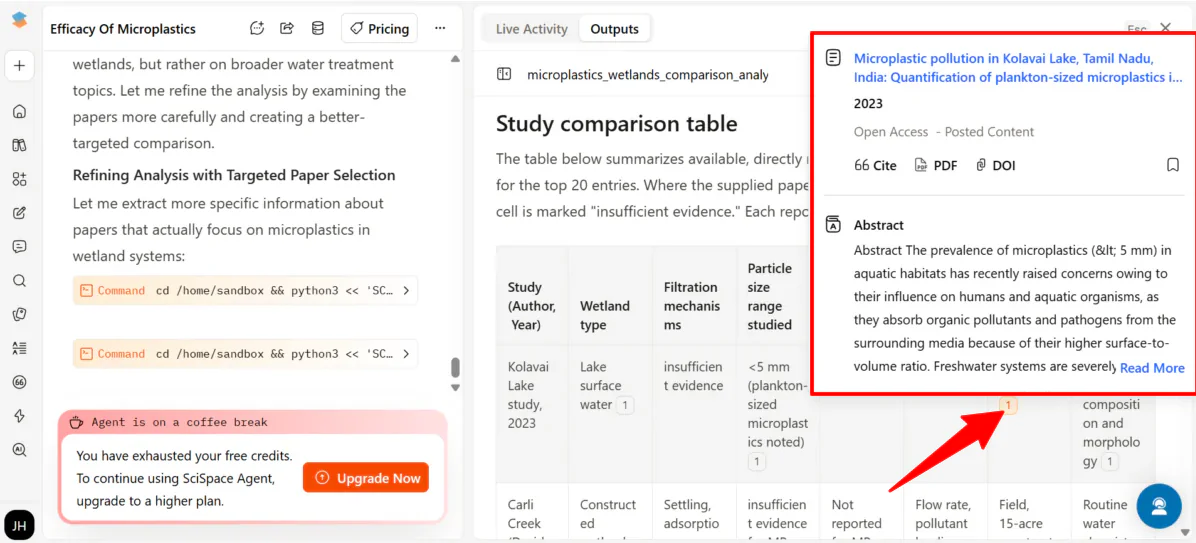
What I loved most about the output table was that every claim was hyperlinked directly to the source paper. Hovering over the citation revealed a small window to access the exact PDF page where that information was found.
Overall, SciSpace felt like having a research assistant who actually understands complex questions and shows their work. It saved me hours by running deep searches, building comparison tables, and linking every insight straight to the source papers.
Top 3 SciSpace Alternatives
Here are the best SciSpace alternatives:
Paperguide
The first SciSpace alternative I’d recommend is Paperguide. It’s an AI research assistant that helps you find, analyze, and write papers faster, with tools like PDF chats, data extraction, and full document generation with proper citations.
Both SciSpace and Paperguide enable you to search millions of papers, summarize findings, and manage references.
However, Paperguide generates entire documents with traceable sources. Meanwhile, SciSpace is best for deep literature searches, structured outputs, and interactive PDF chats.
Choose Paperguide to generate entire documents with citations. Otherwise, choose SciSpace for fast research and a seamless workflow.
Read my Paperguide Review or visit Paperguide!
NotebookLM

The next SciSpace alternative I’d recommend is NotebookLM. It’s an AI research and learning partner that can summarize PDFs, websites, YouTube videos, Google Docs, audio files, and more, while grounding your responses in sources with clear citations.
NotebookLM stands out by transforming uploaded materials into audio overviews, presentation outlines, and creative formats like podcasts. Meanwhile, SciSpace excels at deep academic workflows: semantic literature searches across 200M+ papers, structured Deep Review reports, PDF analysis tables, and citation management.
Choose SciSpace for systematic literature reviews, paper comparisons, and easy referencing. Otherwise, choose NotebookLM to easily combine different types of sources and create outputs from your own materials.
Read my NotebookLM Review or visit NotebookLM!
Liner
The final SciSpace alternative I’d recommend is Liner.
Liner helps you get answers with line-by-line citations, track research trends, and create surveys or hypotheses with AI. Meanwhile, SciSpace conducts deep searches, PDF chats, and manages your entire research workflow.
Choose SciSpace for full research automation. Otherwise, use Liner for trend tracking and generating evidence-backed surveys.
Read my Liner Review or visit Liner!
SciSpace Review: The Right Tool For You?
After trying SciSpace for myself (and inadvertently hitting the “coffee break” credit limit), it’s one of the most comprehensive AI research assistants I’ve used.
If your work involves managing hundreds of PDFs, running systematic reviews, or digging through millions of papers to find exactly what matters, SciSpace is hard to beat. It doesn’t just find information; it structures it.
If that doesn’t sound like it suits your needs, consider these alternatives:
- Paperguide is best for writing full documents with citations.
- NotebookLM is best for turning your PDFs, videos, or notes into study guides.
- Liner is best for research and checking facts and trends with line-by-line citations.
SciSpace offers 100 free credits for signing up. Try it for yourself and see how you like it!
Frequently Asked Questions
Is SciSpace better than ChatGPT?
SciSpace is better than ChatGPT for academic research. Meanwhile, ChatGPT is better for general questions and brainstorming.
What is SciSpace for?
SciSpace is an AI research tool that helps students and academics find, understand, and write papers faster in one place.
Is SciSpace for free?
Yes, SciSpace offers a limited free plan. You can always upgrade to one of the paid plans for more access and features.
Is the SciSpace AI detector good?
SciSpace’s AI detector excels in academic work and is often more accurate than competitors, but it isn’t perfect.
Is SciSpace worth paying?
Whether SciSpace is worth it depends on whether it saves you time with its powerful research tools. However, high costs, fast-depleted credits, and AI errors may outweigh the benefits.
Is SciSpace legitimate?
Yes, SciSpace is a legitimate and widely used AI research platform for students, academics, and researchers.



