
AI Tools 101
Colorcinch Review: Turn Photos Into Cartoons in Seconds

Unite.AI is committed to rigorous editorial standards. We may receive compensation when you click on links to products we review. Please view our affiliate disclosure.

Have you ever wondered how people turn their photos into cartoon portraits? I wanted to see if I could do the same without spending hours in Photoshop or some other bulky app. This led me to Colorcinch.
From the moment I opened it in my browser, I was surprised by how fast and effortless it felt. No downloads or steep learning curve. Just a few clicks, and my photo magically turned into a cartoon image:

In this Colorcinch review, I’ll discuss the pros and cons, what it is, who it’s best for, and its key features. Then, I’ll show you how I used it to cartoonize my photo in seconds.
I’ll finish the article by comparing Colorcinch with my top three alternatives (LTX Studio, Vidnoz, and BasedLabs).
Whether you’re a beginner or someone who edits photos regularly, Colorcinch feels like the creative shortcut we’ve all been looking for: simple, fast, and fun to use. Let’s see if it’s right for you.
Verdict
Overall, Colorcinch is a versatile editor that creates high-quality visuals quickly on any device including smart phones. It comes with a wide range of filters, effects, and editing tools. While some features are limited to premium users and the free plan includes ads, it remains a strong choice for casual and creative projects.
Pros and Cons
- Free plan with premium plans that are reasonably priced
- Intuitive interface with a short learning curve
- Many creative filters, effects, and overlays
- Produces professional, high-resolution outputs quickly
- Works on any device without downloads and supports offline use
- Millions of photos, vectors, and icons available
- Edit multiple photos simultaneously through batch processing
- Helpful editing tools like cropping, resizing, and background removal
- Available free on iOS & Android
- Some features are limited to premium users
- The pop-up ads on the free plan are annoying
- Lacks advanced editing tools for professional use
- Performance depends on Internet speed
- Complex effects can be slow to apply
What is Colorcinch?

Colorcinch (formerly Cartoonize) is an online photo editor for beginners and professionals. It offers AI tools, filters, and effects to enhance images.
Its main feature is the cartoonizer, which turns photos into different cartoon styles with adjustable intensity. It also offers tools for background removal, cropping, resizing, color changes, adding text, and applying artistic effects like sketches and paintings.
Its user-friendly interface lets you quickly create professional visuals without downloading software. This makes Colorcinch popular for social media, creative projects, and graphic design.
What I love about Colorcinch is that it runs entirely in your browser. There are no massive downloads, no waiting for updates to install, and no storage space eating up your hard drive.
Core Mission
At its core, Colorcinch wants professional photo editing to be accessible to everyone. Not just people who can afford Adobe’s subscription or have time to watch countless YouTube tutorials just to remove a background.
Colorcinch vs. Photoshop & Lightroom
Compared to industry-standard options like Photoshop and Lightroom, Colorcinch takes an entirely different approach. Rather than overwhelming you with 500 tools you’ll never use, they’ve streamlined everything into categories that actually make sense.
There’s still plenty of power under the hood (layer editing, masking, AI effects), but it’s organized in a way that doesn’t make you want to throw your mouse across the room.
Device Compatibility
What really sets Colorcinch apart is that device compatibility. The interface adjusts well to different screen sizes (including on a phone), though I still prefer working on a laptop for anything detailed.
The learning curve is also far less steep than desktop software, which matters more than people think. Time is money, especially for small businesses and freelancers who can’t spend weeks mastering new tools.
Who is Colorcinch Best For?
Here’s who Colorcinch is best for:
- Everyone who enjoys editing photos but lacks advanced skills.
- Beginners who want a user-friendly photo editor.
- Influencers creating posts, memes, and avatars for platforms like Instagram, Facebook, and TikTok.
- Artists and creatives exploring filters and other artistic effects.
- Small business owners and entrepreneurs needing quick, professional visuals without graphic design experience.
- Educators and students seeking an accessible tool for projects and learning.
- Hobbyist photographers who want access to creative edits and cartoon effects in a simple app.
Colorcinch Key Features
Here are Colorcinch’s key features:
- AI Photo Cartoonizer: Easily transform photos into cartoons, sketches, paintings, or anime in various styles and adjustable intensity.
- AI Background Removal: Instantly remove backgrounds with a single click.
- Essential Editing Tools: Crop, resize, adjust exposure, vibrance, and more.
- Text Editor & Masks: Add customizable text with various fonts and artistic masking options.
- Extensive Stock Libraries: Access over 2.5 million high-resolution stock photos and over 50,000 vector graphics and icons.
- Filters: Apply artistic filters like glitch, color mix, and liquify.
- Layer Management: Organize elements with the layers panel.
- High-Resolution Export: Export images up to 400 DPI in JPG, PNG and PDF formats for print or digital use.
- Mobile App Availability: Edit on the go with a free iOS and Android app.
- Offline Editing: Edit without an Internet connection.
How to Use Colorcinch
Here’s how I used Colorcinch to upload and cartoonize an image of myself:
- Go to the Editor
- Upload a Photo
- Choose an Effect
- Choose the Type of Effect
- Choose the Effect Intensity
Step 1: Go to the Editor
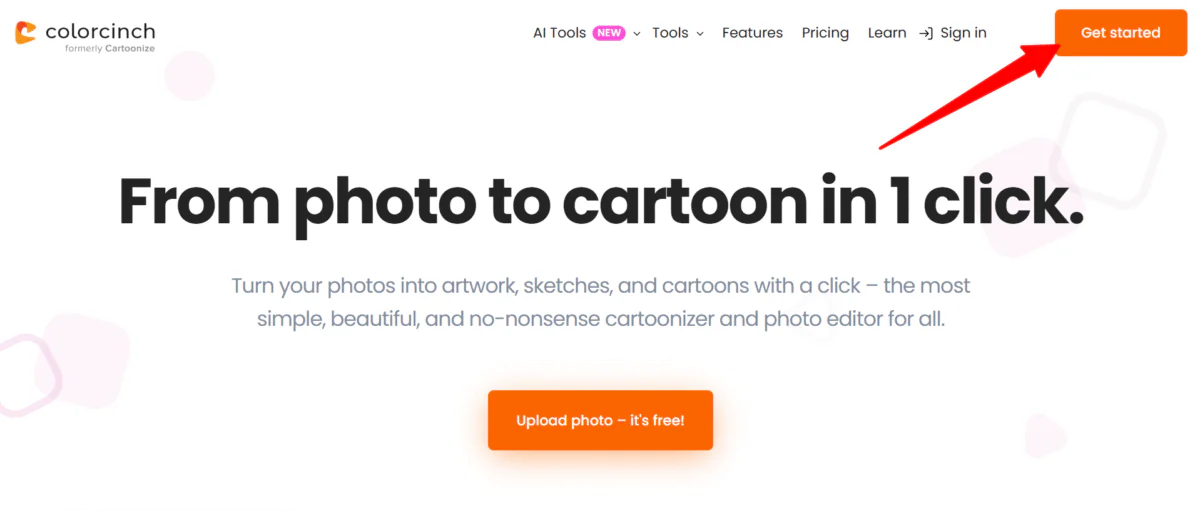
I started by going to cartoonize.net and selecting “Get Started” on the top right.
Step 2: Upload a Photo

Without creating an account, I was taken to the Standard Photo Editor. I could easily switch to the Avatar Maker on the top left.
Despite the simple interface, I found the pop-up ads distracting. The only way to get rid of the ads is to upgrade to the pro version, so feel free to do so.
Colorcinch offered three sample photos. However, I decided to upload a photo of myself to cartoonize:

Within seconds, my photo was uploaded to Colorcinch.
Step 3: Choose an Effect

All of my tools were clearly laid out on the left. I selected “Cartoonizer.”
Step 4: Choose the Type of Effect

A new panel opened where I could choose the cartoonizer effect intensity. I could also add selected effects to favorites, and access advanced settings for more fine-tuning.
Step 5: Choose the Effect Intensity

I selected the first effect and found the effect too intense. Placing the toggle at around 50% was the perfect amount.
And that’s how easy it is to use Colorcinch! There are all kinds of other image editing tools, AI tools, and more on the platform to explore. But those are the basics on how to effortlessly cartoonize any photo.
Overall, Colorcinch made cartoonizing my photo fast and easy with clear tools and almost no learning curve. The only drawback was the ads and watermarks, but those can easily be removed by upgrading to a paid plan.
Top 3 Colorcinch Alternatives
Here are the best Colorcinch alternatives.
LTX Studio
The first Colorcinch alternative I’d recommend is LTX Studio. It uses AI to turn ideas into 2D and 3D cartoon videos without animation skills. You can effortlessly create professional results in various styles ranging from hand-drawn to cel-shaded.
While Colorcinch is an AI photo editor with cartoonifying and artistic filter capabilities, LTX Studio is a more specialized cartoon video maker with deep creative control.
LTX Studio is great for team collaboration, real-time editing, and precise motion control. You can fully customize characters, mix styles like claymation and anime, and edit entire cartoon videos in detail.
Meanwhile, Colorcinch excels in photo editing with cartoonizer effects, background removal, layering, and a large stock library to create static images.
If you want quick AI cartoon effects for photos, choose Colorcinch. For full cartoon video creation with advanced animation tools and scene control, choose LTX Studio.
Vidnoz AI
The next Colorcinch alternative I’d recommend is Vidnoz. It’s an AI image and video generator, offering features like Image to Video, face swapping, and voice cloning. It also has a free AI cartoon generator, similar to Colorcinch’s cartoonizer.
Both platforms use AI for creative edits, but Colorcinch focuses on photo editing. Meanwhile, Vidnoz specializes in AI video creation, face swapping, and avatar generation.
Choose Colorcinch for detailed photo edits and artistic cartoon effects. Otherwise, choose Vidnoz for AI video creation and avatar generation.
Read my Vidnoz review or visit Vidnoz!
BasedLabs AI Anime Generator

The final Colorcinch alternative I’d recommend is BasedLabs AI Anime Generator. It lets you turn short text prompts into high-quality anime art in seconds (no drawing required).
BasedLabs AI Anime Generator creates anime art from text prompts. Describe poses, styles, and emotions, and it’ll generate detailed anime characters, posters, or profile pictures. Tools like seed-locking keep faces consistent, while linked tools preserve layers, making edits easier.
Meanwhile, Colorcinch is a powerful online photo editor with AI tools for cartoonizing, sketching, and background removal. It also comes with editing tools for cropping, resizing, lighting adjustments, layering, text overlays, and millions of stock assets. It’s best for quick, creative edits.
Choose Colorcinch for general image editing and cartoon effects. Otherwise, choose BasedLabs AI Anime Generator to create anime characters or scenes from text.
Read my Basedlabs Review or visit BasedLabs!
Colorcinch Review: The Right Tool For You?
Overall, cartoonizing my photo with Colorcinch was fast, the tools were easy to use, and I didn’t need any downloads or complicated setup. While the free version has ads and watermarks, upgrading to a paid plan removes them and unlocks more features.
For anyone looking for a simple, online editor to create high-resolution images with fun cartoon effects, Colorcinch is a solid choice. Otherwise, consider these alternatives:
- LTX Studio is best for teams and creators interested in making cartoon videos and characters with AI.
- Vidnoz AI is best for AI video creation, face swapping, and generating avatars.
- BasedLabs AI Anime Generator is best for anime fans and artists creating anime characters or scenes from text.
Thanks for reading my Colorcinch review! I hope you found it helpful.
Colorcinch offers a free plan where you can try it for yourself (you don’t even have to create an account). Give it a try and see what you think!
Frequently Asked Questions
Is Colorcinch free?
Colorcinch offers a free version to access essential photo editing and cartoonizing features without a subscription. However, this free plan includes watermarks on images, ads, and other limitations.
How do I turn my photo into a cartoon?
To turn your photo into a cartoon, upload your image to Colorcinch, navigate to the Cartoonize effect in the editing panel, and apply the filter with a single click. You can then adjust the filter’s intensity and fine-tune other settings to get the perfect cartoon look.



