
AI Tools 101
Manychat Review: How I Stopped Drowning in DMs For Good

Unite.AI is committed to rigorous editorial standards. We may receive compensation when you click on links to products we review. Please view our affiliate disclosure.

If you’ve ever sat there trying to reply to every comment and DM that came in after a post took off, you already know how fast it turns into a second job. I mean, it’s a good problem to have. But it’s still a problem nonetheless.
And it’s not just a “creator thing” either. According to the 2026 Social Media Statistics from SproutSocial, 73% of consumers will switch to a competitor if a brand doesn’t respond on social media.
So even small businesses struggle to respond to social media messages quickly. Those are leads and sales quietly slipping away because nobody got back to them in time.
But when I kept hearing about Manychat as the solution, I figured it was worth a shot. It comes with no-code automation, personalized replies, the whole thing.
In this Manychat review, I’ll discuss the pros and cons, what it is, who it’s best for, and its key features. Then, I’ll show you how I used it to set up a flow and watch it send out an automated guide without me lifting a finger. While Manychat offers pre-made flow templates, I found it just as easy to create one from scratch, which says a lot.
I’ll finish the article by comparing it to my top three alternatives (Tidio, Botpress, and Chatfuel). By the end, you’ll know which tool is right for you!
Verdict
Manychat makes it easy to automate messages, grow leads, and personalize content across multiple social media and messaging channels. However, it can get expensive, complicated with more advanced automations, and may need Zapier for deeper integrations. Regardless, it’s great for quickly starting and scaling engagement online.
Pros and Cons
- User-friendly drag-and-drop flows and templates with no coding needed
- Automates DMs/comments across multiple channels, including Instagram, TikTok, Messenger, WhatsApp, and SMS
- AI-powered GPT tools for smart replies and personalization
- Lead and growth tools like comment-to-DM, broadcasts, tagging, and analytics
- The templates make it really easy to get started
- Pricing increases with more subscribers and add-ons
- The free plan can feel restrictive, especially for AI features
- Advanced automations can get hard to manage
- Often needs Zapier for deeper connections
- Support is reliable but can be slow to respond
What is Manychat?
ManyChat is a no-code chatbot tool for automating customer conversations across social media and messaging apps.
Businesses can create interactive chat flows (basically decision trees that respond to your audience automatically, based on what they say or do) for Instagram DMs, Facebook Messenger, WhatsApp, SMS, TikTok, and Telegram. These “chat flows” help with lead generation, sales, and support.
For example, someone comments “RECIPE” on your post. Within seconds, they get a DM with a link to your opt-in page. All of this happens without writing any code or touching your phone! Think about how many more email subscribers you can get automatically.
Automated “Flows”
The “flows” in Manychat are the real magic. Instead of manually replying to 200 comments or DMs (which, if you’ve ever tried to do that on a viral post, you know is basically a full-time job), Manychat handles it in real time.
You can build a flow that sends a freebie, asks a qualifying question, drops someone into an email sequence, or even takes them through a little quiz. It’s all automated, and you can personalize it to your liking.
Brief History & Credibility
Manychat is well-trusted and has a great reputation. They’re an official Meta Business Partner, which means they have approved access to Instagram and Messenger’s APIs. This is important because it means they’re not violating platform rules when they automate your DMs.
The platform also connects directly to TikTok for DM automation, keyword triggers, and lead flows. They have an excellent rating on G2, and they’ve been around since 2015. That’s nearly a decade in a fast-moving industry where many newer tools fade quickly.
Bottom line: Manychat is basically your automated customer service rep, lead generator, and marketing assistant, all rolled into one platform. If you’re still doing all your DM replies by hand, you’re leaving a lot of time (and money) on the table!
Who is Manychat Best For?
Here’s who Manychat is best for:
- Content creators can use Manychat to turn post comments (e.g., “RECIPE”) into DMs with opt-ins, quizzes, or freebies. This turns viral traffic into subscribers!
- E-commerce owners can use Zapier with Manychat for Shopify cart recovery, purchase tagging, and upsell broadcasts via SMS/Messenger.
- Digital marketers and agencies can use Manychat for multi-channel broadcasts, AI personalization, and analytics for client campaigns across Instagram, TikTok, and WhatsApp.
- Small businesses can use Manychat to create no-code flows for support, bookings, or converting leads 24/7 without a big team.
Manychat Key Features
Here are Manychat’s key features:
- Drag-and-drop interface to create decision-tree chat flows triggered by keywords, comments, or actions. No coding required!
- Handles Instagram DMs, Facebook Messenger, WhatsApp, SMS, TikTok DMs, and Telegram from one dashboard.
- AI uses Natural Language Processing to detect user intent without manual keyword lists.
- AI tools are GPT-powered for message generation, text improvement, flow suggestions, and auto-replies for natural conversations.
- The AI automatically responds in your tone to comments, direct messages, and guides users towards goals without you having to do it manually.
- Comment-to-DM (e.g., “RECIPE” auto-sends link), follow-to-DM, broadcasts, and sequences to capture leads.
- Auto-tag users by behavior/purchases for personalized follow-ups and targeting.
- Measures revenue from flows and A/B test campaigns.
How to Use Manychat
Here’s how easy it is to use Manychat to create an automation for social media:
- Sign Up for Manychat
- Connect a Platform
- Explore the Dashboard
- Create an Automation
- Start from Scratch
- Create a New Trigger
- Choose How to Trigger the Automation
- Choose the Keyword Triggers
- Select the Action
- Add a Delay Block
- Add a Text Block
- Insert a Button
- Preview & Set Live
Step 1: Sign Up for Manychat

I started by going to manychat.com and selecting “Get Started.”
Step 2: Connect a Platform

After signing up, I was asked to connect my Instagram.
The main connection methods are Meta, Instagram, or Meta Business Suite. However, there are plenty of other ways to connect, including TikTok, WhatsApp, Facebook Messenger, and Telegram.
Step 3: Explore the Dashboard

Once my account was connected, I was taken to my dashboard. This is where I’ll track my automations once the data has been collected.

The tabs on the left allowed me to access different areas of Manychat effortlessly:
- Contacts: Keeps track of all of the users who have interacted with your automations.
- Automation: Create chat automations in an easy and visual format.
- Manychat AI: Set up automatic AI replies, comments, and goals to guide replies for leads, followers, clicks, etc.
- Inbox: Holds all of your messages across platforms.
- Broadcasts: Send one-time messages to your audience (e.g., promotions or updates).
- Settings: Manage your channels, automations, inbox, and general settings.
Step 4: Create an Automation

I started by creating my first “Flow,” which is the sequence of messages a user receives. I went to the “Automation” tab.

On the top right, I selected “New Automation.”
Step 5: Start from Scratch
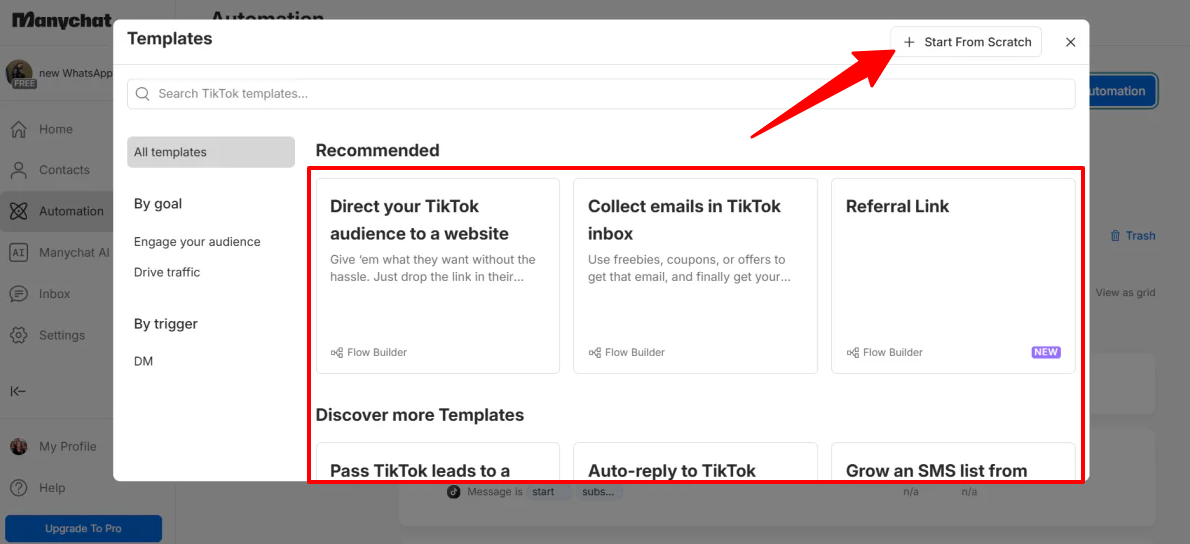
A window appeared with some premade templates. Mine all revolved around TikTok, since I connected my TikTok account:
- Direct your TikTok audience to your website
- Collect emails in the TikTok inbox
- Referral Link
- Pass TikTok leads to a human
- Auto-reply to TikTok messages
- Grow an SMS list from TikTok
- Personalize your content to build your TikTok brand
- Run a giveaway on TikTok
All of these templates are built with the same goal in mind: turning a quick TikTok comment or DM into something that actually matters for your business.
Whether that’s adding someone to your email list, sending them to your website, or just getting them deeper into your world as a follower. It’s nice not having to create these common workflows from scratch!
But as much as these are popular workflows for Manychat, they may not fit every use case. I selected “Start from Scratch” on the top right.

I found myself in the automation builder. This is where you design the logic behind how your workflows run and how different actions connect together. Click and drag on the canvas to pan, and hit the “+” and “-” on the right to zoom in and out.
Step 6: Create a New Trigger

When creating flows, the first step is selecting a trigger to activate the automation. I selected “New Trigger.”
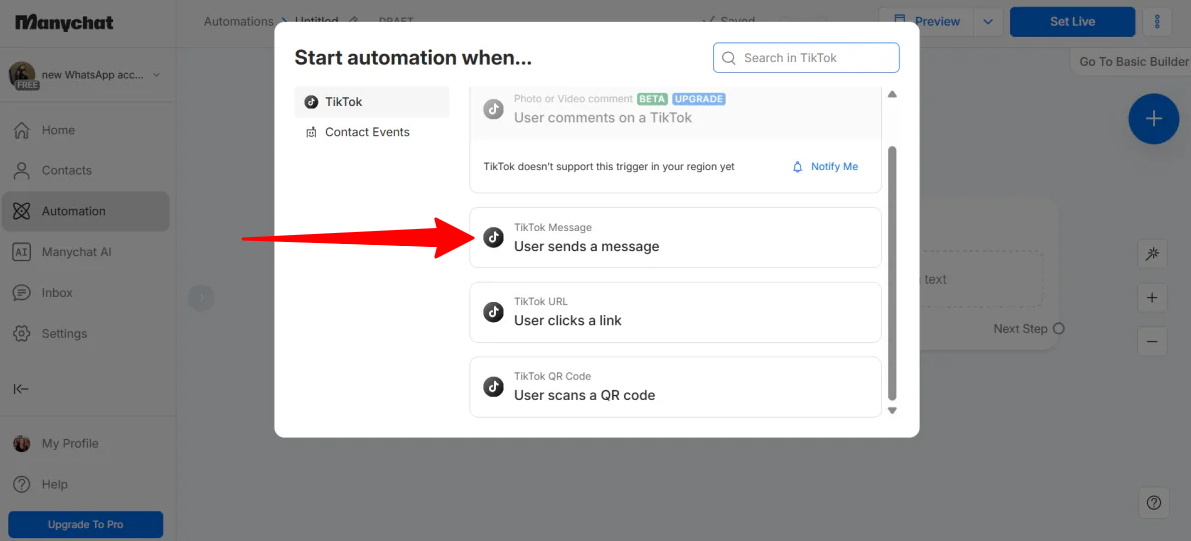
A couple of trigger options appeared:
- User comments on a TikTok
- User sends a message
- User clicks a link
- User scans a QR code
I chose “User sends a message.”
Step 7: Choose How to Trigger the Automation

Next, I had to choose a way to trigger the automation:
- Detect specific words in a message
- Recognize intention in the message (The responses are based on topics, not specific words)
I chose “Detect specific words in a message.”
Step 8: Choose the Keyword Triggers

In the next step, I added the keyword “GUIDE.” So if a user sends me a message including the word “GUIDE” on TikTok, it will trigger the automation in Manychat.
I could add multiple words without worrying about case-sensitivity. It’s a good idea to add multiple variations of the keyword and misspellings to make sure you don’t miss potential triggers and can capture as many relevant messages as possible.
While I manually added variations, Manychat’s AI alternative (“Recognize Intention”) actually removes the need for this. It uses Natural Language Processing to understand that “Can I have the PDF?” means the same thing as “GUIDE,” which is a massive time-saver for Pro users.
Once my keyword was added, I hit “Create.”
Step 9: Select the Action

Now that my trigger was set up, it was time to move on to the next “block” or node: the action.
When someone sends me a message containing the word “GUIDE,” I want to reply automatically with a specific response. I clicked on the node to edit it.

I could choose from the following types of content blocks:
- Text (simple text and buttons)
- Image (boost engagement with visuals)
- Delay (wait a few seconds between texts)
- Data collection (collect emails, phones, etc.)
Step 10: Add a Delay Block

The first thing I did was add a “delay” block for three seconds and move it to the top. Why? Because user experience is everything.
This 3-second delay block shows the “typing” bubble in the chat, making it feel like a real person (or a very attentive AI) is responding. It prevents the “bot-blast” feeling where a message appears instantly.
Step 11: Add a Text Block

Next, I added the “meat” of the message: a text block. I began with a greeting:
“Hey! So glad you’re interested in the guide. I’m excited to share it with you! Here is your guide! [Link] 🚀”
Step 12: Insert a Button
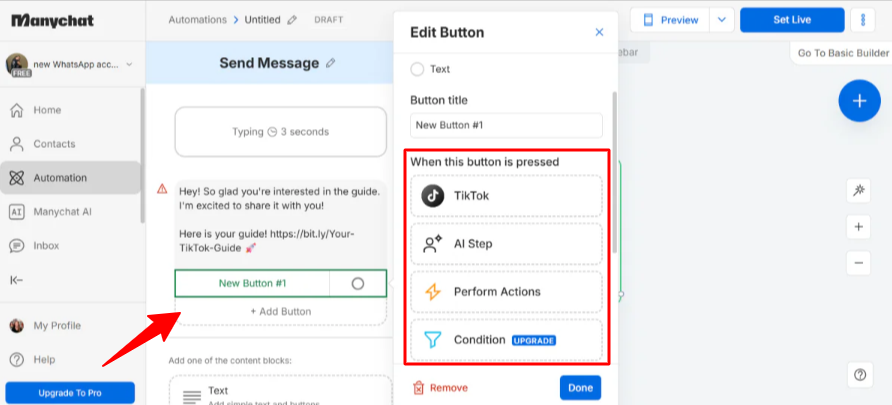
If you choose to add a button within the text message, you get some useful options:
- TikTok (start a new message)
- AI Step (set a goal for the conversation and give AI context)
- Perform Actions (whether that’s managing contact data, automation workflow, or inbox behaviour)
- Condition (choose specific conditions the contact must match)
- Randomizer (split the traffic on a random path)
- Smart Delay (choose longer delay times)
- Start Automation (choose a new automation as the next step)
- Select Existing Step
I kept mine simple with a text response and a link, but feel free to add a button.
If I had chosen the “AI Step” for my button instead of a simple link, I could have given the bot context (like the text of my guide) so it could actually answer questions about the PDF’s content right there in the chat. It turns a delivery bot into a digital consultant, which is pretty cool.
Step 13: Preview & Set Live

On the top right, I selected “Preview” to test my flow. It worked perfectly! I selected “Set Live” to activate the automation so that any incoming messages with the keyword would trigger the flow automatically for real users.
A note on pricing: Manychat’s pricing scales based on your contact list. If you have a large following, keep an eye on your plan tier when upgrading to avoid unexpected charges. Feel free to reach out to their support team if you have a billing question, and they’ll get back to you as soon as they can.
Overall, I found creating automations with Manychat easy, even without using the templates. Not only is the interface easy to navigate and the entire process simple, but they’ve added and are continuously implementing AI to make building, optimizing, and personalizing automations faster and more intuitive.
Top 3 Manychat Alternatives
Here are the best Manychat alternatives:
Tidio
The first Manychat alternative I’d recommend is Tidio. It’s built around combining AI chat with live support, and they claim it can automate up to 67% of customer conversations. The idea is that your responses stay fast and on-brand without needing a human behind the keyboard every single minute.
Both Tidio and Manychat do multi-channel messaging and automation. On the surface, they can feel pretty similar. But spend an afternoon on both platforms, and you’ll start to see where they split off from each other pretty quickly.
Tidio’s big differentiator is their AI agent, Lyro. It’s not just spitting out canned responses. Lyro actually reads the context of a conversation to handle tasks, and can even capture leads when you’re offline. That’s a big deal for small teams who can’t always be available.
Meanwhile, Manychat is where I’d still send anyone who wants drag-and-drop flow building, pre-made templates, and deep marketing automation across Instagram, TikTok, Messenger, WhatsApp, and SMS.
If your main focus is personalized AI customer service and you want live chat baked in, choose Tidio. But if you’re trying to build out a multi-channel marketing system and nurture leads at scale, choose Manychat.
Botpress
The next Manychat alternative I’d recommend is Botpress. It’s a full AI agent platform. You can build, deploy, and manage bots across multiple channels. The bots have real contextual conversations, custom integrations, and even custom code if you want to get into the weeds.
Botpress and Manychat are similar in some ways. Both handle multi-channel messaging and automation, and both can seriously move the needle when it comes to scaling engagement.
However, Botpress is built for people who want more control. It comes with features made for developers, an autonomous AI engine, and the ability to build complex workflows that remember context across a conversation.
Meanwhile, Manychat gets you up and running fast. The drag-and-drop flow builder, the pre-made templates, and the built-in AI personalization features are designed so you don’t need to know how to code to get results.
For highly customizable AI agents or for enterprise-level automations, choose Botpress. For something you can set up in an afternoon and start seeing results from immediately, choose Manychat.
Read my Botpress review or visit Botpress!
Chatfuel
The final Manychat alternative I’d recommend is Chatfuel. It covers a lot of the same ground as Manychat (automated messaging across Facebook, WhatsApp, Instagram, TikTok, and even your website). However, its primary focus is on AI agents that help businesses handle client chats, book appointments, and follow up without dropping the ball.
Overall, the two platforms are more similar than they are different. Both give you no-code automation, AI messaging, and tools built around driving leads and sales. If you’re a small business trying to scale your engagement without hiring a whole team, either one could work well for you.
However, Chatfuel really leans into the scheduling side of things. It natively integrates with Stripe, Calendly, Zapier, and Shopify, which is huge if your business runs on bookings or ecommerce transactions.
Meanwhile, Manychat’s templates are easier to work with, so you can get set up quickly. The multi-channel broadcasts are smooth, and the built-in GPT personalization tools are impressive.
For qualifying leads before they hit your calendar, managing appointments, or syncing everything with your CRM and payment tools, choose Chatfuel. For something you can set up in an afternoon, run campaigns across multiple platforms, and personalize at scale without a tech background, choose Manychat.
Manychat Review: The Right Tool For You?
After building my first automation from scratch with Manychat, I was surprised at how quickly it all started to make sense.
One flow, one keyword trigger, and suddenly I had a little system that could respond, wait, and deliver something useful completely on its own. It stopped feeling like I was configuring software and started feeling like I’d actually built something.
But Manychat isn’t perfect. If your audience grows fast, the pricing can sneak up on you. And once your flows get more complex, you really do need to stay organized.
If that’s the case, you might want to try one of these alternatives:
- Tidio is best for those who want AI customer support and live chat in one place.
- Botpress is best for those who want full control, advanced AI agents, and custom workflows.
- Chatfuel is best for those focused on bookings, lead qualification, and integrations with tools like Stripe and Calendly.
But for what it is (a tool that takes your social media engagement and builds your list, drives traffic, and actually moves people through a funnel), it delivers. Especially if you’re not super technical and you just want to get something up and running without a week-long learning curve.
If you’ve been on the fence about trying it, the free plan is enough to test the waters. Create a flow to automate a simple task you’re tired of doing (like sending a guide, answering FAQs, or collecting emails), and you’ll quickly see how much time and effort you save while keeping your audience engaged!
Frequently Asked Questions
What does Manychat do?
Manychat is a no-code platform that automates messaging and marketing across Instagram, Messenger, WhatsApp, and SMS to help businesses generate leads, support customers, and drive sales.
Is Manychat for free?
Yes, Manychat’s free plan lets you test automation for up to 25 active contacts per month with basic features. However, it includes Manychat branding and limited tools.
Is Manychat worth the money?
Manychat is worth the money as an affordable tool for automating messages and growing engagement on Instagram, Messenger, and WhatsApp. However, costs rise as your audience grows.
Can I trust Manychat?
Manychat is a trusted, Meta-approved platform that helps over 1.8 million businesses automate messages, replies, and lead generation across Instagram, Messenger, and WhatsApp.
Is Manychat approved by Instagram?
Yes, Manychat is safe to use for Instagram DMs and comments because it’s an official Meta Business Partner.



