
AI Tools 101
Letterly Review: The Only App That Gets My Brain Dump

 Add Unite.AI to your preferred sources on Google
Unite.AI may receive compensation when you use links to products we review. This does not influence our editorial evaluations. Read our affiliate disclosure.

Have you ever noticed how your best ideas come out effortlessly when you’re talking, but completely fall apart the second you open a blank document?
It’s easy to record countless voice memos full of energy and clarity, only to later stare at a messy transcript packed with “ums,” half-finished sentences, and random tangents. And considering most people speak at around 150–160 words per minute but type closer to 40, it’s no wonder thinking out loud feels easier than writing.
That’s what made me curious about Letterly. With over 300,000 people already using it, Letterly promises to do more than just transcribe your voice. It turns rambling thoughts into clean emails, structured notes, social posts, and organized to-do lists in seconds.
I tested it with background music playing, heavy technical jargon about quantum computing, and plenty of stumbles and filler words to see if it could actually deliver.
In this Letterly review, I’ll discuss the pros and cons, what it is, who it’s best for, and its key features. Then, I’ll show you how I used it to turn a rambling voice memo about quantum computing into a structured note in seconds.
I’ll finish the article by comparing Letterly with my top three alternatives (Otter.ai, Wispr Flow, and Speechify Dictation). By the end, you’ll know which tool is right for you!
Verdict
Letterly quickly and accurately turns voice notes into clean text, with useful rewrite styles and offline support. However, it’s mostly mobile-focused, lacks team collaboration and deep integrations, and there might be some bugs on the web version.
Pros and Cons
- Extremely fast, highly accurate transcription, even with long recordings
- Generates an accurate transcription with noise in the background and on complex topics
- Processes transcription in seconds
- Automatic cleanup of filler words and grammar
- 25+ rewrite styles for emails, posts, lists, newsletters, and more
- Works offline
- Supports screen-off recording
- Optional home screen widgets on phones
- Recognizes 90+ languages
- Available on iOS, Android, web, and macOS
- Simple tagging and search for organization
- Very user-friendly
- Lacks team collaboration
- It feels built primarily for mobile
- Lacks deep native integrations beyond tools like Zapier
- There might be some bugs (I experienced the "Rewrite" button not working on the desktop version)
What is Letterly?

Trusted by 300,000 users, Letterly is an AI voice-to-text transcription tool that turns spoken or written words into text. Speak or paste your text, and the app turns it into notes, emails, posts, to-do lists, and more.
Letterly truly feels like having a personal editor on standby. You express your thoughts (or paste in something half-formed), and it transforms the chaos into something clear and polished.
Rambling voice memo? It becomes a clean email. Brain dump? Suddenly, it’s an organized to-do list. Rough idea for a post? Now it actually sounds like you meant to write it that way.
Rather than staring at a blinking cursor, Letterly grants you the freedom to think out loud and let it handle the cleanup.
That’s the core workflow, and it’s remarkably simple: speak, let the AI process it, and receive polished text back. The whole thing takes maybe 30 seconds after you stop recording, depending on how long your voice note was.
Letterly vs. Phone Dictation
However, it’s essential to note that Letterly is not the same as your phone’s built-in dictation. They’re fine if you speak in perfect sentences, but most of us don’t talk like that. We trail off, we backtrack, we say “you know what I mean” as filler.
Apple (AAPL ) dictation transcribes all of that mess verbatim and hands it back to you. You still have to do all the editing work yourself.
Letterly vs. Otter.ai
Otter.ai, however, is a step up from that. It’s great for meeting notes and transcription, but it’s still fundamentally a transcription tool. It records what you said and writes it down accurately.
Letterly’s goal is different. It’s not trying to capture exactly what you said, but what you meant, and presents it cleanly. That’s a pretty big distinction between the two.
Available Platforms
The Letterly app is available on iOS, Android, macOS, and online. This flexibility is excellent, especially considering how many people start ideas on their phones and finish them on their laptops.
Plus, having everything sync across platforms without having to think about it makes the whole experience feel seamless. Your notes are just there, ready to pick up wherever you left off.
History & Growth
Letterly has crossed 300,000 users. While that’s not “going viral on TikTok” numbers, for a productivity tool built around a pretty specific use case, it’s impressive. There’s a real audience of people out there who think better out loud than they do staring at a blank page.
If you’ve ever felt like you have great ideas but they somehow die the moment you sit down to write them, that’s exactly what this tool was built for.
Who is Letterly Best For?
Letterly is best for people who create lots of written content but don’t want to be stuck at a keyboard:
- Bloggers, YouTubers, podcasters, and newsletter writers who want to turn ideas or voice notes into posts, scripts, and emails quickly.
- Marketers and solo entrepreneurs regularly posting on social media, emailing lists, or writing sales content, who need speed and a consistent tone.
- Consultants, coaches, and thought leaders who capture ideas on the go and need them turned into structured text.
- Students and researchers who want to use their voice to take notes, summaries, or ideas and get organized text instead of raw transcripts.
- Anyone interested in taking notes, creating lists, or journaling on the go, through their phone, using their voice.
- Those with typing fatigue or physical limitations.
Letterly Key Features
Here are Letterly’s key features:
- Instantly turn spoken thoughts into polished text
- Rewrite and clean up transcripts automatically with AI
- Convert your voice into messages, notes, emails, posts, journals, and more
- Record your voice with your device’s built-in microphone, type or paste notes, or upload existing audio to rewrite and edit
- 25+ AI rewrite styles (structured text, formal email, friendly message, to-do list, X post, etc.)
- Create custom rewrite styles
- Automatically organizes content into paragraphs, headings, and bullet points
- Create custom tags for categorization
- Use Zapier or custom webhooks to send notes anywhere (e.g., Google Docs or Notion)
- Syncs across devices
- 90+ auto-detected language recognition
- Translate your speech into other languages
- Record anywhere offline (even during flights) with no Internet required
- Record with the screen off or in the background
- Turn Letterly into a homescreen widget on your phone for instant recording
- Dark and light modes
How to Use Letterly
Here’s how I used Letterly to turn a rambling voice memo about quantum computing into a structured note in seconds:
- Sign Up for Letterly
- Create a Recording or Write a Note
- Choose a Mode & Rewrite the Transcript
- Create Tags to Organize Notes
Step 1: Sign Up for Letterly
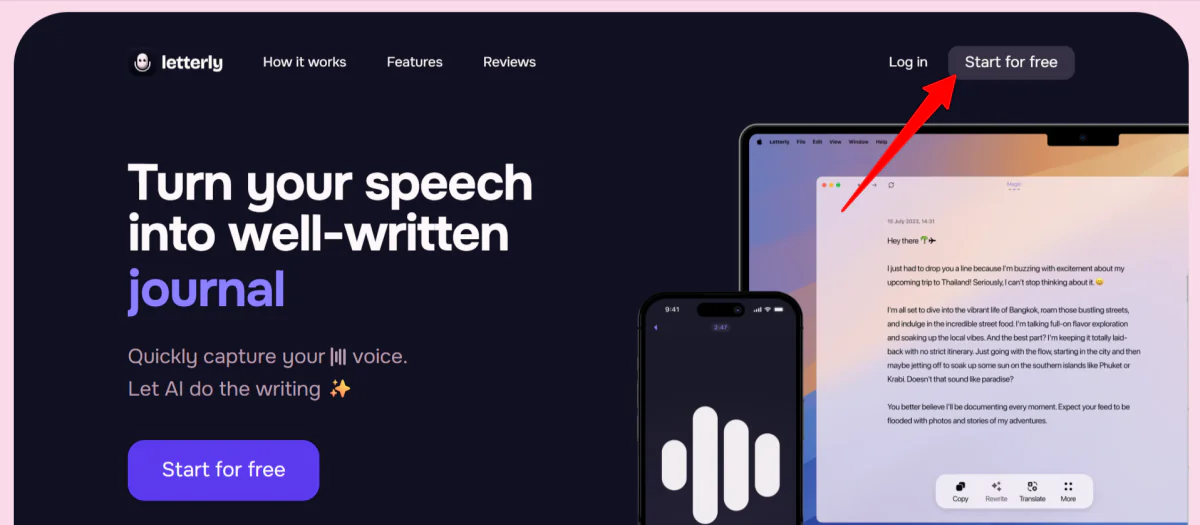
I started by going to letterly.app and selecting “Start for free.”
Step 2: Create a Recording or Write a Note

Once my account was created, I was taken to the Letterly app to make the first recording. All I had to do was select the microphone button to get started.
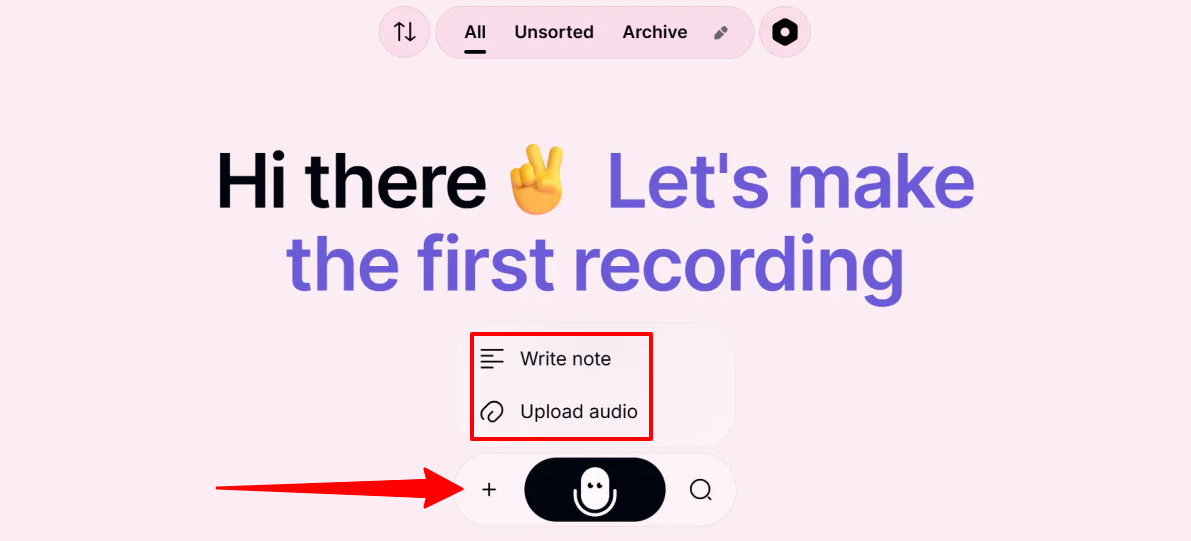
If you don’t want to talk into a microphone, it’s worth mentioning that there is a “+” icon to the left of the microphone. You can write a note (type or paste text) or upload an audio file.
In my case, I wanted to put the microphone to the test to test Letterly’s accuracy, so I selected the microphone.

I had some music with lyrics playing in the background, and started rambling about Quantum Computing. I wanted to discuss something technical to see if Letterly could pick up on the jargon.
Overall, Letterly nailed the transcription. Here’s exactly what it wrote from my recording:
“So, um, I was thinking about the current state of qu- quantum computing, specifically regarding super position and, uh, entanglement. The real bottleneck right now isn’t just the hardware, it’s the decoherence of the qubits due to the environmental noise. I mean, like, if we’re ever going to achieve true quantum supremacy, we have to move past NISQ, that’s noisy intermediate scale quantum devices. We need better error correction protocols, specifically things like the surface code. And then there’s the whole, uh, Shor’s algorithm thing. People are worried about R- RSA encryption being broken, but honestly, we’re probably a decade away from a fault tolerant system that can actually handle that many logic gates. So, yeah, it’s basically a race between cryogenic cooling stability and, um, algorithm- algorithmic efficiency. Does that even make sense? Anyway, that’s the gist of it.”
It didn’t pick up a single lyric from the music I was playing in the background (exactly what I wanted), and it captured the technical jargon (e.g., “quantum supremacy” and “cryogenic cooling”) and acronyms, both spelled and said naturally. It recorded all my “ums” and “uhs” as well as my stutters.
Step 3: Choose a Mode & Rewrite the Transcript

After getting the raw transcript (which was 99% accurate but full of “ums” and “likes”), I put Letterly’s AI Rewrite engine to work.
I noticed different modes in the panel on the right that I could choose from:
- Magic
- Slightly
- Significantly
- List
- Structured
- Detailed Summary
- Short Summary
- Meeting Takeaways
- New (create from scratch or choose from gallery)
I selected the “Structured Text” option from the Rewrite Gallery.

At the bottom of this list, feel free to select “New” and “Choose from gallery.” There are plenty of rewrite styles you can easily search for your use case and tone. Or customize your own to create a really specific tone of voice.
While the microphone and transcription were flawless, the AI Rewrite feature stalled during my testing. Even after multiple attempts and restarts, the rewrite panel failed to generate text, indicating some stability issues or a bug in the UI response.

Since Letterly is available on a variety of platforms, I downloaded it on my phone and redid the process.
This time, the rewrite went through instantly. Within seconds, my scattered voice memo was transformed into clean, organized sections with headings and logical flow:
“Quantum Computing: Current State and Challenges
I was thinking about the current state of quantum computing, specifically regarding superposition and entanglement.
Bottleneck
– The real bottleneck isn’t just the hardware; it’s the decoherence of the qubits due to environmental noise.
Quantum Supremacy
– To achieve true quantum supremacy, we have to move past NISQ (noisy intermediate scale quantum devices).
Error Correction Protocols
– We need better error correction protocols, specifically things like the surface code.
Shor’s Algorithm
– People are worried about RSA encryption being broken, but we’re probably a decade away from a fault-tolerant system that can handle that many logic gates.
Race
– It’s a race between cryogenic cooling stability and algorithmic efficiency.”
It removed the filler words, tightened the phrasing, and made the ideas feel intentional rather than off-the-cuff.
One thing I loved in the app was the ability to swipe between my original, messy transcript and the new, structured note. It’s a satisfying way to see exactly how much cleaning the AI did.
Step 4: Create Tags to Organize Notes

Once the rewrite was finished, I didn’t want this note to get lost in a sea of future recordings. Luckily, Letterly lets you categorize your thoughts using Tags.
At the bottom of both the desktop and app versions of Letterly, I saw a “#” symbol.
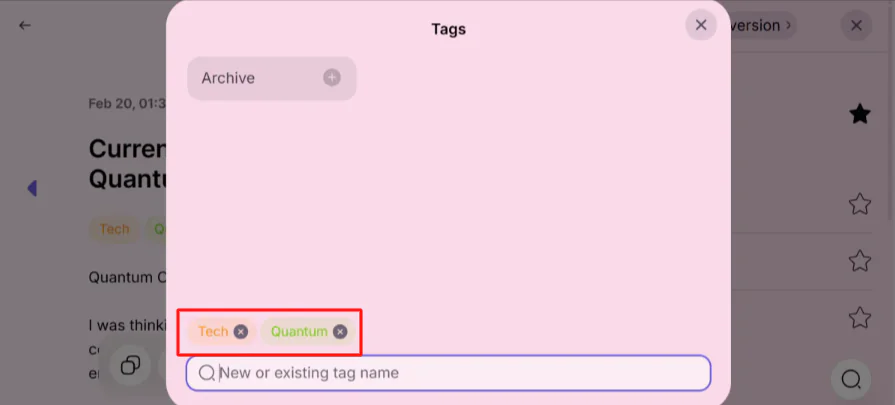
I used this to add both a “Tech” and a “Quantum” tag to the same note. This is great because it allows the note to live in two “folders” at once, making it much easier to find later during a search.
Overall, Letterly impressed me with how accurately it captured jargon-heavy speech and how quickly it turned my messy thoughts into something structured and usable. While I ran into a hiccup with the rewrite feature on desktop, the mobile experience delivered exactly what I was hoping for: fast, clean, and helpful results.
If you encounter the bug I found on the web version of Letterly, don’t give up. The Letterly app seems to be more reliable, so just switch over to that.
Top 3 Letterly Alternatives
Here are the best Letterly alternatives.
Otter.ai
The first Letterly alternative I’d recommend is Otter.ai. It focuses on transcribing meetings and collaboration, automatically capturing notes and action items for team summaries.
Both Otter.ai and Letterly turn spoken words into usable text. However, they serve different purposes.
On the one hand, Otter.ai is the best speech-to-text tool for meetings and team workflows. Meanwhile, Letterly is better for personal voice notes and quick rewrites of emails and social media posts.
If you need to know exactly who said what in a room of five people, Otter is the clear winner because it can identify individual speakers. Letterly, however, is designed for the individual voice, focusing entirely on your personal ideas rather than multiple voices within a group.
For collaboration and meeting automation, Otter.ai is your best bet. For fast personal note-taking and effortless rewriting, choose Letterly.
Read my Otter AI review or visit Otter.ai!
Wispr Flow
The next Letterly alternative I’d recommend is Wispr Flow.
The cool thing about it is that it’s a voice-to-text tool that worksectly in any app. It turns speech into writing without having to switch tools, which makes it powerful for real-time dictation and productivity.
While Wispr Flow is more about seamless dictation across apps, Letterly excels at structured rewrites, notes, and voice journaling within its own app.
For an all-in-one note and rewrite tool, choose Letterly. For universal voice dictation that works inside email, chat, or documents without leaving the app you’re in, Wispr Flow is the best choice.
Speechify Dictation
The final Letterly alternative I’d recommend is Speechify Dictation. It focuses on real-time voice typing that works across any app or website. It’ll help you write up to 5× faster with automatic punctuation and AI cleanup.
Both platforms turn speech into clean text and save time by reducing manual typing. They also use AI to polish your words, fixing small mistakes and improving clarity as you speak.
However, Speechify Dictation stands out for its broad functionality. With its Mac app and Chrome extension, you can dictateectly into Gmail, Google Docs, Slack, Notion, ChatGPT, and more. It’s great for people who want voice typing to replace their keyboard entirely.
Meanwhile, Letterly is more focused on capturing voice notes inside its own app. It then enhances them with structured rewrite styles and tags, among other features.
Choose Letterly for structured notes, rewrites, and organized voice journaling. Otherwise, choose Speechify Dictation for hands-free voice typing across all your apps.
Read my Speechify review or visit Speechify!
Letterly Review: The Right Tool For You?
After testing Letterly with background music, technical jargon, acronyms, and plenty of “ums,” I can confidently say this: it does exactly what it promises.
The transcription was fast and shockingly accurate. Not only that, but the rewrite feature turned my rambling quantum computing monologue into something that looked structured and intentional.
Letterly is a reliable tool for when I want to think out loud without worrying about structure. It feels less like dictation and more like handing my messy thoughts to an editor who cleans everything up in seconds.
However, it’s not perfect and might not completely suit what you’re looking for. If that’s the case, consider these alternatives:
- Otter.ai is best for teams, meetings, and collaborative workflows where you need speaker identification and shared notes.
- Wispr Flow is best for people who want voice dictationectly inside any app without switching tools.
- Speechify Dictation is best for replacing your keyboard entirely with fast voice typing across email, documents, and chat.
Thanks for reading my Letterly review! I hope you found it helpful. Try Letterly for yourself and see how you like it.
Frequently Asked Questions
Is Letterly legit?
Yes, Letterly is a legitimate AI voice-to-text app. It’s often praised for its high transcription accuracy and its ability to turn spoken notes into organized text. It holds positive ratings on platforms like AppSumo and Product Hunt.
How does Letterly work?
Letterly is an AI app that turns spoken thoughts into structured text for notes, emails, and social media. Record audio with a mobile app, and Letterly immediately transcribes and reformats it with over 25+ different rewriting styles.
How good is the Letterly app?
Letterly is a highly-rated AI voice-to-text application that turns spoken thoughts into structured text. It removes filler words, summarizes, and reformats content for social media or emails. It’s highly accurate and easy to use.



