
AI Tools 101
MagicSchool AI Review: The AI Tool Every Teacher Needs

Unite.AI is committed to rigorous editorial standards. We may receive compensation when you click on links to products we review. Please view our affiliate disclosure.

If you’re a teacher who feels like you’re running on a treadmill that only goes faster, you aren’t alone.
Studies show that the typical teacher works a median of 54 hours per week. Yet, only 46% of that time is spent actually teaching students. The rest is swallowed by a mountain of administrative paperwork and lesson prep.
But have you heard of MagicSchool AI? In just a few short years, this education platform has exploded in popularity, now serving over 6 million educators and students.
It doesn’t just promise to help; it aims to solve the time poverty in education by automating the tasks that keep you up at night.
In this MagicSchool AI review, I’ll discuss the pros and cons, what it is, who it’s best for, and its key features. Then, I’ll show you how easy it is to use MagicSchool’s AI tools.
I’ll finish the article by comparing it with my top three alternatives (GradeScope, Cognii, and CenturyTech). By the end, you’ll know if MagicSchool is right for you!
Verdict
MagicSchool AI saves teachers 7–10 hours per week with guided AI tools. However, it works best as a support tool due to risks of over-reliance, limited flexibility, and occasional safety issues.
Pros and Cons
- Saves 7–10 hours per week on planning, grading, and differentiation
- Built for education with strong privacy and teacher oversight
- All-in-one platform for teachers, students, and districts
- Free tier with 80+ teacher tools and 50+ student tools
- Easy to use with guided workflows for each AI tool
- No AI expertise needed
- Risk of over-reliance if not used thoughtfully
- Occasional safety issues despite safeguards
- Less flexible than chatbots
What is MagicSchool AI?
MagicSchool AI is an artificial intelligence platform designed to support K-12 students and educators in their daily work. Unlike general AI tools like ChatGPT, MagicSchool offers a suite of AI tools designed specifically for education.
The platform offers over 80 tools for teachers and over 50 for students. It’s essentially a “one-stop shop for AI in education,” providing everything from lesson planning assistance to student tutoring tools in a single interface.
MagicSchool emphasizes making teaching more joyful and learning more engaging. This goal is reflected in both the playful branding and the practical time-saving features built throughout the platform.
It’s also seen remarkable adoption since its launch. The platform is being used by more than 6 million educators and students, with major school districts like Seattle Public Schools and Aurora Public Schools implementing it system-wide.
MagicSchool AI vs. Alternatives
What sets MagicSchool apart from general AI chatbots and other EdTech solutions is its personalized learning with purpose. MagicSchool provides tools tailored to specific educational tasks.
For example, if you need to adjust a text’s reading level for differentiation, MagicSchool offers a tool for that called the “Text Leveler.” If you want to generate quiz questions from a YouTube video, use the YouTube Video Question Generator. These dedicated tools make AI more accessible to educators who may be new to the technology.
3 Main Product Tiers
MagicSchool organizes its offerings into three main product areas:
- AI for Schools and Districts provides solutions with enhanced privacy controls, data protection agreements, and district-level oversight tools.
- AI for Teachers (also called MagicSchool for Educators) offers the core suite of teaching tools: lesson planners, assessment generators, differentiation aids, and communication helpers.
- AI for Students creates supervised “rooms” where students can access AI tutors, writing feedback, and learning supports while teachers maintain visibility and control over data privacy, moderation, and integration.
MagicSchool’s rapid growth speaks to a real need in education. Teachers overwhelmed by administrative tasks are finding that AI can reduce their workload. Meanwhile, students are getting exposure to AI tools in a safe environment.
Who is MagicSchool AI Best For?
Here’s who MagicSchool is best for:
- Classroom teachers (K–12) can use MagicSchool’s 80+ tools for lesson planning, assessments, IEPs, and differentiation.
- Elementary school educators can use MagicSchool for text leveling and vocabulary lists.
- School leaders and districts can use MagicSchool’s enterprise features, like dashboards and security controls.
- Students (via MagicStudent) can use MagicSchool for safe AI literacy and receive tailored feedback.
MagicSchool AI Key Features
Here are MagicSchool’s key features:
- 80+ AI tools for lesson planning and administration. Some of these tools include lesson and unit plans, a syllabus generator, and learning plans.
- Multiple-choice quiz generator to generate quizzes and make grading faster.
- Communication tools for emails and report cards.
- 50+ student tools that still let you maintain full control over privacy, moderation, and integration into your district’s systems.
- Create custom AI chatbot tutors that ask questions for additional teacher assistance.
- Study tools for quizzes, SAT prep, and study habits.
- Text leveling tools adapt content by grade level to support accessibility and inclusion.
- Academic content generator for educators to create original and tailored academic materials.
- Creative tools for image generation through Adobe Express, songs, and word play.
- Built-in guardrails keep AI use safe and teachers in control.
How to Use MagicSchool AI
Here’s how I used MagicSchool’s tools to level text and create a custom chatbot:
- Sign Up for MagicSchool
- Use MagicSchool as an Educator
- Build Your Profile
- Explore the AI Tools
- Find the Text Leveler
- Choose the Grade Level & Paste the Text
- Generate Text
- Explore More AI Tools
Step 1: Sign Up for MagicSchool

I started by going to magicschool.ai and selecting “Sign up free.”
Step 2: Use MagicSchool as an Educator

Next, MagicSchool asked me if I was a student or an educator. I selected “Educator.”
Step 3: Build Your Profile

After creating my account, MagicSchool asked me to build my profile. I gave it the following information:
- Profession
- School location
- Grade levels I serve
- Subjects I teach
- How I wish to be addressed
Step 4: Explore the AI Tools

Once my profile was created, I was taken to my “Teacher Tools.” At the top, I could conveniently search all of my tools.

Further down, I could filter my tools by category (Instructional Materials, Planning, Student Support, Feedback & Assessment, Communication, Student Engagement, and Admin). I could also view the trending tools and add them to my favorites.
Step 5: Find the Text Leveler
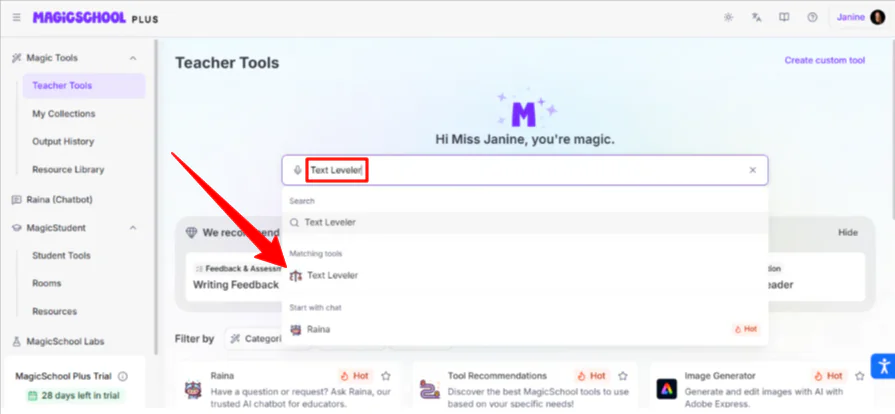
To demonstrate MagicSchool’s capabilities, I tried one of the simpler tools: the Text Leveler. It allows you to paste any level of text and adapt it to fit a student’s reading level.
To access this tool, I searched “Text Leveler” in the search bar and selected it.
Step 6: Choose the Grade Level & Paste the Text

Next, I was taken to the prompt editor for the Text Leveler. I chose the grade level (Pre-K to University- I chose “5th grade”) and pasted the text I wanted to level. I pasted a few paragraphs from a BBC article:
“Maggie Hildebrand’s first apartment in Toronto had a kitchen, a dining table, a workspace and a bed – all in the same 300-sq-ft room.
It was a decent home at first, close enough to her job downtown and with all the bare necessities for daily living.
But it didn’t take long for the 28-year-old to feel boxed-in. “It was so isolating in that tiny space,” she told the BBC. “It definitely feels like it’s just somewhere to put worker bees during the night.”
Ms Hildebrand lived in one of the city’s micro-condos, a once rare sight in Canadian real estate that has become ubiquitous in the last decade thanks to fast-growing, high-rise developments in major cities like Toronto and Vancouver.”
I then hit “Generate.”
Step 7: Generate Text

Immediately, my text was rewritten for 5th grade:
“Maggie Hildebrand’s first apartment in Toronto was very small. Her kitchen, dining table, workspace and bed were all in the same 300-square-foot room.
At first, it was a fine place to live. It was close to her job downtown and had the basic things she needed each day.
But after a while, the 28-year-old felt cramped. “It was so isolating in that tiny space,” she told the BBC. “It definitely feels like it’s just somewhere to put worker bees during the night.”
Ms. Hildebrand lived in one of the city’s micro-condos. These tiny apartments used to be rare in Canada, but in the last ten years they have become very common because many tall buildings have been built in big cities like Toronto and Vancouver.”
With a single click, I could copy, export, print, edit, translate, read aloud, and save.
Overall, MagicSchool did an excellent job immediately leveling the text I gave it. It simplified complex words like “ubiquitous” to “very common.”
Step 8: Explore More AI Tools

But MagicSchool doesn’t stop there. Feel free to check out their other, more complex tools, like “Custom Chatbot.” It can create AI tutors that ask questions for teacher assistance.
Top 3 MagicSchool AI Alternatives
Here are the best MagicSchool AI alternatives.
GradeScope
The first MagicSchool AI alternative I’d recommend is Gradescope. It speeds up grading for homework, exams, code, and bubble sheets with AI grouping and flexible rubrics. This saves instructors hours while providing detailed analytics on student performance.
While both tools save teachers time, Gradescope focuses heavily on grading. Meanwhile, MagicSchool AI handles lesson planning and student engagement.
Choose MagicSchool AI for full classroom support. Otherwise, choose Gradescope for fast and flexible grading with analytics.
Cognii
The next MagicSchool AI alternative I’d recommend is Cognii. It helps students learn by conversing with AI, writing answers in their own words, and giving instant feedback.
Both Cognii and MagicSchool AI reduce teacher workload and provide student insights. However, Cognii excels at conversational tutoring, while MagicSchool AI focuses on tools for planning, grading, and classroom management.
Choose Cognii for personalized AI tutoring. Otherwise, choose MagicSchool AI for all-in-one classroom support.
CenturyTech
The final MagicSchool AI alternative I’d recommend is CenturyTech. It uses AI to personalize learning, give teachers actionable insights, and save time on marking and planning.
While both tools reduce teacher workload, MagicSchool AI offers broad tools for planning, grading, and student engagement. Meanwhile, CenturyTech focuses on personalization and detailed progress tracking.
Choose MagicSchool AI for user-friendly classroom tools. Otherwise, choose CenturyTech for personalized learning and data insights.
MagicSchool AI Review: The Right Tool For You?
After spending some time with the platform, it’s clear MagicSchool AI is a powerhouse for the busy but dedicated educator.
What impressed me most wasn’t just the sheer number of tools. It was how much they lowered the barrier to entry for AI. You don’t need to be a prompt engineer to get high-quality results.
Whether I was using the Text Leveler to make complex news accessible for 5th graders or experimenting with the Custom Chatbot to create a tutor, the interface felt intuitive and safe.
MagicSchool excels at taking the administrative weight off your shoulders so you can focus on what actually matters: connecting with your students.
While MagicSchool is a fantastic all-in-one workspace, other tools might be a better fit:
- Gradescope is best for grading and large classes needing fast, consistent feedback and analytics.
- Cognii is best for open-ended feedback and building critical thinking through conversational AI tutoring.
- CenturyTech is best for personalized learning, progress tracking, and actionable data insights.
Thanks for reading my MagicSchool AI review! I hope you found it helpful.
MagicSchool AI offers over 130 AI tools for teachers and students for free. Try it for yourself and see how you like it!
Frequently Asked Questions
Is MagicSchool free?
Yes, MagicSchool offers a great free plan for individual teachers, including paid Plus and Enterprise plans with advanced features.
Is Magic School AI legit?
Yes, MagicSchool AI is a legitimate K-12 platform focused on privacy and safety. It is used by millions of educators worldwide.
What is MagicSchool used for?
MagicSchool is an AI platform for teachers and students that saves time on lesson preparation, personalizes learning, and creates content.



