
AI Tools 101
Jenni AI Review: Citations So Smart You’ll Ditch ChatGPT

Unite.AI is committed to rigorous editorial standards. We may receive compensation when you click on links to products we review. Please view our affiliate disclosure.

We’ve all been there. It’s nearly midnight, there’s a half-open document on your screen, and you still need a fully cited research paper done before morning.
The topic isn’t the hard part. It’s turning scattered notes and half-formed ideas into something that actually reads like a real paper.
That’s the problem Jenni AI was built to solve. And when you consider that researchers publish 5 to 6 million academic papers every year, the need for smarter research writing tools is clear.
When I tested it, I wanted to know if it was actually useful for research writing or just another AI text generator. What I found was a capable writing assistant with smart citation tools, a solid academic database, and a clean editor that’s easy to navigate.
In this Jenni AI review, I’ll discuss the pros and cons, what it is, who it’s best for, and its key features. Then, I’ll show you how I used it to generate and edit an article on why this platform is the new gold standard for research writing.
I’ll finish the article by comparing Jenni with my top three alternatives (SciSpace, Elicit, and Scite AI). By the end, you’ll know if Jenni is right for you!
Verdict
Overall, Jenni AI is a strong tool for research writing thanks to its citation features, large academic database, and user-friendly interface. However, it can be slow for long documents, it may produce generic text, and the free plan is limited.
Pros and Cons
- Excellent citation handling with 2,600+ styles
- Smart citations from 250M+ papers prevent hallucinations
- Autocompletes content to fight writer's block
- Multilingual support (30+ languages)
- Automatically generates bibliography
- PDF chatting/summarization
- Exports to Word/LaTeX
- Effective for outlines
- Clean interface
- Slow for long documents due to line-by-line generation
- Paraphrasing may change the meaning in technical writing
- Outputs can feel generic or need heavy editing
- Citations can be inaccurate or irrelevant
- The free plan is very limited
What is Jenni AI?
Launched in 2019, Jenni AI is an AI writing and research assistant designed primarily for students, researchers, and academics. But it’s not your average Google doc; Jenni combines a writing editor with AI features like autocomplete, paraphrasing, and citation tools to help draft essays, papers, and reports.
The best part is that Jenni is packaged into one writing workspace. That means you’re not jumping between five different tabs to draft a single paper.
Jenni AI vs. Alternatives
But here’s where Jenni separates itself from tools like ChatGPT.
General AI tools are great for many things, but they weren’t built with research in mind. They don’t naturally handle citations, they can hallucinate sources, and they don’t help you manage your reference library.
Jenni was designed to solve those problems. It supports citation formats like APA, MLA, and Chicago right out of the box, which is incredibly useful when writing lengthy research papers at midnight.
Interface & Ease of Use
Off the bat, I was impressed by how clean the platform was. The document editor felt familiar (similar to Google Docs), but smarter.
One thing that stood out was the built-in “AI Chat” sidebar. I could ask the AI questions, and it would pull from its online database of 250M+ scholarly articles or from my library of documents, depending on whether I had the “Web” or “Library” toggles turned on or off.
If you’ve ever felt like general AI tools just don’t get what you’re trying to do with serious writing, try Jenni AI. It’s built for that frustration.
Who is Jenni AI Best For?
Here’s who Jenni AI is best for:
- Students (undergrad/grad/PhD) can use Jenni AI for essays and coursework when deadlines are tight.
- Researchers and PhD candidates can use Jenni AI to draft manuscripts, summarize PDFs, and build structured papers with accurate citations.
- Academic professionals can use Jenni AI for source-based writing and multilingual content.
- Content creators in education and tech can use Jenni AI for SEO-optimized reviews and marketing analyses with citations. However, it works best for research content rather than casual blogging.
Jenni AI Key Features
Here are Jenni AI’s key features:
- AI autocomplete generates sentences for each section to overcome writer’s block, with options to accept suggestions or see alternatives.
- Edit content by highlighting specific sentences and choosing to simplify, paraphrase, change tense, etc.
- Grammar checks with explanations.
- Outline builder creates structured plans (e.g., IMRaD) from topics or uploaded documents.
- Chat with PDFs lets you upload documents, ask questions, summarize, or extract insights from multiple files. Optionally restrict the AI to your uploaded library only for 100% context-control to avoid AI hallucinations.
- Smart citations search a 250M+ paper database or your library, inserting inline citations that auto-compile into a bibliography in 2,600+ styles like APA 7th.
- Multilingual support for 30+ languages.
- Export to Word, LaTeX, or HTML.
How to Use Jenni AI
Here’s how I used Jenni AI to generate and edit an article on why this platform is the new gold standard for research writing:
- Sign Up for Jenni AI
- Give Jenni a Prompt
- Choose the Outline Type
- Tweak the Document Settings
- Start Writing
- Edit with AI
- Add Citations
- View the Bibliography
- Research with AI Chat
Step 1: Sign Up for Jenni AI

I started by going to jenni.ai and selecting “Start Writing.”
Step 2: Give Jenni a Prompt

Once my account was created, Jenni asked me for a document prompt (“What are you writing today?”) and what kind of outline I wanted to generate.

Starting with the prompt, I used the “PCR” (Purpose, Context, and Requirements) method to get the most out of Jenni.
I added this prompt:
“Write a professional and tech-savvy article for graduate students and academic researchers titled ‘Beyond the Hallucination: Why Jenni AI is the New Gold Standard for Research Writing.’ The purpose is to demonstrate how Jenni AI solves the critical reliability issues found in general tools like ChatGPT.
Key points to cover:
- The Grounded Truth: How Jenni’s ‘Smart Citations’ link to a database of 250M+ academic papers (OpenAlex) to prevent fabricated sources.
- Library-First Generation: Explain the ‘AI Chat with Source Control’ feature, where the AI writes using only the user’s uploaded library for 100% context-control.
- The Workflow Advantage: Detail the seamless transition from the text editor to automated bibliography generation in 2,600+ styles (APA, MLA, etc.).
Use an objective yet encouraging tone, positioning Jenni as a ‘co-pilot’ rather than a replacement for human critical thinking.”

After giving Jenni my prompt, it was scored as a “Great prompt.” That’s why following the PCR (Purpose, Context, and Requirements) method is essential when using Jenni.
Step 3: Choose the Outline Type

Next, I chose my outline style:
- Standard Headings (IMRaD): Add standard headings like Introduction, Methods, Results, etc. (best for academic papers and lab reports).
- Smart Headings: Get AI to generate headings based on the document prompt (best for blog posts, articles, and essays).
- No Headings: Start with a blank document (best for short emails and creative brainstorms).
The outline style you choose depends on the type of content you want to generate. My prompt is for generating an article, so I chose “Smart Headings” and hit “Next.”
Step 4: Tweak the Document Settings

From there, I had to choose the sources I wanted Jenni to consider, as well as the citation filters and format. I left the external and library sources turned on to allow Jenni to pull from their massive database, as well as any additional resources.

For the citation filters, I chose the “Last 5 Years” for the publication year rather than “All.” Since the AI field is moving so quickly, citing a paper on AI from five years ago will feel like ancient history.

For the Impact Factor, I chose “>3” to cite high-quality journals. I also chose APA (7th ed.) as the citation style (it’s the gold standard for social sciences and tech articles), and turned the “Show page numbers and citations” toggle on.
From there, I selected “Start Writing.”
Step 5: Start Writing

Immediately, Jenni started writing my article. Rather than writing the entire thing in one go, it went section by section.
For each sentence I liked, I hit “Accept.” For each section I was not a huge fan of, I hit “Try Again” to regenerate the content.

Initially, I expected Jenni to automatically jump to the next section to continue autocompleting the article. Little did I know, Jenni kept writing the Introduction (which started to get way too long), and I ran out of my autocompletes for the day.
Rather than writing a 2,000-word introduction, I manually clicked into the next section and continued generating content.
Step 6: Edit with AI
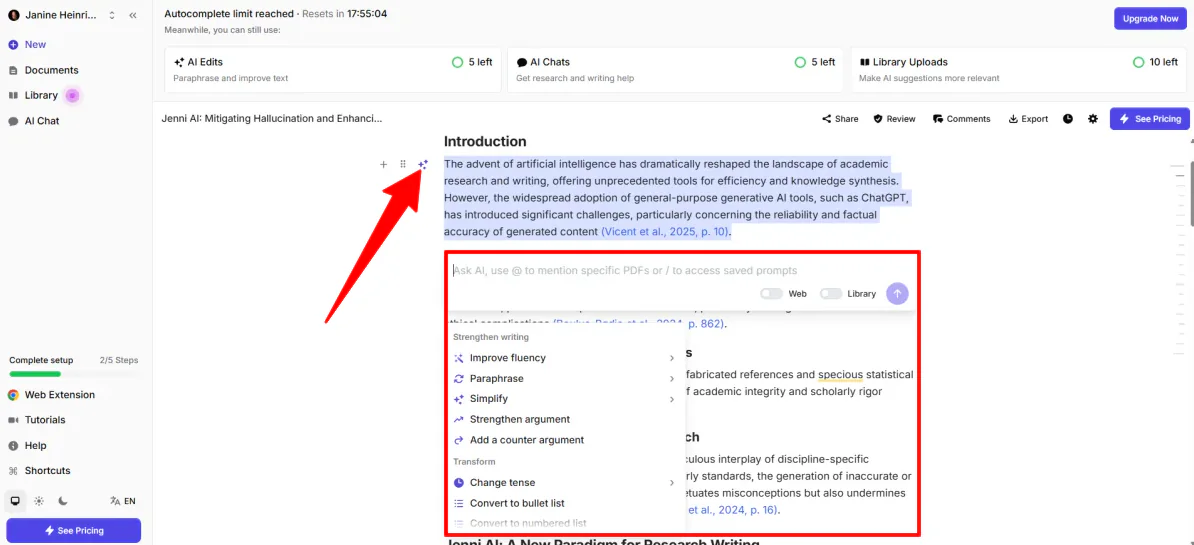
Now that my content was more evenly distributed, I wanted to try editing with AI.
To access the “AI Edits” feature, I selected the AI Edit icon for the entire section. I found this method displayed the most options, but feel free to highlight specific sentences to edit.

When selecting the AI Edit icon, my section was highlighted, and a chatbot appeared where I could ask AI to make changes. I could also use “@” to mention specific PDFs or “/” to access saved prompts.
Since the text felt so dense, I gave it the following prompt: “Simplify this text while maintaining a professional academic tone.”

Seconds later, Jenni generated content according to my request. I was impressed to see that it even gave me an AI insight, explaining what changed and why. I could even see the edits.
Jenni did exactly what I asked. When comparing it to the original content, it definitely sounded simpler while retaining a professional tone of voice. Plus, it explained the reasoning behind the changes and clearly helped me see how the piece improved.

If I didn’t want to explain the changes I wanted to make, I could use the options below the chatbot to improve fluency, paraphrase, or simplify. These single-click presets save time compared to typing out custom prompts in the chatbot.
Step 7: Add Citations

Another cool feature I tried was Jenni’s “Citation” tool. I highlighted the first sentence of my article and selected “Cite.”

Seconds later, Jenni suggested real academic papers from its own database. I could filter them by year and relevance and add them in the proper format, which saved me a lot of time. No need to open a new tab and search Google Scholar!
Step 8: View the Bibliography

As I wrote, Jenni automatically generated a bibliography in APA style at the bottom of my article. I loved how it automatically handled the most boring parts of research for me.
Step 9: Research with AI Chat

Last but not least, I wanted to try Jenni’s AI chatbot. I selected “AI Chat” from the panel on the left, which opened the chatbot on the right.
I asked a general question: “What are the most cited papers on AI hallucinations from 2024?”

While the chatbot gave me an answer, it told me to turn on the “Web” toggle to search databases like OpenAlex or Google Scholar. I gave it the same question and made sure the Web toggle was turned on this time.

As expected, the second response was much more comprehensive. It gave an overview of the research and broke each finding down by including the authors, citations, and summaries.
Overall, Jenni AI felt like a true research writing assistant rather than just another text generator. It streamlined everything from drafting and editing to citations and bibliography, making the entire academic writing process faster and far more organized.
Top 3 Jenni AI Alternatives
Here are the best Jenni AI alternatives:
SciSpace
The first Jenni AI alternative worth considering is SciSpace, built for the research side of academic work. That includes literature reviews, paper discovery, PDF analysis, and citation-backed answers all on one platform. It connects to databases like PubMed, arXiv, and Google Scholar, so you’re searching across 200+ million papers without jumping between five different browser tabs.
When I tested it, I threw it a pretty specific research task: finding the top-cited papers on microplastics filtration in urban wetlands, with a comparison table of their methodologies. The output had every claim hyperlinked directly to the source paper.
While both Jenni and SciSpace handle AI-assisted writing and citations, SciSpace is more of a research hub. It’s where you go to find and understand information.
On the other hand, Jenni AI is more of a writing assistant. While it has its own database of 250M+ papers, it’s where you go to draft and organize that information once you have it.
For a tool that helps you explore papers, summarize PDFs, and review research across many studies, choose SciSpace. But if you need a clean AI editor to help you draft and cite your academic writing, choose Jenni AI.
Read my SciSpace review or visit SciSpace!
Elicit
The next Jenni AI alternative I’d recommend is Elicit. I tested it by asking it to compare the effectiveness of online CBT versus face-to-face CBT for treating depression. Within seconds, I had a full research report with an abstract, methods, results, and clickable citations that linked directly to the source quotes.
On the one hand, Elicit stands out for finding, analyzing, and summarizing research papers. It searches over 138 million papers and 545,000 trials, auto-populates comparison tables with study details, and even lets you chat with the papers.
Meanwhile, Jenni AI focuses more on the writing process itself: drafting content, autocompleting paragraphs, and managing citations in one clean editor.
For finding and reviewing research papers, choose Elicit. For writing and managing citations, choose Jenni AI.
Read my Elicit AI review or visit Elicit!
Scite AI
The final Jenni AI alternative I’d recommend is Scite AI. When I tested it, I asked it whether social media impacts mental health.
What stood out wasn’t just the answer; it was the Search Strategy tab that listed the top 55 publications the AI used to build that response. I’d never seen that kind of transparency on any other research tool I’ve tried.
On the one hand, Scite AI stands out for evidence-based research and citation analysis. It searches over 187 million papers and 1 billion citation statements. Plus, its Smart Citations feature shows you exactly how other papers have cited a source (whether they’re supporting or contradicting it).
Meanwhile, Jenni AI focuses on the writing side. It helps you draft, autocomplete, and manage citations inside one clean editor.
To check citations and evidence, use Scite AI. For academic writing, drafting, and citation tools, use Jenni AI.
Read my Scite AI review or visit Scite AI!
Jenni AI Review: The Right Tool For You?
After spending time with Jenni AI, it’s clear what it’s good at and what it’s not trying to be. It’s built for the writing stage.
Once you have your topic and sources figured out, Jenni makes the drafting process a lot smoother. The autocomplete, built-in citations, and automatic bibliography generation are genuinely useful, not just marketing bullet points.
The AI editing tools surprised me, too. With a click, I could simplify dense sections, track what changed, and maintain the academic tone without it sounding like a robot rewrote everything.
But here’s the main thing: it works best when you already know what you want to write. It’s not a research discovery tool. It’s not going to help you explore papers or figure out what the literature actually says. That’s just not what it’s designed for.
If you’re staring at a blank document, drowning in citations, or trying to turn a pile of notes into something structured and readable, Jenni can save you hours. However, if you’re in the “finding and analyzing research” phase, consider one of these alternatives:
- SciSpace is best for researchers who want to explore papers, analyze PDFs, and run literature reviews across huge academic databases.
- Elicit is best for quickly summarizing studies, generating research reports, and comparing findings across multiple papers.
- Scite AI is best for checking evidence and assessing how research papers support or contradict one another through citation analysis.
Thanks for reading my Jenni AI review! I hope you found it helpful.
Jenni offers a free plan that lets you try its main features, including autocomplete, AI edits, and AI chat messages. Try it for yourself and see how you like it!
Frequently Asked Questions
Is Jenni AI better than ChatGPT?
For academic writing, Jenni AI has the edge. It gives you real, verified citations. Meanwhile, ChatGPT is the better pick when you need to brainstorm, write creatively, or think through ideas without worrying about sourcing everything.
Is Jenni AI for free?
Yes, Jenni AI has a free plan, but it’s pretty limited. You get access to the core features like autocomplete and a limited number of PDF uploads, so it’s fine for light use. But if you’re writing anything more lengthy, you’ll hit that ceiling fast. At that point, consider upgrading to a paid subscription.
Can Jenni AI be detected?
Yes, Jenni AI content can be detected. Tools like Turnitin can flag it. Jenni is ultimately best used for drafting and brainstorming, not submitting something straight out of the editor without editing it yourself first.
Which is better, Scite AI or Jenni AI?
Scite AI is built for research (verifying claims, evaluating sources, and analyzing how papers cite each other). Meanwhile, Jenni AI is built for writing (drafting, editing, and getting words on the page).
If you need to fact-check and dig into the literature, use Scite. If you need to actually write the paper, use Jenni.
Is Jenni AI worth the money?
For most students and academic writers, Jenni AI is worth the money. You’re getting autocomplete, built-in citations, and a tool that’s genuinely good at getting you unstuck when you don’t know how to start.
Where it gets a little shaky is with more complex papers. It’s not always the fastest option for heavy-duty writing, and other alternatives handle full-length academic work more efficiently. But for everyday research writing and citation management, Jenni is a great choice.
Which is better, PaperPal or Jenni AI?
Overall, Paperpal is the better choice for deep academic editing (grammar, phrasing, journal compliance). Meanwhile, Jenni AI is better for drafting, brainstorming, and quickly getting words on the page. In a nutshell: use Paperpal to polish a manuscript, and use Jenni to start one.



