
AI Tools 101
Claude Sonnet 4.5 Review: The Best Coding Model in the World

Unite.AI is committed to rigorous editorial standards. We may receive compensation when you click on links to products we review. Please view our affiliate disclosure.
If you’ve ever spent hours fixing a messy spreadsheet, debugging stubborn code, or keeping track of too many project details, you know how frustrating it can be.
That’s where Claude Sonnet 4.5 comes in. It’s the latest AI from Anthropic, and it isn’t just another chatbot. It’s a powerhouse built for complex reasoning, coding, and managing large workflows to accomplish tasks efficiently.
In this Claude Sonnet 4.5 review, I’ll discuss the pros and cons, what it is, who it’s best for, and its key features. Then, I’ll show you how I used it from start to finish to do research, collect data, create a slideshow, and write supporting automation code.
I’ll finish the article by comparing it with my top three alternatives (OpenAI GPT-5, DeepSeek-V3.2-Exp, and Google Gemini 3.0 Pro). By the end, you’ll know if Sonnet 4.5 is right for you!
Verdict
Claude Sonnet 4.5 is a powerful AI tool that excels at complex reasoning, coding, and handling large workflows. It’s great for research, content creation, and developer productivity. However, it can make factual errors, be overly cautious on sensitive topics, and lack image generation.
Pros and Cons
- Excels at complex reasoning, multi-step tasks, and coding
- Handles very long contexts for large documents and workflows
- Strong safety and alignment, reducing hallucinations
- Understands instructions very well
- Produces creative writing for content and research
- Boosts developer productivity through autonomous coding and code comprehension
- Can make factual errors
- Can be too cautious on sensitive topics
- Cannot generate images and has limited real-time web access
- May need review due to occasional inaccuracies
What is Claude Sonnet 4.5?
Claude Sonnet 4.5 (released September 29, 2025) is the latest AI model developed by Anthropic, the most advanced member of the Claude 4 family. Its focus is on coding, building complex agents, reasoning, and math.
But Sonnet 4.5 isn’t just a minor update; it’s positioned as “the smartest model” in Anthropic’s lineup. While Opus models were traditionally the best for really complex reasoning tasks, Sonnet 4.5 is both incredibly smart and efficient for everyday use. That’s the sweet spot most people actually need.
Sonnet 4.5 vs. Previous Versions
The jump from Claude Sonnet 4 to 4.5 was significant. On the OSWorld benchmark that measures real-world computer tasks, Sonnet 4 scored 42.2% while Sonnet 4.5 hit 61.4%. That’s not just an improvement; that’s a completely different level of capability.
Compared to Claude Opus 4.1, the difference is more nuanced. Experts in finance, law, medicine, and STEM found that Sonnet 4.5 shows better domain-specific knowledge and reasoning than Opus 4.1.
Overall, Sonnet 4.5 is better at sustained, complex work while being just as fast and more cost-effective.
Where You Can Use It
Claude Sonnet 4.5 is available pretty much everywhere you’d want to use Claude. If you’re using the regular Claude.ai web interface, it’s your default model on any paid plan. The mobile apps have it too.
Developers can access Claude Sonnet 4.5 through the Claude API by specifying the model string (claude-sonnet-4-5) in API calls. The pricing has remained the same as Claude Sonnet 4: $3 per million input tokens and $15 per million output tokens.
Claude Code users got immediate access with some bonus features like checkpoints to save your progress and roll back when needed. There’s also a native VS Code extension that integratesectly into your development environment.
What Makes Claude Sonnet 4.5 Unique
What makes Claude Sonnet 4.5 unique is that it hits this perfect balance between power and practical usability. It’s not just the most capable coding model in the world; you can also trust it to work autonomously.
The “most aligned frontier model” designation means they’ve reduced issues like sycophancy (telling you what you want to hear), deception, and power-seeking behaviors compared to previous models. For anyone building agents or automation, that is just as important as the model’s intelligence.
If you’re trying to determine whether Claude Sonnet 4.5 is right for you, ask yourself this: Do you need a model that can handle complex, multi-step tasks over extended periods while maintaining context? If yes, this is your model. If you need quick answers to your questions, a simpler option will suffice.
Who is Claude Sonnet 4.5 Best For?
Here’s who Claude Sonnet 4.5 is best for:
- Developers can use Claude Sonnet 4.5 as a powerful coding assistant for large projects to design software more effectively and automate tasks.
- Experts in specific fields can use Claude Sonnet 4.5 to support work in finance, law, medicine, and STEM.
- Business and marketing teams can use Claude Sonnet 4.5 to automate routine tasks, such as content creation.
- Professionals can use Claude Sonnet 4.5 to expedite software development, automate tough tasks, and stay compliant and secure.
- Advanced users can use Claude Sonnet 4.5 to handle large research or analysis projects that require long-term context and high accuracy.
Claude Sonnet 4.5 Key Features
Here are Claude Sonnet 4.5’s key features:
- Superior Reasoning & Autonomy: Designed for long autonomous work with strong multi-step reasoning, planning, and improved tool use.
- Enhanced Coding Capabilities: Optimized for generating and debugging code.
- Computer & Browser Use: Supports complex workflows in IDEs like VS Code and through extensions such as Claude for Chrome.
- Agentic Workflow Support: Autonomous agents can plan, reason, and act over long projects to automate workflows, manage tasks, and address vulnerabilities.
- Safety & Alignment: Includes advanced protections to reduce hallucinations and prompt-injection risks for excellent security.
- Industry Suitability: Performs well in specialized fields like finance, law, medicine, and STEM.
- Developer Tools & SDK: Offers the Claude Agent SDK for building custom autonomous agents and tailored workflows.
How to Use Claude Sonnet 4.5
Here’s how to use Claude Sonnet 4.5:
- Select the Sonnet 4.5 Model
- Define the Task & Agent Scope
- Collect the Data in a Spreadsheet
- Create a Slideshow
- Write Supporting Automation Code
Step 1: Select the Sonnet 4.5 Model
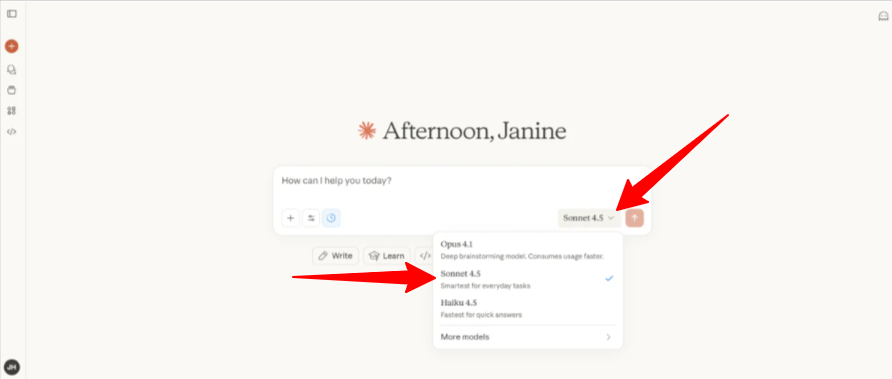
I started by going to claude.ai/new. In the models, I made sure “Sonnet 4.5” was selected (it’ll be selected by default). If you don’t have an account, you can create one for free.
While you can use Sonnet 4.5 for basic tasks like writing emails and simple questions, it’s made for much more than that (e.g., coding projects and building agents). The SWE-bench Verified scores show it’s the best coding model available right now.
For this review, I will have Claude Sonnet 4.5 build a multi-component agent that researches a niche market, analyzes trends, generates visualizations, and outputs a structured report with code, spreadsheet, and slides.
Step 2: Define the Task & Agent Scope

First, I got Sonnet 4.5 to define the task and agent scope by giving it the following prompt:
“You are an autonomous research agent. Your task is to explore the niche market of eco-friendly consumer gadgets. Please:
- Identify the top 5 trends in this market.
- List 10 leading competitors and notable products.
- Summarize key market insights in 3–4 concise paragraphs.
Provide the summary in Markdown format, suitable for a report.”

Immediately, Claude began searching the web and breaking down the research step by step. It generated a report exactly how I asked.
Step 3: Collect the Data in a Spreadsheet

Next, I wanted to collect this data in a structured spreadsheet. To do this, I gave Claude Sonnet 4.5 the following prompt:
“Using the information from your research:
- Create a spreadsheet (CSV format) with columns:
- Competitor Name
- Product Name
- Category
- Price (USD)
- Estimated Sales
- Average Online Rating
- Populate it with the top 10 products and their details.
Output the CSV contentectly.”
Step 4: Create a Slideshow

Seconds later, Claude Sonnet 4.5 created a CSV.
Next, I wanted to create a presentation from Claude’s findings. I gave it the following prompt:
“Create a simple slide deck (PowerPoint format) summarizing your findings:
- Slide 1: Title + Market Overview
- Slide 2: Top 5 Trends
- Slide 3: Competitor Analysis Table
- Slide 4: Charts of Price vs Rating and Category Popularity
- Slide 5: Key Recommendations
Provide a step-by-step Python script that generates this slide deck automatically using python-pptx.”

A few seconds later, Claude generated an entire slideshow! It included tables, charts, and visuals to highlight trends, competitors, and market insights in a digestible way. I could also download the PPTX, PY, and MD files or open the PPTX file in Google Drive.
Step 5: Write Supporting Automation Code

Last but not least, I got Claude Sonnet 4.5 to write supporting automation code by giving it the following prompt:
“Write a Python agent that:
- Reads the CSV spreadsheet.
- Automatically updates it with new product data from a mock API (or structured placeholder).
- Regenerates charts and updates the slide deck.
- Saves all outputs in an organized folder: report.md, data.csv, slides.pptx, charts/.
Provide fully commented code.”

Despite taking a while, Claude Sonnet 4.5 had no problem creating a Python agent to automate the entire workflow. I was impressed by how deep it went.
Overall, Claude Sonnet 4.5 made the whole process feel smooth. I was surprised by how quickly it handled research, spreadsheets, and slides without getting lost.
Top 3 Claude Sonnet 4.5 Alternatives
Here are Claude Sonnet 4.5’s top 3 alternatives:
OpenAI GPT-5
The first alternative to Claude Sonnet 4.5 is OpenAI GPT-5. It excels at coding, reasoning, writing, health queries, and multimodal tasks. It even has flexible “thinking” modes that adjust speed and depth.
Both models handle complex work well, but Claude Sonnet 4.5 is known for stable, predictable performance on long-running agent tasks. Meanwhile, GPT-5 offers larger context windows, deeper reasoning options, and stronger tool integration. This makes it more flexible but sometimes less consistent for simple jobs.
Choose Claude Sonnet 4.5 for steady enterprise and autonomous coding. Otherwise, choose GPT-5 for powerful, adaptive reasoning and broader multimodal and scientific tasks.
DeepSeek-V3.2-Exp

The next alternative to Claude Sonnet 4.5 is DeepSeek-V3.2-Exp. It’s an experimental model using DeepSeek Sparse Attention (DSA) for faster and more efficient long-context processing. It reduces compute costs by over 50% while maintaining high-quality output.
DeepSeek-V3.2-Exp excels in efficiency and cost-effectiveness for long documents, making it great for cost-sensitive projects. Meanwhile, Claude excels in safety, instruction-following, and autonomous coding, as demonstrated in Sonnet 4.5. It’s best for enterprise and developer workflows.
Choose Claude Sonnet 4.5 for safety and coding reliability. Otherwise, choose DeepSeek-V3.2-Exp for fast, affordable long-context processing.
Read my DeepSeek review or visit DeepSeek!
Google Gemini 3.0 Pro
The final alternative to Claude Sonnet 4.5 is Google Gemini 3 Pro. It offers multimodal reasoning, a massive 1-million-token context window, and advanced agentic coding for complex tasks.
On the one hand, Gemini 3 Pro stands out with its ability to understand text, images, videos, audio, and code. Meanwhile, Claude Sonnet 4.5 focuses on safety, balanced performance, and secure autonomous workflows.
Choose Gemini 3 Pro for multimodal workflows and Google ecosystem support. Otherwise, choose Claude Sonnet 4.5 for reliable AI coding and planning.
Claude Sonnet 4.5 Review: The Right Tool For You?
After running Claude Sonnet 4.5 through a full research-to-slides pipeline, I was impressed. It didn’t just follow instructions. It handled long tasks, stayed organized, and never felt overwhelmed. That made the whole process feel smooth and reliable.
If your work depends on tools that can think through problems, track details across long workflows, and build real automation without breaking, then Claude Sonnet 4.5 is a great fit. But if you only need quick answers, you can skip all the extra power or consider these alternatives:
- OpenAI GPT-5 is best for those who need the strongest adaptive reasoning.
- DeepSeek-V3.2-Exp is best suited for fast, cheap, long-context processing.
- Google Gemini 3.0 Pro is best suited for those who rely on multimodal inputs, such as images, video, and audio.
For me, Sonnet 4.5 strikes the perfect balance: smart enough for deep work, sufficient for long runs, and simple enough to trust day-to-day.
Thanks for reading my Claude Sonnet 4.5 review! I hope you found it helpful.
You can try Claude’s more basic models on the free plan, but you’ll have to upgrade to a paid plan to access Sonnet 4.5. Try it for yourself and see how you like it!
Frequently Asked Questions
Is Sonnet 4.5 free?
No, Sonnet 4.5 is not free for full use. The official Claude API is paid at $3 per million input tokens and $15 per million output tokens. The old free Claude.ai tier uses a weaker model.
Is Claude Sonnet 4.5 good?
Claude Sonnet 4.5 is good, especially for coding and building complex agents. It also handles tough tasks well and competes with the best AI models available.
Is Sonnet 4.5 better than Opus?
No, Sonnet 4.5 is not better than Opus. Sonnet 4.5 is great for everyday coding, while Opus 4.1 excels at high-stakes tasks that need the most reliable reasoning.
What is the difference between Claude Sonnet 4.5 and GPT-5?
Claude Sonnet 4.5 is great for quickly generating code and handling complex tasks. Meanwhile, GPT-5 produces code with a stronger project-wide understanding.
What is Claude Sonnet 4.5 ranked?
Claude Sonnet 4.5 ranks highly in coding and computer benchmarks but sits in the middle tier for overall general intelligence.
Is Sonnet 4.5 slow?
No, Sonnet 4.5 is much faster than Sonnet 4 and handles most tasks quickly (including complex coding). However, it can occasionally slow down, freeze, or take longer to complete complex sessions.



