
AI Tools 101
Atoms Dev Review: Here’s How I Built a SaaS in Minutes

Unite.AI is committed to rigorous editorial standards. We may receive compensation when you click on links to products we review. Please view our affiliate disclosure.

Have you ever felt like you’ve been stuck in the gap between ideas and reality? You sketch something exciting, imagine users paying for it, and then the project dies in a folder of unfinished files.
The truth is brutal: roughly 90% of startups fail, often because building a product is too slow, too expensive, or simply impossible without technical resources.
But that’s where Atoms Dev steps in. It promises to collapse the distance between idea and revenue by generating full-stack apps and MVPs in minutes, complete with hosting, payments, and AI agents that act like a built-in product team.
In this Atoms Dev review, I’ll discuss the pros and cons, what it is, who it’s best for, and its key features. Then, I’ll show you how I used Atoms Dev to build a premium, high-converting SaaS platform in minutes.
I’ll finish the article by comparing Atoms with my top three alternatives (Lovable, Base44, and Bolt.new).
If you’ve ever wished you could ship faster without hiring developers, Atoms is a fascinating shift in how businesses get built. Let’s see if it’s right for you!
Verdict
Atoms Dev builds MVPs and apps that are ready to generate revenue impressively quickly. Its built-in tools make it great for entrepreneurs without developers. However, results depend on prompt quality, costs can rise with heavy use, and it isn’t the best for complex or highly custom builds.
Pros and Cons
- Quickly builds working prototypes, landing pages, and full-stack apps
- AI agents act like a built-in team (engineer, designer, analyst) to take you from idea to revenue
- Great for MVPs and those lacking funding or technical development skills
- Focuses on generating a product that sells, not just a prototype
- Built-in market research, SEO, analytics, and payments
- Backend and Stripe payments are ready to go
- Visual editor for fast changes without code
- Option to chat with AI to make changes
- Hosting is included
- One-click deploy
- Results depend on how clear your prompt is (not great for complex or very custom builds)
- Web-only platform (no dedicated mobile or desktop app)
- Credit-based pricing can get expensive with heavy use
What is Atoms Dev?
Atoms.dev is an AI platform that doesn’t just effortlessly build full-stack web applications. It builds entire businesses with pre-built multi-agent AI workflows.
It automates the entire process from idea validation and market research to development, deployment, SEO, payments, and analytics. The entire process takes minutes rather than weeks.
Parent Ecosystem (MetaGPT & OpenManus)
Atoms operates inside a pretty impressive ecosystem. It’s built on top of MetaGPT and OpenManus.
MetaGPT is a multi-agent framework that basically lets AI roles (like product managers, engineers, designers) collaborate on tasks the way a real team would.
Meanwhile, OpenManus is an open-source agentic system that expanded on that idea. It makes MetaGPT more flexible and accessible for builders outside of big tech companies.
Core Mission
Atoms is where that infrastructure (MetaGPT and OpenManus) meets the real world. It’s the layer where all that AI power gets focused on one specific goal: turning your idea into something you can actually sell.
And that mission is refreshingly clear. A lot of AI tools right now are trying to do everything for everyone, and they end up doing nothing great.
Atoms isn’t like that. The whole point is to take you from concept to digital product, without needing a development team and months of back-and-forth.
We’re talking real, working products (SaaS tools, client portals, internal dashboards, paid subscriptions, you name it), not just mockups or pretty landing pages.
It closes the gap between “I have an idea” and “This is live.” And that gap is usually where most projects die.
Atoms Dev vs. Alternatives
Traditional development stacks require you to know what you’re doing (and if not, pay someone who does). No-code tools like Bubble or Webflow are great, but they still have a learning curve. They also weren’t built with AI-native workflows in mind.
Atoms is different because AI is baked into the process.
You’re not dragging and dropping components and hoping it works. Instead, the agents are reasoning through your product requirements, making decisions, and generating functional output that’s meant to be shipped (not just previewed in a browser).
Atoms starts from a different assumption than other no-code tools: the person using it has a business outcome in mind, not just a design prototype. That shift in philosophy is what makes it feel less like a tool and more like a co-founder who knows how to code.
Ultimately, Atoms isn’t just another app builder. It’s a new kind of product development tool.
Who is Atoms Dev Best For?
Atoms Dev is best for people who want to ship a monetizable app quickly without managing a full engineering team:
- Non-technical founders can use Atoms Dev to describe what they want to build in plain language, but can’t (or don’t want to) build full-stack apps themselves.
- Solo founders, freelancers, and small teams can use Atoms Dev to launch and test a SaaS, paid tool, or niche product fast.
- Engineers who understand code but want an AI “team” to handle boilerplate (auth, databases, payments, CRUD, dashboards) can use Atoms Dev so they can focus on custom logic, UX polish, or integrations.
- Marketers or agencies can use Atoms Dev to generate working landing pages, simple tools, or SaaS prototypes with real logins and Stripe integration, to test offers and funnels with actual users.
Atoms Dev Key Features
Here are Atoms’ key features:
- A pre-built multi-agent AI team that handles research, planning, design, build, and deployment in one continuous workflow.
- Turn a short product brief into a live app or website ready to generate revenue, not just code snippets or mockups.
- Automated market research (with AI Agent Iris): trend analysis and idea validation with data‑backed summaries.
- Product strategy with AI Agent Emma.
- An entire specialized team of agents (like a full‑stack engineer, designer, and data analyst) collaborates on the same project.
- Automatic frontend, backend, database, APIs, auth, and payments generated as a cohesive system.
- Uses Supabase PostgreSQL backend with real‑time features, auth (email/OAuth), RLS security, file storage, and auto‑generated REST CRUD endpoints.
- Automatically generates the UI/UX design, layout, and elements.
- Two editing modes: a Visual Editor for manual editing, or Select to Chat for AI-Assisted editing.
- Creates logos, color palettes, design systems, and initial marketing copy to ship products quickly.
- SEO tools: meta tags, sitemaps, SEO‑optimized content, and on‑page structure.
- One‑click Stripe integration for payments, subscriptions, and webhooks tied into the generated backend.
- One‑click deploy with hosting, CDN, SSL, and custom domains.
- Analytics for user behavior, conversion metrics, and revenue tracking.
- Race Mode lets you pick the best result for more reliability and quality.
How to Use Atoms Dev
Here’s how I used Atoms Dev to build a premium, high-converting SaaS platform in minutes:
- Sign Up for Atoms Dev
- Give Atoms a Prompt
- Edit & Approve the Plans
- Generate a Preview
- Make Edits in the Preview
- Make Edits with AI
- Publish to Atoms Cloud
Step 1: Sign Up for Atoms Dev

I started by going to atoms.dev and selecting “Sign Up.”
Step 2: Give Atoms a Prompt

After creating an account, I was taken back to the AI generator.
Rather than giving Atoms a basic prompt, I wanted to see what it was truly capable of. I gave it this full-stack business prompt:
“Build a premium, high-converting SaaS platform for ‘NomadHealth’ (a subscription service that provides remote workers with on-demand digital health consultations).
Include:
- A landing page with a modern ‘glassmorphism’ aesthetic and a clear pricing section.
- A dashboard for users to schedule appointments and view their health history.
- Full-stack functionality: User authentication, a PostgreSQL database for health records, and Stripe integration for a $29/mo ‘Pro’ plan.
- Use Race Mode to show me four different UI/UX architectural approaches so I can pick the most ‘startup-ready’ version.”
Step 3: Edit & Approve the Plans

Immediately, the AI team got to work.
Alex (the Engineer Agent from the AI team) gave me an overview of the development plan for me to edit and approve. He needed confirmation on the landing page design, pricing section, appointment scheduling system, and a few more.
Everything looked good to me, so I hit “Approve.” Alex continued building right away.
While the entire process took some time (understandably so), Alex effortlessly moved from planning to execution without me needing to prompt him again.
I could see tasks getting completed step by step. The entire process felt less like submitting a request into a black hole and more like watching a skilled developer quietly build everything in the background.
Step 4: Generate a Preview

Within minutes, what started as a rough concept turned into something tangible.
Alex informed me that my requested SaaS platform was complete and listed what had been implemented (landing page, user dashboard, appointments page, health history page, payment integration, and design). On the right, I could see a preview of what he’d created.
Everything in the preview aligned with my original prompt:
- The platform name (“NomadHealth”)
- The concept (a subscription service that provides remote workers with on-demand digital health consultations)
- The aesthetic (glassmorphism)
- Inclusion of a clear pricing section
- Features (appointment scheduler and health record access)
- User authentication (“Sign In” and “Get Started” options)
- Stripe integration

I was also happy to see that it was fully responsive in different window sizes (something I’ve personally struggled with when designing websites previously). The copy sounded great, and the images were high-quality and aligned with the content.
The only thing that was clearly missing from my request was the four different UI/UX versions. Atoms only generated one.
I later noticed that Race Mode (which allows you to run a single prompt across multiple models simultaneously to obtain the best version) was only available on the Max plan. If you’re someone who likes to explore multiple creative directions before making a choice, consider upgrading to the Max plan.
In my case, the single version it produced was solid. It had a clean layout and clear hierarchy. It wasn’t anything flashy, but it was functional.
Step 5: Make Edits in the Preview
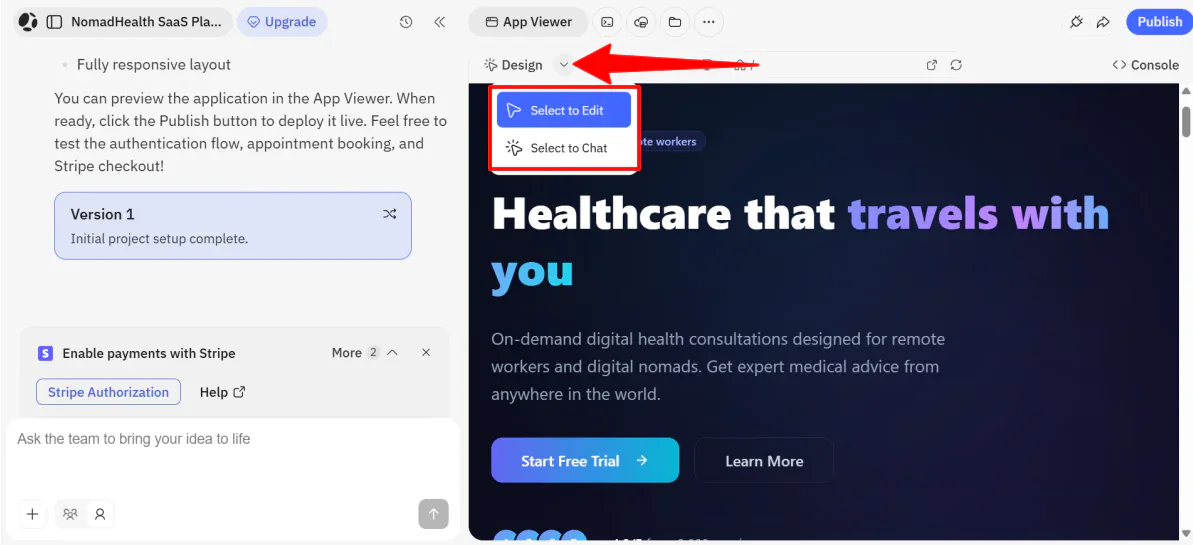
But let’s say that wasn’t the case, and I wanted to make some changes.
Next to the “Design” button at the top left of the preview, I found an arrow pointing down. Hovering over that revealed two ways I could edit the design Atoms generated.

- Option 1: Select to Edit (Visual Editor): For immediate manual changes, click on a specific element (like a button, image, or text block), and change the formatting in the menu.
- Option 2: Select to Chat (AI-Assisted Editing): For more complex changes, give a command to Alex (the AI Engineer agent) by selecting an element and using the chatbox.
Step 6: Make Edits with AI

I decided to select an element and chat with Alex to make some changes. I selected the “Start Free Trial” button on the preview and gave it the following command: “Make this button larger and emerald green.”

Step 7: Publish to Atoms Cloud

Overall, Atoms Dev felt less like using a tool and more like directing a small AI product team that actually followed through. From idea to live, hosted SaaS with payments and a database, it handled the heavy lifting in a way that made building a full-stack business feel surprisingly easy.
Top 3 Atoms Dev Alternatives
Here are the best Atoms Dev alternatives:
Base44
The first Atoms Dev alternative I’d recommend is Base44. It’s built around one simple promise: describe the app you want, and it builds, hosts, and prepares it for launch: no code and no setup required.
What I love about Base44 is how heavily it leans into simplicity. You describe your idea, and it generates the app with backend systems already in place.
On the other hand, Atoms Dev feels more like managing an AI product team. Instead of just generating an app, it uses AI workflows that also think through validation, positioning, pricing, and revenue. Arguably, the best part is that it doesn’t just focus on building something functional, but on something designed to sell.
For a simple no-code builder that gets your app live fast, choose Base44. If you want help thinking through the business side while building something you can sell, choose Atoms Dev.
Read my Base44 review or visit Base44!
Lovable
The next Atoms Dev alternative I’d recommend is Lovable. It lets you build apps and websites simply by chatting with AI, turning your idea into an application in real time.
On the one hand, Lovable stands out for its simplicity and design-first approach. It’s built for fast prototyping and polished front-end experiences, with an active community and millions of projects already launched.
Meanwhile, Atoms Dev focuses more on full-stack execution. That includes backend logic, databases, Stripe payments, hosting, SEO, analytics, and built-in AI agents that act like a mini product team.
For full-stack apps with payments and infrastructure, choose Atoms Dev. Otherwise, choose Lovable for fast prototypes and gorgeous website templates.
Read my Lovable review or visit Lovable!
Bolt.new
The final Atoms Dev alternative I’d recommend is Bolt. Both platforms let you build apps by chatting with AI and generate working products quickly.
However, Bolt.new leans more toward developer-style control and code flexibility. It also offers Bolt Cloud, which includes its own hosting and databases. Meanwhile, Atoms simplifies the full-stack business pipeline with built-in hosting, payments, and marketing tools.
For rapid MVPs and a focus on building apps that generate revenue, choose Atoms. For deeper coding control and a more traditional development workflow inside of an AI-assisted environment, choose Bolt.new.
Read my Bolt.new review or visit Bolt.new!
Atoms Dev Review: The Right Tool For You?
Overall, I enjoyed my experience using Atoms Dev. Among the other AI tools I’ve tried, it felt like the closest thing to an AI product team.
It effortlessly built something functional with hosting and payments, making the MVP process feel real and not just theoretical. For someone who values moving from idea to product as quickly as possible, it delivered.
But as great as Atoms Dev is, it isn’t for everyone. If that’s the case for you, consider these alternatives:
- Base44 is best for the most simplicity (describe an app and get something live with the least amount of decisions or customization).
- Lovable is best for fast prototypes and apps with the best design, where the front-end experience matters more than deep backend infrastructure.
- Bolt.new is best for developers who want AI assistance but still need coding control and flexibility.
Thanks for reading my Atoms Dev review! I hope you found it helpful.
Get 7.5 credits on the free plan to try it for yourself and see how you like it!



