Video Generators
Colossyan Creator Review: Great for Training, Weak Avatars

 Add Unite.AI to your preferred sources on Google
Unite.AI may receive compensation when you use links to products we review. This does not influence our editorial evaluations. Read our affiliate disclosure.

If you’ve ever been asked to “turn this policy into a training video,” you know the content isn’t the hard part. The hard part is that nobody wants to be on camera, and the video is out of date the moment a rule changes.
AI video generators like Colossyan are fixing that. You drop in a document, its AI agent (Cora) plans and writes the scenes, and an AI presenter delivers them. You can add quizzes and branching choices, then export the result to your learning platform.
I paid for a month of Colossyan’s Professional plan and ran three tests: turning an actual policy into a training video, building an interactive role-play with two avatars, and dubbing a video of myself into Spanish. Some of it was more accurate than I expected. Other parts needed a lot of hand-holding.
In this Colossyan Creator review, I’ll show you how it worked, where it impressed me, and where I think it still falls short. I’ll finish the article by comparing it to my top three alternatives: Synthesia, HeyGen, and AI Studios. By the end, you’ll know which tool is right for you!
Verdict
Colossyan is a video tool built for training first and an avatar tool second. Its AI turned my policy PDF into an accurate video that ran almost exactly the length I asked for. Branching scenarios and SCORM export are also useful for course builders, although building interactive videos still takes manual work. However, NEO 2 minutes are scarce on Professional, rendering is slow, and the avatars’ expressions don’t always match the script.
Pros and Cons
- Cora turned a policy PDF into a 9-scene training video, without inventing rules.
- The video length stayed close to my requested two minutes (2:07).
- You can review and approve a plan before the video is created.
- Branching scenarios, quizzes, and SCORM export.
- Up to four avatars can talk in the same scene, each with their own voice. Frustrated customer’s voice sound believable.
- Every plan includes 300+ avatars, 700+ voices, and support for 100+ languages.
- The NEO 2 avatar model adds hand gestures and upper-body movement.
- The free Starter plan includes 20 minutes per month, 15 custom avatars, and 3 voice clones.
- The free Toolkit includes SCORM converters, an SCORM viewer, and quiz and course-outline generators.
- Enterprise security features include SOC 2 Type II, GDPR compliance, SSO, and EU or US data residency.
- The Professional plan includes just 10 minutes of NEO 2 per month. The rest uses the older NEO model.
- Rendering was slow. A 2-minute video took about 35 minutes, while a 1-minute interactive video took 17 minutes.
- Avatar expressions didn’t match the script. An angry customer smiled occasioanlly while quitting.
- Cora can’t build branching or multi-avatar videos, so I had to create those by hand.
- Interactive videos can’t be downloaded as MP4 files. You can only share, embed, or export them as SCORM.
- You can’t dub uploaded videos in the paid app. The separate free web tool only handles the first minute and didn’t work in my test.
- Test 1 mixed three visual styles and fonts in a single video, which didn’t look good together.
What is Colossyan?
Colossyan is an AI video platform for learning and development teams. You give it a script, document, or slide deck and it turns it into a video with an AI presenter, voiceover, text, and visuals. There’s no need to film anyone.
When I first reviewed Colossyan in 2023, it was mainly an editor with avatars and automtic translation. Today, it’s a tool for building training courses.
Cora: The AI That Plans Your Video
The biggest change is Cora, Colossyan’s AI video generator. You upload PDFs, Word docs, slides, images, or video and describe what you want.
From there, Cora reads the material, proposes a plan, and waits for your approval before building anything. Then it writes the script and designs each scene, and you can either render it or edit it further.
The Classic Editor for Interactions
Cora can’t handle branching or multiple avatars yet (that’s what it told me), so for those you’ll need Colossyan’s editor. That’s where conversation mode exists: you give each paragraph of the script its own avatar and voice, so two or more presenters can talk in the same scene.
The editor’s toolbar also has a screen recorder and an Interaction menu, where you can add action buttons, multiple-choice questions, and branching paths.
NEO vs. NEO 2
Colossyan renders avatars with two models:
- NEO is the standard talking-head model.
- NEO 2 (introduced in early 2026) adds hand gestures and posture shifts that follow the voice’s energy. Colossyan labels it “Best,” but rations its minutes much more tightly on every plan.
Interactive videos also can’t be downloaded as MP4. They’re meant to be shared as a link, embedded, or packaged as SCORM for your learning platform.
Who is Colossyan Best For?
Here’s who Colossyan is best for:
- L&D teams can upload policies or SOPs and let Cora turn them into a training video. They can review the draft and make changes by editing the text instead of filming the entire thing over again.
- Training professionals can create role-play exercises for sales calls, customer complaints, or safety situations. Learners choose how to respond and see what happens next.
- Teams that deliver training through a learning platform (LMS) can export videos and courses as SCORM packages on the Professional plan.
- HR and onboarding teams can create welcome and compliance videos with a consistent presenter without booking anyone for filming.
- Online course creators who don’t want to be on camera can present lessons with a stock avatar or one of the 15–20 custom avatars included on the paid plans (Enterprise has unlimited custom avatars).
- Companies with a security review process can point to SOC 2 Type II, GDPR, SSO/SAML, and EU or US data residency (EU or US data residency is Enterprise-only).
- Small teams on a tight budget can start with the free Starter plan’s 20 monthly minutes before paying for anything.
Colossyan Key Features
Here are the key features that stood out to me:
- Cora AI video generator: Upload documents, slides, images, or video. Cora proposes a scene-by-scene plan, waits for your approval, then writes the script and designs every scene.
- NEO & NEO 2 avatar models: NEO is the standard talking-head model. NEO 2 adds gestures and upper-body movement, but paid plans (best Enterprise that offers unlimited minutes) include far fewer minutes of it.
- 300+ AI avatars: Stock presenters in different views (front, side-front, side-back) and crops (full, half, shoulder, bubble).
- Conversation mode: Assign each block of the script to a different avatar to create dialogue in a single scene.
- Branching scenarios & quizzes: Add decision points that route viewers to different scenes, and multiple-choice quizzes from the Interaction menu.
- SCORM export: Export interactive videos and courses for your learning platform. Professional includes 5 SCORM exports a month (streaming only; self-contained packages are Enterprise-only).
- 700+ AI voices in 100+ languages: Voices can be set per script block, and you can clone your own voice (3 on Starter, 5 on Professional, unlimited on Enterprise).
- Instant & custom avatars: Create a digital version of yourself (15 on Starter, 20 on Professional). Studio-quality avatars are a $1,000/year add-on.
- Auto-translation: Translate videos made in Colossyan into other languages (15 a month on Starter, 20 on Professional).
- Toolkit: Free tools including a SCORM translator, PowerPoint-to-SCORM and HTML-to-SCORM converters, a SCORM viewer, and AI quiz, SOP, and course-outline generators.
Hands-On Testing: What Colossyan Produced
I tested Colossyan on the Professional plan, which started with 30 NEO minutes and 10 NEO 2 minutes. For each test, I focused on the finished video: how accurate it was, how natural it looked, and how much I’d need to fix before sharing it.
Test 1: Turning a Company Policy into a Training Video
For my first test, I uploaded a PDF of Unite.ai’s Editorial Policy to Cora. It’s the same file I used in my Synthesia review, so I could compare the results directly.
I gave it the same prompt:
“Turn this editorial policy into a 2-minute training video for new Unite.ai writers. Cover the most important rules they need to follow, and end with a short recap of the key points.”

Cora came back with a 9-scene plan covering accuracy, independence, sourcing, labeling opinion, affiliate disclosure, and corrections, ending with a recap. I approved it without changes, and it built the storyboard in about three minutes.
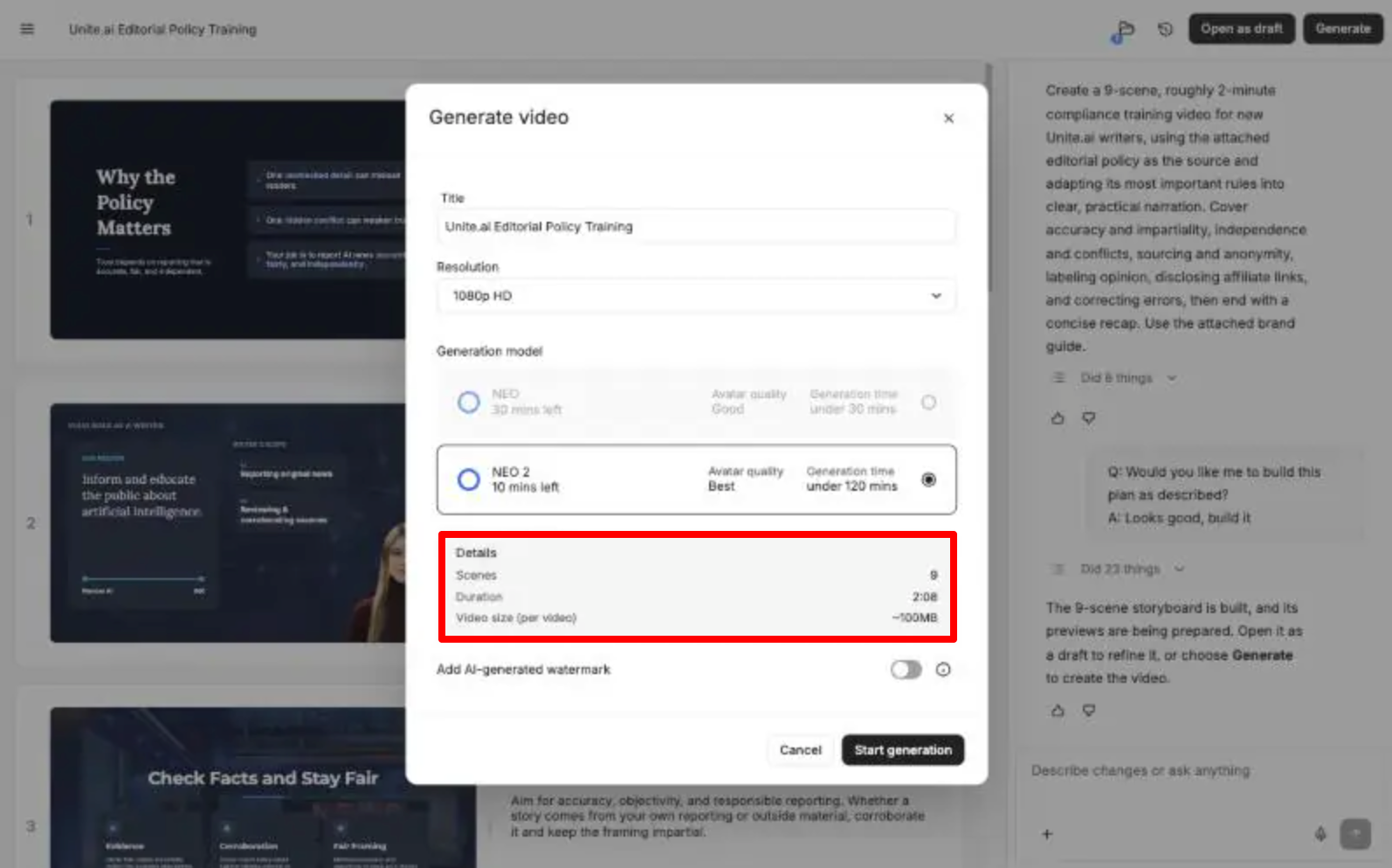
Colossyan estimated the video at 2:08 before rendering.
The final video came out at 2:07. Rendering on NEO 2 took about 35 minutes.
My Take
The script was the highlight. Every rule on screen traced back to something in the policy:
- The equity rule.
- How to treat partner press releases.
- When anonymous sources are acceptable.
- Putting “Opinion” in the title.
- Disclosing affiliate links.
- Correcting errors quickly.
I didn’t catch it inventing a single rule. It also skipped sections that don’t matter to a new writer, like the diversity and privacy policies.
The length was pretty spot-on. I asked for 2 minutes and got 2:07. In my Synthesia test, the same prompt produced a 3 minute video.
However, the design was where it fell short. The first two scenes are dark navy slides, the next two use a “NEWS UPDATE” TV studio background, and the rest switch to white slides with different fonts.
Each scene looks professional on its own, but together it feels like three templates that’ve been stitched together. Because of this, I’d apply a brand kit before sharing it.
The avatar also had a slightly rough edge around her hair against the dark background, and she disappears in various scenes.
But on the bright side, there were no broken text wraps or typos on screen. That was a problem in my Synthesia version, where “Advertising” wrapped onto two lines.
For the most part, the AI presenter sounded natural, and I didn’t notice any mispronunciations. The pacing was good too. It never felt rushed or dragged, even as it moved through nine scenes in just over two minutes.
If anything, the delivery sounded almost too perfect. There are no stumbles or changes in energy like you’d hear from a real presenter, and that’s probably what gives it away as AI generated.
Overall, this was a very usable first draft. I’d trust the content and make only minor tweaks.
Test 2: A Branching Customer Support Role-Play with Two Avatars
Next, I wanted to test the feature that sets Colossyan apart: interactive scenario training. I first asked Cora to build it from this prompt:
“Create a short branching-scenario training video for customer support reps at an AI software company. Two avatars act out a support call: a frustrated customer whose annual subscription renewed without warning, and a support rep. After the customer explains the problem, pause and let the viewer choose how the rep should respond: (A) apologize, acknowledge the frustration, and offer a prorated refund, or (B) read out the renewal policy and say nothing can be done. Show a different ending for each choice, then end with a one-line takeaway.”

Unfortunately, Cora told me it couldn’t do it. It can’t create branching choices yet, and its previews only use one avatar. It offered a linear version instead.

So I built it myself in the classic editor.
I put two avatars in an office scene: Linda as the support rep and Jason as the customer. From there, I gave each their own lines and voice, and I added a branching decision screen and two ending scenes with a narrated takeaway.
It took me about 25 minutes to build a video that’s roughly a minute long across both paths, mostly because of small editing tasks like deleting template elements and assigning a speaker to each line.
Rendering on NEO 2 took about 17 minutes. The decision screen worked exactly as intended. The video pauses, shows “How should the rep respond?” with two buttons, and plays the matching ending.

My Take
The branching itself is easy to use, and for an L&D team it’s a real step up from a plain video. Learners actually have to make a decision, and you can export the whole thing as SCORM on the Professional plan.
The weak point was the acting. My customer is supposed to be angry, but Jason smiles occasionally while saying he’s canceling everything in branch B.
Also, both avatars aren’t facing each other, which makes the whole thing feel awkward. It feels like two presenters taking turns reading lines rather than an actual conversation.

For a role-play that’s meant to teach empathy, that emotional mismatch is a real problem. The structure is solid, but I’d only use this for simple practice scenarios until the avatars can better match the tone of the script.
The voices held up better than the faces. While the customer’s frustrated tone of voice sounded believable, this made the mismatch with his smiling face even more obvious. If you only listened to this scene, you’d think he was genuinely annoyed.
Test 3: Dubbing a Real Video of Myself Into Spanish
For my last test, I wanted to dub the same English talking-head video I used in my ElevenLabs review and my Synthesia review into Spanish, so I could compare all three.
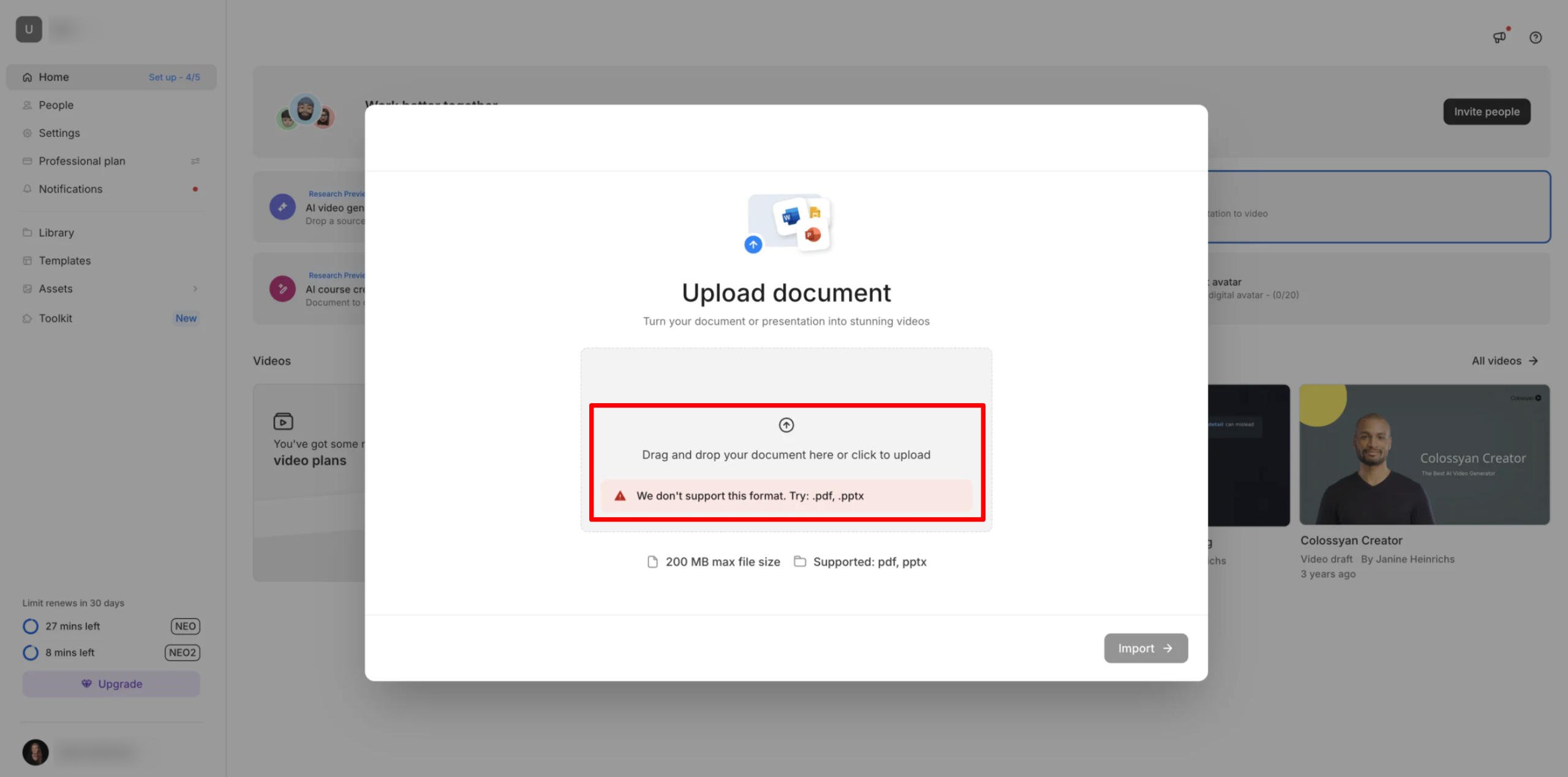
This is where I hit a surprise.
Colossyan’s paid app has no way to dub a video you upload. The Import option only accepts PDF and PowerPoint files, and the in-app translation only works on videos made in Colossyan. Dubbing your own footage lives in a separate free AI video dubbing tool on Colossyan’s website, which dubs only the first minute.

I uploaded my 72-second clip and chose Spanish. Instead of showing the result on the page, Colossyan said it would email me a link when the dub was ready.
And what did it produce? Nothing.
A few minutes after I uploaded it, Colossyan emailed to say dubbing had started. Then nothing arrived for the rest of the day.

I got a second email the next morning saying “Your video didn’t make it through.” Colossyan said something had gone wrong, that it hadn’t kept my file, and that dubbing needs “a clearly visible face and audible speech.”
However, my clip meets those requirements.
It’s 72 seconds of me alone, facing the camera in a quiet room, speaking clearly. It’s well under the two minutes Colossyan recommends, and Synthesia and ElevenLabs both dubbed the exact same file without any problems. I tried again with the same clip, and that attempt failed too.
My Take
This was the most disappointing test. Dubbing your own footage isn’t part of the paid app. The free web tool is the only way to try it, but it didn’t produce anything in my test. It took most of a day to tell me so, and the email suggested my clip was the problem when it clearly wasn’t.
For comparison, Synthesia returned a lip-synced Spanish version of the same clip in 14 minutes, and ElevenLabs dubbed the audio without any trouble. If dubbing existing videos matters to you, I couldn’t recommend Colossyan for it based on my experience.
Results & Output Quality
Here’s what I noticed across my tests:
- Accuracy: This was Colossyan’s strongest area. Cora’s script for my policy video was faithful to the source, with no invented rules and no typos.
- Following instructions: I asked for a 2-minute video and got 2:07, much closer than Synthesia’s 3 minutes for the same prompt.
- Design: Individual scenes looked professional, but Test 1 mixed three visual styles and several fonts. I’d recommend applying a brand kit.
- Avatar realism: The NEO 2 avatars look sharp and natural when they’re still, but their expressions don’t follow the script’s emotion. My frustrated customer smiled through his complaint, which is unrealistic.
- Voice quality: In Test 1, the presenter’s voice sounded natural with good pacing and no mispronunciations. The only downside was that the delivery felt almost too perfect, which took away from it sounding believably human. In Test 2, the customer’s voice convincingly sounded frustrated, even though his facial expressions didn’t match that frustration.
- Interactivity: The branching worked perfectly, but I had to build it by hand because Cora can’t create interactive or multi-avatar videos yet, although the editor supports conversations between up to four avatars in a single scene.
- Speed: Renders were slow: about 35 minutes for a 2:07 video and 17 minutes for the interactive one.
- Reliability: Both videos made with Colossyan rendered without errors. But the free dubbing tool couldn’t process a clip with just one speaker. I had to wait hours for it to tell me.
- Editing required: Test 1 needed only cosmetic fixes. Test 2 needed about 25 minutes of manual building, and I’d still want to fix the inaccurate expressions.
How to Get Good Results in Colossyan
Here’s the workflow I’d recommend based on my tests:
- Give Cora your actual source material. When I uploaded my actual policy document, every rule in the video came straight from it with nothing invented.
- Read the plan before approving it. In my test, Cora summarized the number of scenes and the topics it would cover, then asked whether to build it or make changes. That’s your chance to catch a missing topic before any scenes are created.
- Set up a brand kit before generating. This should prevent the mixed styles and fonts I got in Test 1.
- Save your NEO 2 minutes for videos that matter. With only 10 a month on Professional, use NEO for drafts and internal videos.
- Use the classic editor for scenarios. Build one scene with your avatars and background, then use “Save as Scene Layout” so every branch reuses it. Keep in mind that the avatars are naturally quite friendly and upbeat. That can make them look out of place when the script calls for a more serious tone.
Top 3 Colossyan Alternatives
Here are the best Colossyan alternatives I’ve tried that I’d recommend.
Synthesia
Synthesia goes after the same buyer as Colossyan (corporate training teams), so the choice comes down to output quality versus cost.
In my tests, Synthesia had the edge on avatars and localization. Its dubbing re-rendered my mouth to match the Spanish audio in 14 minutes, while Colossyan’s paid app can’t dub uploaded footage at all. It also supports 160+ languages, compared with Colossyan’s 100+.
However, Colossyan followed my instructions better. The same policy prompt produced 2:07 in Colossyan versus 3:00 in Synthesia, and Colossyan’s text in the video was cleaner. It also includes branching and SCORM on its Professional plan, while Synthesia reserves quizzes and SCORM for Enterprise.
Choose Synthesia if avatar realism and dubbing matter the most to you. Otherwise, choose Colossyan if you need interactive SCORM training without an enterprise contract.
Read my Synthesia review or visit Synthesia!
HeyGen
The next Colossyan alternative I’d recommend is HeyGen. It’s the better choice if your videos are for marketing or social media rather than an LMS.
On the one hand, HeyGen has a bigger avatar library (1,100+ versus Colossyan’s 300+), supports 175+ languages, and exports in 4K on its Pro plan. Meanwhile, Colossyan caps their plans at 1080p and saves 4K for Enterprise. HeyGen’s Creator plan is also much cheaper than Colossyan Professional.
Colossyan is better for structured learning. Cora builds training videos from your documents, and branching, quizzes, and SCORM are on the Professional plan. HeyGen keeps SCORM and LMS integrations on its Business plan.
Choose HeyGen for marketing videos and creator content. Otherwise, choose Colossyan if your videos need to exist inside a course.
Read my HeyGen review or visit HeyGen!
AI Studios
Last but not least, AI Studios (from DeepBrain AI) is the alternative I’d recommend if you produce lots of videos and keep running out of minutes.
Its Personal plan includes unlimited videos up to 30 minutes each, 120 minutes of AI dubbing per month, and 3 video avatars. Meanwhile, Colossyan Professional includes 30 minutes of NEO and just 10 minutes of NEO 2. And dubbing your own footage isn’t available in the paid app.
However, Colossyan offers the better training package: Cora’s video planning, branching scenarios, quizzes, SCORM export, and a free SCORM toolkit. AI Studios dubs into 70+ languages, while Colossyan offers 100+ for its own videos.
Choose AI Studios for high-volume video and dubbing on a budget. Otherwise, choose Colossyan for interactive courses.
Read my DeepBrain AI review or visit AI Studios!
Colossyan Creator Review: The Right Tool For You?
What impressed me most about Colossyan was how accurately it handled actual source material. Cora turned my editorial policy into a structured video that stuck to the facts and came in almost exactly at the length I asked for. That’s more than I can say for Synthesia on the same task. Branching and SCORM export on the Professional plan are also a good advantage for training teams.
What disappointed me about Colossyan revolved around the avatars. Professional includes only 10 minutes of NEO 2, and renders took 17 to 35 minutes. My two-avatar role-play also had to be built by hand, and the avatars smiled through a conversation that was supposed to be tense. I was also surprised that dubbing your own footage isn’t part of the paid app at all, and the free dubbing tool failed after two attempts on a clip that Synthesia and ElevenLabs both handled easily.
But the voices were a pleasant surprise. My presenter sounded natural, and my “frustrated customer” actually sounded frustrated, even if his face didn’t show it.
I’d recommend Colossyan to teams that turn documents into training videos. Its branching and SCORM features make it useful for course builders who don’t want an enterprise plan. But if you need the most realistic avatars, dubbing, or lots of videos for marketing, one of these is probably a better fit:
- Synthesia is best for teams that put avatar realism and lip-synced dubbing first.
- HeyGen is best for marketers and creators who want 4K output and a bigger avatar library.
- AI Studios is best for high-volume production with unlimited videos and 120 dubbing minutes a month.
Thanks for reading my Colossyan Creator review! I hope you found it helpful. If you want to try Colossyan Creator for yourself, sign up for free and see what it can build for you.
Frequently Asked Questions
Is Colossyan free?
Yes, Colossyan’s free Starter plan includes 20 NEO minutes a month, 10 interactive videos, 15 custom avatars, and 3 voice clones, but videos are watermarked. Professional is more expensive but it removes the watermark.
Can Colossyan make interactive videos?
Yes, Colossyan can make interactive videos. You can add branching scenarios, multiple-choice quizzes, and action buttons in the editor. However, interactive videos can’t be exported as MP4. They can only be shared, embedded, or exported as SCORM. Colossyan’s AI generator (Cora) also couldn’t build branching videos in my test.
Can Colossyan dub my own videos?
Not inside the paid app on Professional. In my testing, the app’s translation feature only works on videos made in Colossyan. To dub your own footage, you need Colossyan’s separate free dubbing tool, which handles the first minute of an uploaded clip and emails you the result (though this failed for me).
Is Colossyan worth it?
Colossyan is worth it if you build training content from documents and need branching or SCORM without an enterprise plan. Its scripts were accurate and its interactivity works. But if you mainly want realistic avatars, dubbing, or high-volume marketing videos, Synthesia, HeyGen, or AI Studios may be better value.