AI Tools 101
Holo AI Review: I Didn’t Expect This Ad Tool to Work So Well

 Add Unite.AI to your preferred sources on Google
Unite.AI may receive compensation when you use links to products we review. This does not influence our editorial evaluations. Read our affiliate disclosure.

Ever feel like you’re drowning in content ideas you’ll never actually create? Yeah, same.
I recently came across Holo AI and was honestly surprised by how well it solves that problem.
Instead of juggling multiple tools or rewriting the same caption ten different ways, you just plug in a website URL and instantly start generating ads, posts, emails, and short videos that match your brand’s style.
In my own testing with OLIPOP (it’s a healthy soda alternative), I was genuinely surprised at how quickly it went from a website link to a full set of assets in just a few minutes.
I generated this image, made tweaks, and then turned it into a video in a matter of minutes:
Pretty crazy, right? Branded visuals, motion, background music, everything. It’s pretty much campaign-ready.
In this Holo AI review, I’m breaking down everything: features, pros and cons, who it’s best for, and whether it’s actually worth your money. Then I’ll show you how I used Holo AI to generate branded images and videos for marketing in minutes.
I’ll finish the article by comparing Holo with my top three alternatives (AdCreative.ai, Creatify, and Canva Pro). By the end, you’ll know which marketing tool is right for you.
Let’s get into it!
Verdict
Holo AI quickly creates ads, posts, emails, and visuals that match your brand’s style in 99+ languages. It works best for high-volume marketing, but the output may need editing.
Pros and Cons
- Learns your brand’s voice and style in seconds from website content
- Creates different types of content, including text, images, and short video ads
- Workflows (such as post-idea swiping) to speed up recurring marketing tasks
- Generates hundreds of ads, posts, and emails in minutes
- 99+ languages for easy global content creation
- Learns your brand’s tone, visuals, and voice from a website URL
- Multiple workspaces for managing clients or brands in one account
- Your content is never used to train the AI, keeping your brand protected
- User-friendly interface makes it easy to create professional content quickly
- Output can be inconsistent and may need editing
- No deep design control or fully editable design files
- Not great for long, detailed content like essays or deep research
- Can repeat itself or get slower on complex prompts
- The number of features can initially feel overwhelming
- Not ideal for small budgets that only need occasional use
What is Holo AI?
Holo AI is an AI marketing platform that turns your website URL into on-brand ads, social posts, emails, and videos from one platform instead of bouncing between five different tabs and three different tools. It analyzes your brand’s website to generate marketing content that matches your brand’s tone and style.
VC Funding & OpenAI Models
Holo is backed by VC funding, with a valuation sitting at around $30 million. In other words, they’ve got the resources to keep improving the product.
It’s also built on top of OpenAI’s models, so you’re working with the same family of language models powering a lot of the tools you’ve probably already heard of.
The Problem It Solves
Content creation bottlenecks are real, and they’re brutal. You can easily spend an entire afternoon trying to write three Facebook ad variations for a single product launch.
By the time you finish, you’ve second-guessed every word so many times that none of them feel right anymore, and end up scrapping two of them the next morning anyway.
That’s the gap Holo AI is aiming at.
Instead of staring at a blank document trying to will good copy into existence, you’re feeding it some basic information about your product or campaign, and it generates a starting point. Sometimes a really solid starting point, sometimes one that needs some editing, but a starting point nonetheless.
Who is Holo AI Best For?
Holo AI is best for product-based businesses and teams that need to generate large volumes of short-form marketing content quickly:
- E-commerce brands can quickly create ad creatives, carousel ads, and social posts that match their brand.
- Founders and small teams can generate creative assets without hiring designers or agencies, saving time on repetitive content tasks.
- Marketing agencies can produce large amounts of content for different clients using separate brand workspaces (up to 10 brands).
- Social media managers can produce consistent posts that match each brand’s style across Instagram, Facebook, TikTok, LinkedIn, and X in 99+ languages.
- Email marketers can quickly create full email campaigns with subject lines and product descriptions.
Holo AI Key Features
Holo AI focuses on creating marketing content that matches a brand’s style by picking up on a brand’s tone from a website, then producing content in different formats and languages.
Image
- Swipe: Quickly swipe through to select prebuilt visual ideas.
- Concept: Turn rough ideas into clear visual concepts.
- Clone: Turn a reference image into a new style that matches your brand.
- Variations: Generate multiple visual variations from a single prompt and asset.
- Photoshoot: Create professional product or brand images without a photoshoot.
- Translate: Translate text in images into other languages while keeping the design unchanged.
Video
- Image to Video: Turn images into moving clips with effects.
- AI UGC: Generate videos with realistic AI avatars that promote your product.
- Video Clone: Recreate an existing video style, structure, or format.
- Scripts Video: Convert written scripts into video ads.
- B-Roll: Auto-generate supporting footage to enhance main video content.
- AI Lipsync: Create realistic talking videos where someone (an AI influencer or your own uploaded footage) delivers your script with matching lip movement and voice.
- Concept: Turn campaign ideas into structured email themes and messages.
- Templates: 36 professionally designed, prebuilt layouts for fast email creation.
How to Use Holo AI
Here’s how I used Holo AI to generate branded images and videos for marketing in a matter of minutes:
- Create a Holo AI Account
- Review the DNA Dashboard
- Create Idea Swipes
- Explain Your Image Idea
- Swipe Through Ideas
- Edit an Image
- Make the Headline Punchier
- Animate the Image
- Explain & Generate Video
Step 1: Create a Holo AI Account

Instead of manually typing out brand guidelines, start by creating an account and pasting in your website or product URL. Holo AI will spend a few minutes scanning to automatically extract your brand tone, audience pain points, value propositions, and color hex codes.
For my review, I used OLIPOP (the popular healthy soda alternative) as my test brand.
Step 2: Review the DNA Dashboard

After completing onboarding, you’ll arrive at your homepage. Review the DNA dashboard.

While Holo AI is remarkably accurate at capturing language patterns and aesthetics right out of the gate, take a moment to manually review and adjust any color palettes or fonts.
If you’re managing multiple clients, Holo AI allows you to save up to 10 distinct brand profiles.
Step 3: Create Idea Swipes

With your Brand DNA locked in, it’s time to brainstorm content for your platforms. Navigate to your homepage and click Create Swipes.
Step 4: Explain Your Image Idea

“Launch campaign for our new limited-edition summer flavor: Raspberry Sherbet. Focus on a nostalgic, guilt-free ‘Drink of the Summer’ vibe for backyard BBQs and pool days.”
For the generation settings, I shifted the aspect ratio from the default square to 9:16 vertical (ideal for TikTok and Instagram Reels) and requested a batch of 6 image outputs for a healthy variety of options. Each image costs 1 generation credit.
Step 5: Swipe Through Ideas

Holo AI doesn’t just spit out a boring list of text; it generates a stream of content concepts presented as a visual deck.
From here, you use the Idea Swipe mechanic (it functions like Tinder, but for marketing assets). If a concept feels generic or misses the mark, swipe left to discard it. If it hits the right note, swipe right to save it directly to your creative library.

I ended up swiping right on all of them because they were that good. The assets were saved in the library, and they all felt cohesive, professional, and on-brand. The AI successfully married the retro, pastel typography of OLIPOP’s website with the bright, backyard-BBQ aesthetic outlined in the prompt.
However, despite getting the overall branding and setting right, it failed to showcase the new Olipop flavor (Raspberry Sherbet). Instead, it showcased the Crisp Apple flavor.
Go into the Advanced Settings when generating images with Holo AI to make more detailed tweaks before generating, and ensure the branding is correct.
Step 6: Edit an Image
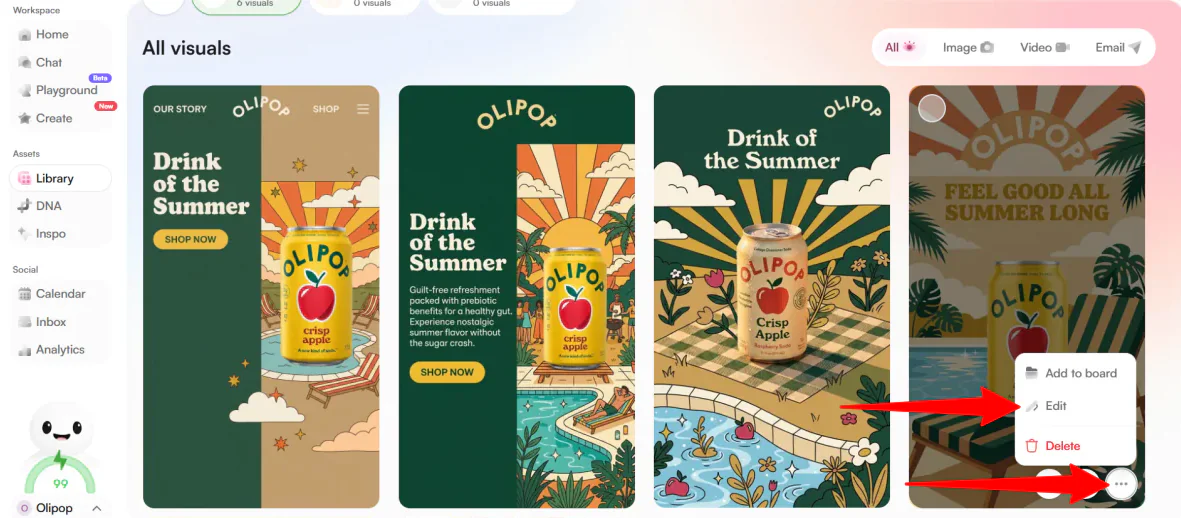
But I wasn’t finished yet.
Instead of exporting the asset to an external editor like Canva or Photoshop, you can edit everything inside Holo AI by finding the image you like, going to More Options, and selecting Edit.
Step 7: Make the Headline Punchier

This opens the Conversational Chat Editor.
You type instructions in plain English, like: “Make the headline punchier” or “Change the background to our secondary brand color.” The AI rewrites the ad on the fly.
I sent the chat: “Make the headline punchier.”

A few seconds later, a new image appeared with a stronger headline, shifting from “Feel Good All Summer Long” to “Summer’s Wellness.”
Step 8: Animate the Image

Once you’re happy with your freshly tweaked image, you don’t need to export it to third-party software to build a video campaign. Holo AI bridges the gap between static imagery and high-retention short-form video.
From the homepage, go to Animate.

Select your favorite generated image to turn into a video.
Step 9: Explain & Generate Video

On the next page, Holo asked me for a prompt. I went really descriptive to put Holo to the test:
“Bring the image to life by adding a crisp, slow-motion water splash effect around the soda can. Keep the poolside camera angle stable, but animate gentle water ripples in the pool background and add a subtle solar lens flare from the sun to make it feel like a real, hot summer day.”
It costs 8 credits to generate a video.
The video looked fantastic. It was completely aligned with my prompt, though the water splash didn’t make much sense with the can “sitting” in the beach chair. Unfortunately, the only way to fix this is to remove the “slow-motion water splash effect” from the prompt and regenerate the entire video.
But wow. I couldn’t believe the entire video was generated with AI.
The branding was on point, the composition felt intentional, and every element I described appeared exactly where I expected it to be. It even had background music that fit the summery feel.
Overall, Holo AI impressed me with how quickly it transformed a simple URL into branded marketing assets across both images and video. While it occasionally missed smaller details and still benefits from some human oversight, it dramatically reduced the time and effort needed to create professional campaign content.
Top 3 Holo AI Alternatives
Here are the best Holo AI alternatives I’d recommend.
AdCreative.ai
The first Holo AI alternative I’d recommend is AdCreative.ai. It’s built for high-performing ads, helping to quickly create banners, copy, product visuals, and videos that boost conversions and campaign results.
Both tools are built for fast AI content creation, making it easy to produce ads, social posts, and marketing content at scale.
However, AdCreative.ai is more focused on performance ads. It uses data insights, creative scoring, and competitor analysis to help improve ROI, plus tools for product photos and turning images into videos.
Meanwhile, Holo AI is broader across content types (ads, social, emails), but it’s still purpose-built for marketing. It helps create branded content across ads, social posts, emails, and 99+ languages.
Choose AdCreative.ai for ads focused on conversion, performance insights, and e-commerce creatives. Otherwise, choose Holo AI for broader and more accurate brand content across formats, languages, and marketing workflows.
Read my AdCreative.ai review or visit AdCreative.ai!
Creatify.ai
The next Holo AI alternative I’d recommend is Creatify.ai. It helps quickly turn products into high-performing video ads ready to test and scale.
Both tools use AI to speed up content creation, so they’re great if you want to produce marketing assets without doing everything manually.
But the main difference is focus.
Creatify.ai is all about video ads that are designed to perform, with features for testing different versions, scaling what works, and tracking results. It can turn things like product pages into ads, quickly generate variations in batches, and help you optimize based on performance.
Meanwhile, Holo AI provides a wider range of content, including ads, posts, emails, and visuals in 99+ languages.
If your focus is on making and improving video ads at scale, choose Creatify.ai. For more general brand content across multiple formats, choose Holo AI.
Canva Pro
The final Holo AI alternative I’d recommend is Canva Pro. It’s a popular, user-friendly design platform that combines graphic design, video editing, brand tools, templates, and AI features in one workspace.
Both platforms help you create marketing content faster with AI, making them great options for ads, social posts, images, and other promotional content.
However, Canva Pro stands out with its design flexibility. It has millions of templates and a huge library of stock assets. It also has powerful editing tools for images, videos, and branded content.
Meanwhile, Holo AI is designed for high-volume marketing content creation, helping teams quickly generate ads, emails, social posts, and short-form videos that stay consistent with their brand.
If you want to generate quality marketing content quickly and at scale, choose Holo AI. Otherwise, for a more full design platform with stronger creative tools, choose Canva Pro.
Holo AI Review: The Right Tool For You?
After testing Holo AI with an actual brand (OLIPOP), I came away impressed by how quickly it turns a simple website URL into full marketing campaigns.
In just a few minutes, I was able to generate ads, social posts, and short-form videos that felt aligned with the brand’s overall vibe. I could easily see the video I generated working in a real social media ad.
The biggest strength I found with Holo AI was its speed and scale. Once your brand “DNA” is set, you can generate a huge volume of content across formats without starting from scratch every time. The Idea Swipes workflow also makes it surprisingly easy to explore creative directions.
However, you’ll occasionally need to make edits to get things right, and Holo’s editing capabilities are more limited than full design platforms. For significant changes, you may need to regenerate the asset.
Otherwise, you might want to consider these alternatives:
- AdCreative.ai is best for performance-driven ad creatives, especially if you care about conversion rates, testing variations, and optimizing ROI.
- Creatify.ai is best for scalable video ad creation and turning products into high-performing short-form ads.
- Canva Pro is best for all-around design work, branding, creating visuals, presentations, and marketing assets with full creative control.
Overall, Holo AI is best for marketers, founders, and agencies who need to produce a lot of branded content quickly across multiple channels. But if you’re looking for deep design control, it may feel a bit limiting.
Thanks for reading my Holo AI review! I hope it helped you decide if it’s the right fit.
If you want to try Holo for yourself, you can get started with a 14-day money-back guarantee.
Frequently Asked Questions
Is Holo AI any good?
Holo AI is a popular AI marketing tool that helps create content for ads and social media. It takes a website URL and quickly generates branded posts, ads, and emails.
Is Holo AI free?
No, Holo AI isn’t free. It doesn’t offer a free plan or trial, but it does come with a 14-day money-back guarantee.
Is Holo worth it?
Holo AI is worth it if you need to quickly create a lot of marketing content like ads, posts, emails, and videos at scale. It’s less useful if you only need occasional content or want full design control.