
Writing Generators
Jasper AI Review: Great for Brands, Weak for Writing?

 Add Unite.AI to your preferred sources on Google
Unite.AI may receive compensation when you use links to products we review. This does not influence our editorial evaluations. Read our affiliate disclosure.

If you remember Jasper as the AI writing tool that helped you crank out blog posts, the product looks very different today. Jasper has evolved into a much broader marketing platform built around brand consistency, workflows, and AI agents. Jasper says it now serves more than 900 enterprise customers and 20% of the Fortune 500.
That sounds impressive, but it also raises an important question: is Jasper actually better at writing, or are you mostly paying for everything built around the writing?
I spent time testing Jasper by setting up its Brand Voice, Knowledge Base, Audience, and Canvas, then using them to create both social media content and a long-form. Some parts genuinely impressed me, while others left me wondering why I wouldn’t just use a general AI assistant and edit the result myself.
In this Jasper AI review, I’ll show you exactly how it worked, where it impressed me, and where I think it still falls short. I’ll finish the article by comparing it to my top three alternatives: Writesonic, Copy.ai, and Anyword. By the end, you’ll know which tool is right for you!
Verdict
Jasper is a content platform built around brand consistency, shared workflows, and AI tools for marketing teams rather than simply helping you write. I liked how easy it was to set up brand context and manage content in one place, but the initial writing often felt generic or incomplete. I found myself still having to do a fair amount of editing, making it difficult to justify the price for Jasper if you mainly want an AI writing assistant.
Pros and Cons
- Jasper IQ keeps your brand voice, audience, product details, and style rules in one place so your whole team can create consistent content without repeating them in every prompt.
- Canvas replaces the old “working on one document at a time” approach with a shared workspace where briefs, drafts, approvals, and history live together.
- Over 100 marketing agents handle specific jobs (optimization, research, translation) instead of leaving you to prompt from scratch.
- Jasper supports multiple models, including Claude and Gemini, and automatically updates Studio Agents to the best available model.
- The GEO Agent tracks how your brand appears in ChatGPT, Gemini, and Claude and helps improve its visibility.
- Style Guides can be auto-generated from up to three sources.
- Strong enterprise features on Business: API access, SSO/SAML, SCIM provisioning, role-based permissions, admin controls, and team analytics.
- Integrations into platforms where marketing work already happens, including a Slack agent, SharePoint Knowledge Base syncing, Workfront, and Box export.
- Built-in image generation and editing plus Image Pipelines, so visual assets do not require a separate AI art tool.
- Used by hundreds of enterprises including Prudential and Cushman & Wakefield, and by close to 20% of the Fortune 500.
- There’s no free plan. A 7-day trial is the only way to evaluate it, which is short for a platform that rewards setup.
- A steep entry price for one seat, especially compared to general AI assistants that write competently for a fraction of that.
- The Pro plan is noticeably thin on the team features that are Jasper’s whole pitch: 2 Brand Voices, 5 Knowledge assets, and 3 Audiences.
- Grid, custom no-code agents, API access, and unlimited IQ assets are only available on the Business plan, which requires a custom quote from sales.
- History and backups are capped at 7 days on Pro, which is short if you revisit campaigns.
- The platform has a lot of features (Canvas, Grid, Studio, IQ, Agents) which can feel overwhelming if you’re a solo user who just wants to write faster.
- The brand voice might not show through too much, meaning you still might have to do quite a bit of editing.
- Generated images might require editing or be the wrong aspect ratio.
- It lacks actual internal and external linking for long-form content.
- Most of the product is built with only marketing teams in mind.
What is Jasper AI?
Jasper started out as an AI writing assistant, then spent the last couple of years turning into something different: an AI platform for marketing teams. The company now describes itself as a marketing agents platform, and it’s organized around three pillars.
The 3 Pillars: Agents, Content Pipelines, and Jasper IQ
Agents are AI operators that do a specific marketing job rather than waiting for you to describe one. Jasper offers over 100 of them, covering things like content optimization, research, and translation.
For example, an optimization agent can identify keyword clusters, flag underperforming content, and prepare briefs. That’s the kind of work that can easily take up an entire afternoon and often never gets properly planned out.
Content Pipelines are the repeatable workflows that move something from idea to launch. This is where Canvas, Grid, AI Studio, and Image Pipelines live.
Jasper IQ is the context layer. It holds your Brand Voice, Visual Guidelines, Style Guide, Marketing IQ, Product IQ, and Knowledge Base, and it feeds all of that into whatever the agents produce.
This is the part that actually explains the price. You’re not paying for text generation, but text generation that already knows your brand rules.
The Old vs. New Jasper
The old Jasper was a document and template library with a chat window. You picked a template, filled in fields, and got copy back.
The current Jasper moves that into Canvas, which is a shared workspace where a campaign brief, the drafts, the approvals, and the decision history exist in one place. The shift is from “which model writes the best paragraph?” to “which platform reliably executes the same workflow every time that stays on brand?”
The GEO Angle
The most interesting addition is the GEO Agent that launched in June 2026. Instead of only focusing on Google rankings, it looks at how your brand shows up in AI search (ChatGPT, Gemini, and Claude), including citations, sentiment, and visibility. It finds gaps in your visibility and suggests ways to improve them. It also has built-in GEO scoring, so you can check content readiness before publishing.
What Powers Jasper
Jasper is LLM-agnostic rather than tied to one provider. As of the May 2026 update it supports models including Claude Opus 4.8 and Google Gemini 3.5 Flash, and Studio Agents automatically selects the best model as new ones ship.
Who is Jasper AI Best For?
Here’s who Jasper AI is best for:
- Content teams at mid-size and enterprise companies can add their brand voice, style rules, and product facts into Jasper IQ once. From then on they can get consistent output from everyone on the team instead of monitoring tone in every review cycle.
- Brand teams can use Visual Guidelines and Style Guides to keep branding consistent across all their content.
- Marketers can spin up variations of ad and landing page copy inside Canvas while keeping the messaging consistent with their brand positioning.
- SEO teams worried about AI search can use the GEO Agent and Grid’s AI visibility workflows to track and improve how their brand gets cited inside ChatGPT, Gemini, and Claude.
- Marketing operations teams can build no-code agents in Jasper Studio on the Business plan and wire Jasper into Slack, SharePoint, Workfront, and Box so the work happens where the team already is.
- Agencies managing several client brands can keep each client’s voice, audience, and knowledge assets separate. However, you’ll need Business for unlimited IQ assets.
- Localization teams can use translation agents plus 27 supported languages to push campaigns into new markets without rewriting from scratch each time.
Jasper AI Key Features
Here are the key features that stood out to me:
- Canvas: A shared workspace where campaign briefs, drafts, approvals, and version history live together.
- Marketing Agents: 100+ pre-built agents for optimization, research, personalization, and translation.
- Jasper Studio: A no-code builder for creating custom AI agents tuned to your own workflows (available on the Business plan only).
- Jasper Grid: Scalable content creation with reusable templates, run history to track status and execution time, and AI visibility workflows.
- Brand Voice: Teaches Jasper how your brand sounds so every output matches it. Pro includes 2, but Business is unlimited.
- Knowledge Base: Stores approved source material the agents draw from, and syncs knowledge from Google Drive and SharePoint for no manual exports or audits. You get 5 Knowledge assets on the Pro plan.
- Audiences: Audience profiles that help you create content for specific groups instead of a generic audience. Pro includes 3.
- Style Guide: Creates guidelines from up to three brand sources (documents, URLs, or text), then applies it across Canvas and slash commands, including rules for branded terms and acronyms.
- GEO Agent: Monitors brand citations, sentiment, and brand visibility inside AI search platforms and runs optimization workflows against the gaps.
- Marketing IQ & Product IQ: Context that gives Jasper the marketing strategy and product details it needs to create accurate content.
- LLM-agnostic model routing: Access to multiple advanced AI models, with automatic updates when newer versions are available.
- Image Generation & Editing: Image creation and Image Pipelines for making assets at scale.
- Slack Agent: @mention Jasper in a channel or DM to brainstorm, summarize, rewrite, expand, or draft with your IQ assets available. Requires API access.
- Browser Extension: Brings Jasper into whatever tool you are writing in rather than making you work inside Jasper.
- Plagiarism Checker: Identifies plagiarism in 100+ languages.
How to Use Jasper AI
Here’s how I used Jasper IQ to create a campaign for Unite.ai, from setting up the brand context to generating and refining content in Canvas:
- Set Up Jasper IQ
- Create a Brand Voice
- Create a Knowledge Base
- Create an Audience
- Use the Canvas to Create a Campaign Brief
- Generate Content with AI Chat & Agents
- Generate Content Variations
- Make Edits
- Generate Long-Form Content
- Share the Output
Step 1: Set Up Jasper IQ

The first thing to do is set up Jasper IQ. It’s the step people skip and then wonder why the output feels generic.
Step 2: Create a Brand Voice

I used the IQ Agent to generate the Brand Voice for unite.ai, a website that covers news, interviews, tools, and research for artificial intelligence.
I gave it a couple of blog posts for context, and the description it came up with was perfect. It described it as analytical, authoritative, confident, and measured.
Step 3: Create a Knowledge Base
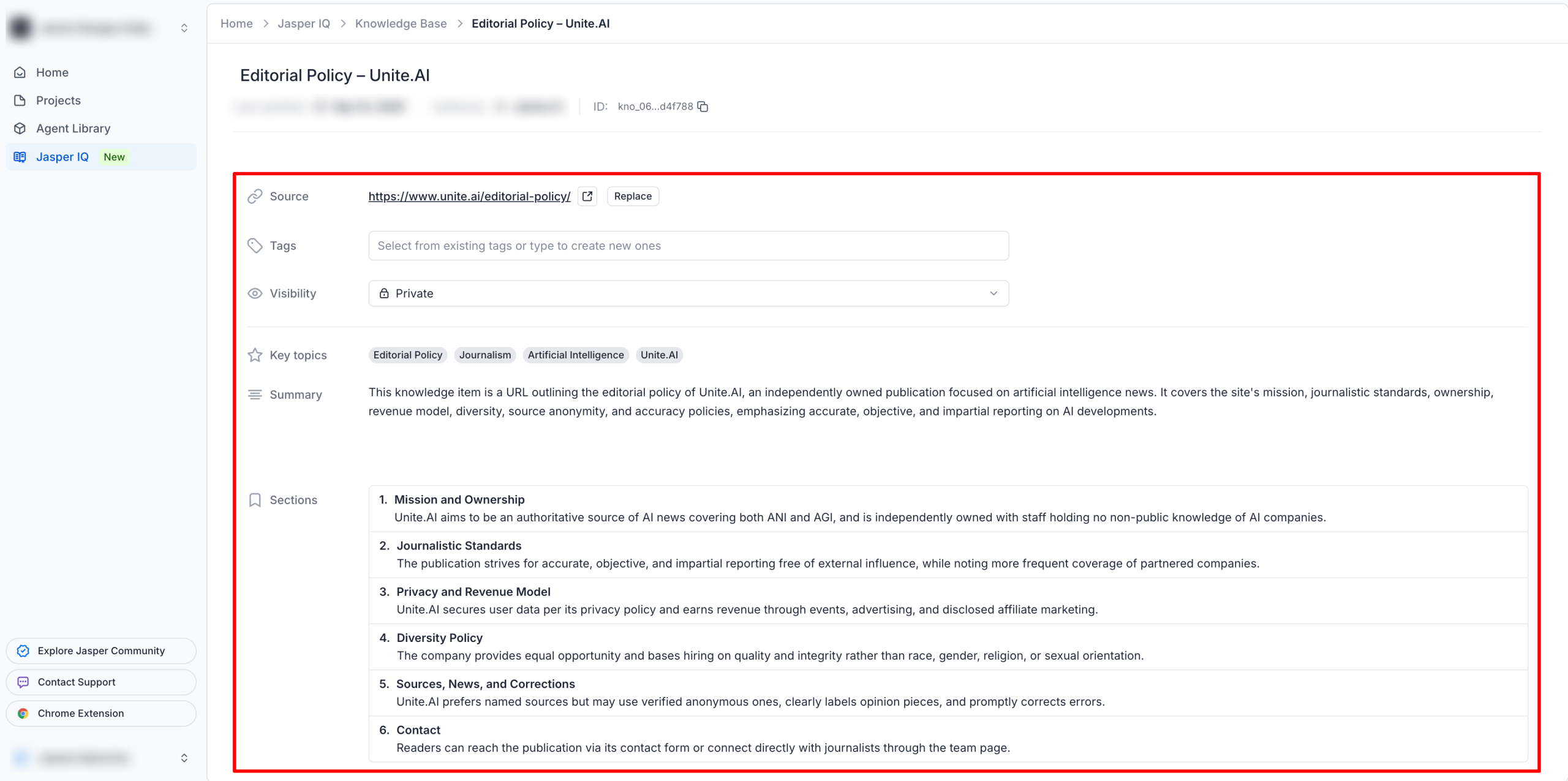
While the Brand Voice is for how the content sounds, the Knowledge Base is for context. Add relevant source material to the Knowledge Base, like product information, pricing, company details, research, and reference articles.
For my knowledge base, I gave it the Editorial Policy which covers the site’s mission, journalistic standards, and more. Jasper was able to summarize the key information from the page, including Unite.ai’s mission, ownership, journalistic standards, revenue model, diversity policy, and approach to sources and corrections. This gives Jasper important context about the publication it is writing for, rather than relying solely on my instructions.
Step 4: Create an Audience

Lastly, I added information on Unite’s audience by describing the demographics, pain points, and core motivations. The core messaging it generated felt very accurate to what I described.
Step 5: Use the Canvas to Create a Campaign Brief
From there, I headed to the Canvas to create the campaign brief and specify the goal and parameters rather than prompting for one asset at a time. I started by setting up the Project Settings by giving the project a name and goal, and selecting the brand voice and audience I just created.
For my campaign, I decided to focus on driving revenue by giving it the following information:
- Project Name: Unite.ai – Q3 Growth & Revenue Campaign
- Goal: To expand our industry network by positioning Unite.ai as the leading media partner for tech executives and AI startups. Create compelling content that drives conference ticket conversions and affiliate clicks while maintaining strict editorial independence.
Step 6: Generate Content with AI Chat & Agents
Next, I told the AI chat to take a look at Unite’s affiliate partner’s latest AI development and write a short teaser that mentions how executives can see this kind of technology in action at an upcoming conference.
Jasper suggested Agents to help that were best for repeatable tasks and maintaining quality at scale (e.g. a LinkedIn post, social media posts, and a press release).

I went with the LinkedIn post, and after specifying the parameters (the key message, call to action, post length, and custom instructions), it generated a brief LinkedIn post:
“A new AI capability is coming from our partner [Partner Name], built to solve [specific problem] rather than just automate around it.
Executives can see it working firsthand at [Conference Name].
Details soon. #AI #Innovation”
I’ll be honest, even with my brand voice applied, I wasn’t too impressed with the output. It felt too short and basic, and the output came back with bracketed placeholders.
I’d loaded a Brand Voice, a Knowledge Base, an Audience, and a campaign goal, and Jasper still handed back template scaffolding instead of content. It didn’t ask me for the missing details, and it didn’t reach into the Knowledge Base for them, which is a pretty big drawback.
Step 7: Generate Content Variations

I asked Jasper to generate three more variations in different tones (more editorial, more executive, and more promotional). It did a good job generating drafts in different tones within seconds, and I liked having all my campaign assets organized on one canvas.
The version that stood out most to me was the promotional tone:
“Something big is coming! 🚀 Our partner’s newest AI innovation debuts at [Conference Name] — don’t miss it! Grab your spot now (link in comments). #AI #TechConference #Innovation”
It felt the most engaging, though it still felt pretty bland in terms of standing out with copywriting.
Step 8: Make Edits

I asked Jasper to act more like a talented copywriter and come up with something that truly stood out:
“The next chapter in AI starts at [Conference Name]. Our partners are debuting something that challenges how we think about what AI can actually do — and who it does it for. If you follow AI developments closely, or you’re just beginning to, this is worth your attention.
Secure your spot: [link in comments]
#AI #EthicalAI #AIForEveryone”
I still didn’t feel like it stood out enough. It was professional but it still sounded like typical AI-generated marketing copy rather than something I would actually want to post.
The outputs on Jasper will only be as good as the context and instructions you give it. Make sure your brand voice is unique and specific enough for Jasper to capture what makes your content sound like you, rather than falling back on generic marketing language.
Step 9: Generate Long-Form Content

Next, I wanted to test Jasper’s ability to generate long-form content and images simultaneously with the “Pillar Article” agent:
“Using the Unite.ai brand voice and knowledge base, write a 1,200-word article titled “What Generative Engine Optimization Actually Changes for Content Teams.” Cover what GEO is, how it differs from traditional SEO, what signals AI search engines use when deciding which sources to cite, and what a small content team should do differently starting now. Use specific examples, and cite a source for every statistic. Then generate a featured image for this article that follows our visual guidelines, sized for a blog header.”
I gave Jasper this prompt in a new project called “Unite Blogs” with this as the description: “Publish an accurate, useful explainer for Unite.ai’s audience that meets the site’s editorial standards.”
The content’s formatting, tone, accuracy, and length looked and sounded good overall. However, while there were embedded citations, they were vague with no links (just a lastname and a year). Actual internal and external linking would have been nice, and the featured image was too detailed and didn’t have the right aspect ratio. I also checked the wordcount, and it was at 1,700 which was over the length I wanted my article to be.
Step 10: Share the Output
Once you’re happy with your content, you can share your output with specific people, everyone in your organization, or anyone with the link.
Overall, Jasper made it easy to build a brand voice, knowledge base, audience, and campaign in one place. I also liked how quickly it could generate and adapt content.
However, the initial outputs often felt generic or incomplete. Even after providing detailed context and instructions, I still had to do a fair amount of editing to get copy looking and sounding how I wanted. So at that point, what Jasper produces doesn’t feel like it justifies the price compared to a general assistant that writes as well (if not better) for less.
Top 3 Jasper AI Alternatives
Here are the best Jasper AI alternatives I’ve tried that I’d recommend.
Writesonic
The first Jasper alternative I’d recommend is Writesonic. It brings article writing, SEO, and AI search visibility together in one workflow.
Writesonic overlaps with Jasper on the part most buyers actually care about: getting found inside AI search. But it approaches it from the content side rather than the management side. You are writing and optimizing an article, not orchestrating agents against a brand knowledge base.
That makes Writesonic a lot easier to get value from on day one. On the one hand, Jasper will produce more consistent output across a ten-person team because Jasper IQ enforces it. Meanwhile, Writesonic will get one person to a ranking article that’s visible to AI faster.
Choose Writesonic if you’re a solo creator or small team whose main goal is publishing search-optimized content that AI engines cite. Otherwise, choose Jasper if brand consistency across many people is the actual problem you’re solving.
Read my Writesonic review or visit Writesonic!
Copy.ai

The next Jasper alternative I’d recommend is Copy.ai. Like Jasper, Copy.ai has expanded beyond AI copywriting into a broader marketing and go-to-market platform, with content creation, repurposing, and sales workflow automation.
This is one of the closest comparisons on the list because both platforms emphasize repeatable workflows rather than just writing assistance. The main difference is this: Copy.ai is more focused on sales, outreach, and marketing operations, while Jasper is more focused on marketing content, campaign creation, and brand consistency.
Jasper also appears to have the stronger documented brand controls, including Style Guide rules for terminology, capitalization, grammar, and punctuation, as well as Visual Guidelines for checking image consistency. Copy.ai also offers Brand Voice and editorial guidance, but it gives you less control over these areas.
Choose Jasper if your main priority is producing consistent marketing content that closely follows brand rules. Otherwise, choose Copy.ai if your main bottleneck is automating repeatable sales, outreach, or broader marketing workflows.
Read my Copy AI review, my Jasper AI vs Copy AI comparison, or visit Copy.ai!
Anyword
The final Jasper alternative I’d recommend is Anyword. It creates marketing copy and predicts how well each version might perform.
Anyword answers a question Jasper largely does not: which version of this copy is most likely to convert. It scores variants against channel and audience data before you choose them, which is a different kind of confidence than “this is on brand.”
On the one hand, Jasper is the better choice for the full content operation (long-form content generation, campaigns, brand governance, and AI search visibility). Meanwhile, Anyword is more focused on performance, using data to help marketers choose the copy most likely to perform well.
Choose Jasper if you need a broader content platform with strong brand controls. Otherwise, choose Anyword if your priority is using data to improve the performance of your marketing copy.
Read my Anyword review or visit Anyword!
Jasper AI Review: The Right Tool For You?
What I liked most about Jasper was how easy it was to build a consistent content workflow. I could set up a Brand Voice, Knowledge Base, and Audience, then use that context across a campaign in Canvas. The Brand Voice and Audience it created for Unite.ai were accurate, and I liked how quickly I could create and compare different content variations.
What I disliked is that the initial outputs often felt generic or incomplete. Even after giving Jasper detailed context and instructions, the first LinkedIn post was short, basic, and filled with placeholders. The long-form article was better, but I still had to fix the citations, image, and word count.
What surprised me was that having all this brand context didn’t necessarily translate into better first drafts. Jasper gave me the tools to create consistent content, but I still felt like had to do a decent amount of editing to make the copy feel ready to publish. This was a pretty big drawback, and ultimately I didn’t find the writing quality strong enough to justify the price.
Use Jasper if you’re part of a marketing team that needs a shared place to manage brand information and create content. But if you’re a solo writer or feel like Jasper isn’t the right fit, consider these alternatives:
- Writesonic is best for individual creators and small teams focused on SEO and AI search visibility.
- Copy.ai is best for teams whose bottleneck spans marketing and sales workflows.
- Anyword is best for performance marketers who want predictive scoring on copy for better results.
Thanks for reading my Jasper AI review! I hope you found it helpful. If you want to try Jasper AI for yourself, they have a free 7-day trial so you can see what it can build for you.
Frequently Asked Questions
Is there a free version of Jasper AI?
No, Jasper offers a 7-day free trial of the Pro plan with no free tier afterward. If you want to evaluate it properly, set up Jasper IQ on day one rather than day six.
Is Jasper AI still a good tool for bloggers?
Jasper AI is an expensive tool for bloggers. Jasper’s pricing and features are all aimed at marketing teams who need brand consistency at scale. A solo blogger will get similar (if not better) drafting from a general AI assistant or a more affordable writing tool.
What AI models does Jasper use?
Jasper uses an LLM-agnostic architecture rather than a single AI model. As of its May 2026 update, supported models include Anthropic’s Claude Opus 4.8 and Google’s Gemini 3.5 Flash, and Studio Agents automatically update to the best supported model as newer ones arrive.
What is Jasper’s GEO Agent?
Launched in June 2026, the GEO Agent monitors and optimizes how a brand appears inside AI search platforms like ChatGPT, Gemini, and Claude. It tracks citations, sentiment, and share of voice, identifies visibility gaps, and runs optimization workflows against them.
Can I use Jasper AI content commercially?
Yes, Jasper is built for commercial marketing use, and Pro includes a plagiarism checker. As with any AI tool, you are responsible for fact-checking claims before publishing.
Does Jasper integrate with other tools?
Yes, Jasper integrates with other tools. Pro includes basic integrations and a browser extension. Business adds API access, SharePoint Knowledge Base syncing, Workfront, and Box export.
Is Jasper better than ChatGPT?
For raw drafting, a general AI assistant is far cheaper than Jasper. Jasper’s advantage is everything around the drafting, like brand voice enforcement and repeatable workflows across a team. If you don’t need that layer, you’re paying for it anyway.
What is the best alternative to Jasper AI?
The best alternative to Jasper AI depends on the problem: Writesonic for SEO and AI-search visibility, Copy.ai for go-to-market workflows, and Anyword for performance copy with predictive scoring.








