
Writing Generators
Copy.ai Review: Great Workflows, Weak Copywriting

 Add Unite.AI to your preferred sources on Google
Unite.AI may receive compensation when you use links to products we review. This does not influence our editorial evaluations. Read our affiliate disclosure.

Writing copy is rarely the slow part of marketing. The slow part is everything around it: rewriting the same announcement for five channels, turning one article into a week of social posts, personalizing outreach emails, and keeping all of it on brand when several team members touch it.
That’s the problem Copy.ai now says it solves. It started in 2020 as one of the first AI copywriting tools. Today, it calls itself a “GTM AI platform” for sales and marketing teams. It was acquired by Fullcast in October 2025, and its plans include Chat and Agents, with the latter unlocking its advanced workflows and content agents.
So the real question is whether Copy.ai still writes well, and whether its automation is worth paying extra for.
I paid for the Agents plan and tested Copy.ai’s Brand Voice, Infobase, Content Agent Studio, and Workflows on actual content, comparing the results with ChatGPT along the way.
In this Copy.ai review, I’ll show you how Copy.ai worked, where it impressed me, and where I think it still falls short. I’ll finish the article by comparing it to my top three alternatives: Jasper, Anyword, and ChatGPT. By the end, you’ll know which tool is right for you.
Verdict
Copy.ai is a useful option for teams that want to automate sales and marketing tasks, with strong workflows, content repurposing, and bulk processing. However, the best features require the $249/month plan, and the AI output still needs fact-checking, while Brand Voice and Content Agent Studio can be inconsistent.
Pros and Cons
- The Chat plan is affordable at $29/month for five seats with unlimited access to OpenAI, Anthropic, and Google models.
- Facts from Infobase appear correctly in copy without having to repeat them in the prompt.
- Strong content repurposing:
- The Repurpose Blog Post workflow effectively turns long-form content into short-form content like LinkedIn, Facebook, X, and Instagram posts and even marketing emails in one go.
- Workflows accurately pull numbers and test results from exisiting content.
- The workflow library includes automations you can use immediately, so you don’t have to build everything from scratch.
- Workflows can bulk-process many articles or contacts simultaneously from a table.
- Brand Voice and Infobase work across Chat and Workflows, giving the entire team the same information to work from.
- Choose a different AI model for each workflow step.
- Connects to 2,000+ tools that sales teams already use.
- Includes key security and enterprise features like SOC 2, GDPR compliance, and SSO.
- You have to choose a paid plan before you can use the product.
- Workflows and Content Agent Studio require the $249/month Agents plan, compared with $29/month for Chat.
- Content Agent Studio doesn’t always work. In my testing, it kept asking for three examples even though I’d already provided them.
- The Brand Voice can be inaccurate, whereas alternatives like ChatGPT do a better job capturing tone-of-voice.
- AI-generated content needs fact-checking for accuracy.
- The number of credits a workflow uses depends on its complexity, and unused credits don’t roll over.
- Copy.ai is focused heavily on B2B sales and marketing, making it less useful for bloggers and students.
What is Copy.ai?
Copy.ai was founded in 2020 by Paul Yacoubian (CEO) and Chris Lu (CTO), and it was one of the first tools to put GPT-3 in front of marketers. For years, you picked a template, filled in a few fields, and got a batch of copy back.
That version of Copy.ai is mostly gone. The company rebuilt itself around what it calls GTM (go-to-market) AI, which means using AI to run the repeatable work of sales, marketing, and revenue operations, not just to write copy.
In October 2025, it was acquired by Fullcast, a revenue planning company. The goal is to connect GTM planning with the content and outreach needed to put those plans into action.
Copy.ai now claims 17 million users, with customers including Siemens, Lenovo, Gong, ServiceNow, and Juniper Networks.
The Three Levels: Chat, Content Agents, and Workflows
One useful way to think about Copy.ai’s current platform is as a progression from one-off prompting to repeatable content agents to multi-step workflow automation. It roughly mirrors the “crawl, walk, run” adoption model Copy.ai uses:
- Chat (crawl) is for one-off tasks. It gives you access to models from OpenAI, Anthropic, and Gemini, alongside Brand Voice and Infobase context.
- Content Agent Studio (walk) is for repeatable content. You provide three examples of content your team already produces, and the agent uses them to generate new content in that voice and structure.
- Workflows (run) are multi-step automations. For example, a workflow could research a company, reference product information stored in Infobase, draft personalized outreach, and send the results to connected CRMs. You can then apply that process across many accounts or records, depending on the integrations and plan in use.
Copy.ai’s value is no longer in any single piece of copy. It’s in whether a workflow can reliably do a 20-minute task in two minutes a few hundred times a month.
Who is Copy.ai Best For?
Here’s who Copy.ai is best for:
- Sales teams can automate customer research and personalized emails so they don’t have to start from scratch for every potential customer.
- Marketing teams repurposing content can turn one webinar, blog post, or case study into social posts, emails, and ad variations that uses the same Brand Voice.
- B2B marketing teams can create sales materials and messaging tailored to companies at a scale that would be difficult to manage by hand.
- Revenue operations teams can use workflows to update CRM records, clean up data, and send leads with Salesforce and HubSpot connected.
- Sales leaders can analyze call transcripts to evaluate deals and spot potential problems without listening to every call.
- Global marketing teams can translate and adapt campaigns for different markets without having to create each version from scratch.
- Small teams on a budget can use the Chat plan as a shared, multi-model AI assistant, as long as they don’t need Workflows.
Copy.ai Key Features
Here are the key features that stood out to me:
- Chat: A multi-model chat workspace with unlimited words on every paid plan and access to OpenAI, Anthropic, and Gemini models.
- Brand Voice: Analyzes content you’ve already written to capture your tone, then applies it in Chat and Workflows.
- Infobase: A shared knowledge base for company facts, product details, and messaging, referenced in prompts with #tags so you never have to re-explain your business.
- Content Agent Studio: Builds a reusable content agent from three or more human-written examples, learning tone, style, and length.
- Workflows: Multi-step AI and procedural automations you can run once, repeatedly, or in bulk.
- Actions: The building blocks inside a workflow (web research, website scraping, content generation, translation).
- Agents: Task-specific agents that handle specific tasks within workflows while following set rules.
- Tables: A central place to combine and organize data from different sources, which workflows can use to automate tasks at scale.
- Model selection: Choose the AI model for each workflow step, including OpenAI, Anthropic, and Gemini models.
- Workflow library: Prebuilt workflows like Repurpose Blog Post and Personalized Cold Outbound Email Outreach, plus GTM strategies like Prospecting Cockpit and Inbound Lead Processing.
- Integrations: Connect with tools your team uses daily. Copy.ai advertises 2,000+ connections.
- Translation & Localization: Translates and adapts content for different markets.
- Security & admin: SOC 2, GDPR compliance, SSO, and Teamspaces for separating brands or departments.
- API & bulk runs.
Hands-On Testing: What Copy.ai Actually Produced
I focused my testing on the finished output: how good the copy was, how accurate the research was, and how much editing it needed before I’d actually send or publish it.
Test 1: Short-Form Marketing Copy with Brand Voice
For my first test, I wanted to see whether Copy.ai’s Brand Voice and Infobase actually improve the copy it writes.
I trained a Brand Voice on a portion of one of my published Unite.ai reviews and created an Infobase entry with Unite.ai’s Editorial Policy and a short description of the site. Then I gave Copy.ai Chat this prompt with both applied:
“Write three LinkedIn posts promoting Unite.ai’s newest AI tool reviews, five email subject lines for our weekly newsletter, and two 90-character ad headlines. Use #UniteAI for facts about the site.”
I also pasted the same review sample, the Editorial Policy, and the site description into ChatGPT, then gave it the exact same prompt. That way, both tools had the same information, and any difference would come down to the tool itself.
Copy.ai Results
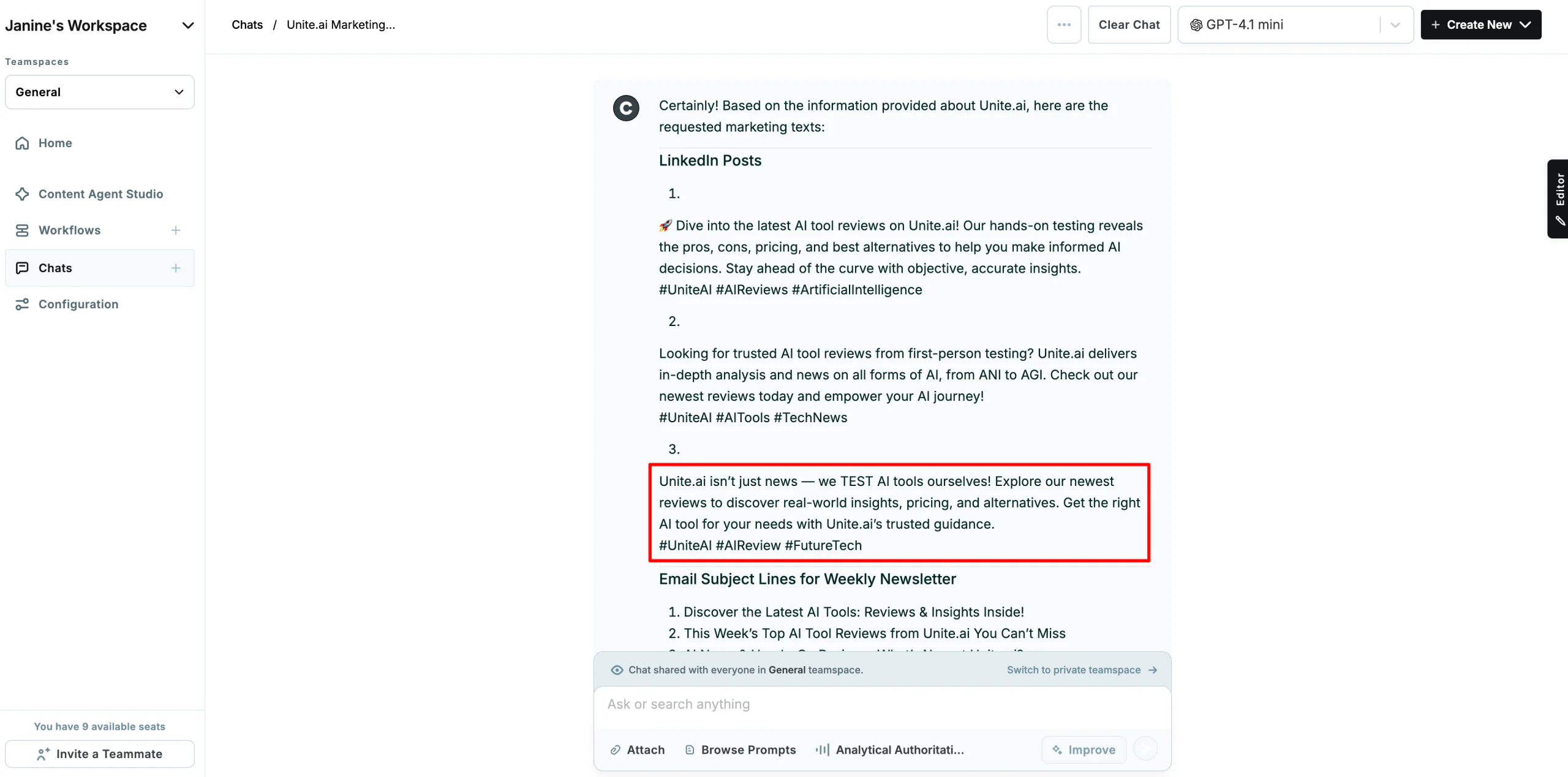
Copy.ai finished in seconds and wrote everything I asked for.
Here’s the best of its three LinkedIn posts:
“Unite.ai isn’t just news — we TEST AI tools ourselves! Explore our newest reviews to discover real-world insights, pricing, and alternatives. Get the right AI tool for your needs with Unite.ai’s trusted guidance. #UniteAI #AIReview #FutureTech”
Three of its five subject lines:
- “AI News & Hands-On Reviews: What’s New at Unite.ai?”
- “This Week’s Top AI Tool Reviews from Unite.ai You Can’t Miss”
- “Unlock the Potential of AI with Our Expert Tool Reviews”
And its two ad headlines:
- “Get Trusted AI Tool Reviews & Insights. Stay Ahead with Unite.ai! #UniteAI”
- “Find the Best AI Tools with Hands-On Reviews from Unite.ai. Start Today! #UniteAI”
ChatGPT Results
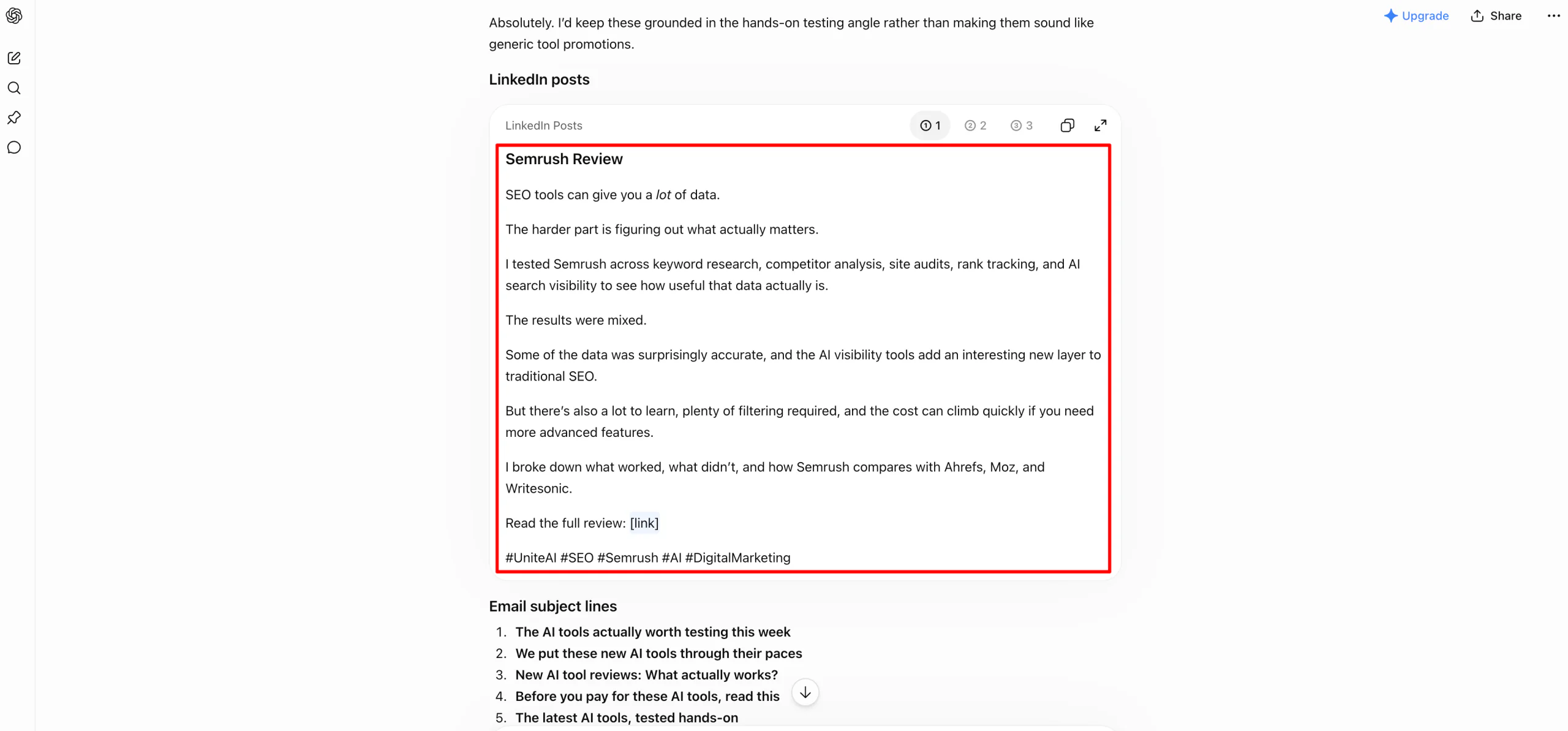
With the same context, ChatGPT wrote one post for each of the three newest reviews.
Here’s the one it wrote for my Semrush review:
“SEO tools can give you a lot of data. The harder part is figuring out what actually matters. I tested Semrush across keyword research, competitor analysis, site audits, rank tracking, and AI search visibility to see how useful that data actually is. The results were mixed. […] I broke down what worked, what didn’t, and how Semrush compares with Ahrefs, Moz, and Writesonic.”
Its subject lines included “Before you pay for these AI tools, read this” and “The latest AI tools, tested hands-on.” Its headlines were “Hands-on AI tool reviews: See what actually works before you pay” and “AI tools tested for real: Features, pricing, pros, cons, and alternatives.”
My Take
Copy.ai clearly took advantage of the Infobase.
Several details came straight from the Editorial Policy I gave it: that Unite.ai tests tools first-hand, that reviews cover pros, cons, pricing, and alternatives, that the site covers “all forms of AI, from ANI to AGI,” and that the newsletter includes events. There were no bracketed placeholders (an improvement over Jasper).
The Brand Voice was a different story.
My reviews are first-person, specific, and straightforward. Copy.ai’s copy was third-person promotion with a 🚀 emoji and phrases I’d never use, like “Stay ahead of the curve,” “empower your AI journey,” and “Unlock the Potential of AI.” It also didn’t name a single actual review.
Every post promoted “our newest reviews” in general, so none of them gave a reader a reason to click. It also added #UniteAI to both ad headlines, where a hashtag doesn’t belong.
Of Copy.ai’s 10 pieces, one was usable: the subject line “AI News & Hands-On Reviews: What’s New at Unite.ai?” The others needed light edits, mostly cutting hype phrases and the hashtags in the headlines. Two needed a full rewrite: the “empower your AI journey” post and “Unlock the Potential of AI with Our Expert Tool Reviews.”
ChatGPT was noticeably better with the same context. It wrote about specific reviews, and its Semrush post matched the article’s actual findings. It also sounded like me, and its subject lines were stronger. “Before you pay for these AI tools, read this” is the kind of line I’d actually send. The only placeholder was a “[link]” where the URL should go, which is fair.
So overall, Copy.ai got the facts right but not the voice. Since ChatGPT did better with the exact same material, the Brand Voice feature didn’t give me an edge over pasting my examples into a general AI assistant.
However, this wasn’t a perfectly even comparison. Copy.ai was running GPT-4.1 mini, a smaller and older OpenAI model, while ChatGPT used its free plan’s default model, which is newer.
ChatGPT also looked things up online. Its Semrush post was about a review I hadn’t pasted in. So some of the gap is almost certainly down to the model rather than Copy.ai’s Brand Voice, and Copy.ai lets you switch to stronger OpenAI, Anthropic, and Google models.
If you use Copy.ai Chat, pick a stronger model before you judge the output. I’d expect it to close some of the gap.
Test 2: Training a Content Agent on My Own Writing
Content Agent Studio is one of the main reasons to pay for the $249/month Agents plan instead of the $29 Chat plan. Instead of describing your voice, you give it at least three real examples of something you write, and it’s supposed to learn the tone, structure, and length.
I set up an agent called “Unite.ai Review Intro Writer” and gave it three examples: the introductions from my Jasper, Writesonic, and ElevenLabs reviews. They all follow the same pattern (a relatable pain-point hook, what the tool claims to do, a line about how I tested it, and my standard closing line), so it would be easy to tell whether the agent had actually learned the structure or was only copying surface details.
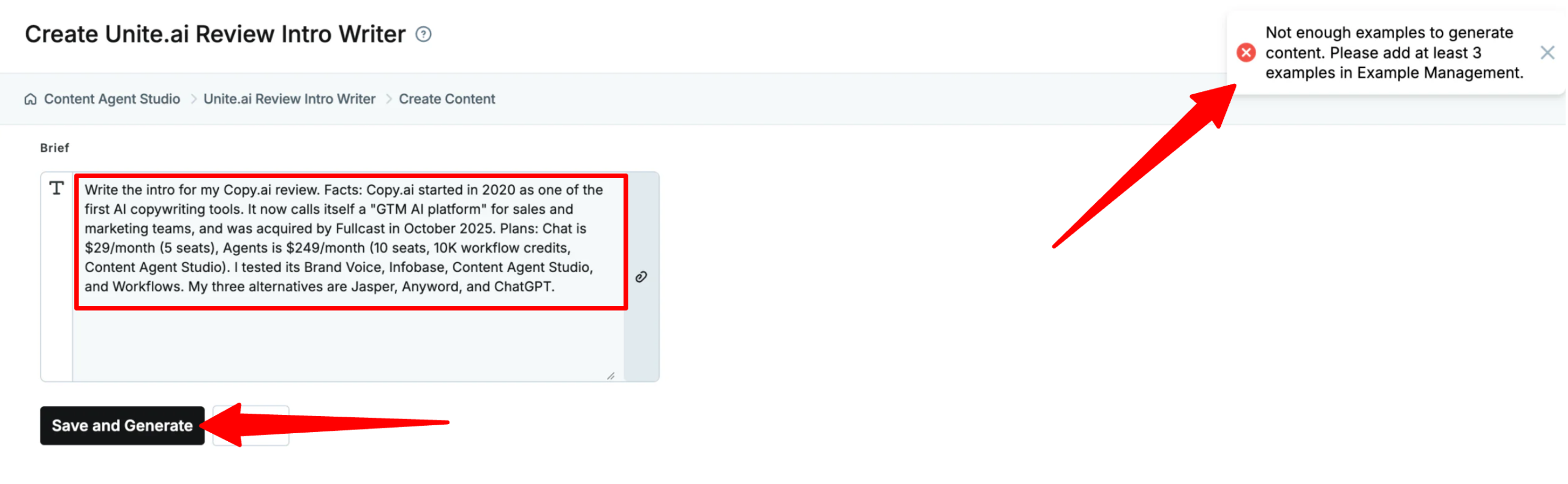
Then I gave it a new brief: write the intro for this Copy.ai review. I included the key facts it would need, like the 2020 launch, the Fullcast acquisition, both plans and their prices, what I tested, and my three alternatives.
What It Produced
Nothing! Every time I clicked “Save and Generate,” Copy.ai returned this error:
“Not enough examples to generate content. Please add at least 3 examples in Example Management.”
All three examples were in the agent, and I could see them in Example Management. I checked them and tried again several times by refreshing the page, resaving the examples, uploading files rather than text, and even creating a completely new content agent, but I kept getting the same error and no content.
My Take
This was the most frustrating part of my testing. Content Agent Studio is the feature I was most curious about, because learning from real examples should do a better job of capturing a voice than the Brand Voice feature did in Test 1. It’s also one of the features that justifies the jump from $29 to $249 a month.
I can’t tell you how well it writes, because I couldn’t get it to write anything. And the error message didn’t help because it told me to add three examples when three were already there, so I had no idea what to fix.
To be fair, this could be a bug that Copy.ai fixes quickly. But if you’re paying $249/month partly for this feature, you should know it didn’t work in my testing.
If Content Agent Studio is your reason for upgrading, test it during the 5-day refund window before you commit.
Test 3: Repurposing One Article Into a Campaign (Workflow)
Workflows are the main reason Copy.ai costs more than a regular AI assistant, so I wanted to see what it does with actual content.
I used Copy.ai’s prebuilt “Repurpose Blog Post” workflow. The only input it takes is a URL, so I gave it my newly published Semrush review, which is a 4,700-word article with five tests and a lot of specific numbers.
The template decides the outputs for me:
- A LinkedIn post
- A Facebook post
- An X (Twitter) post
- An Instagram caption
- A marketing email
What it Produced
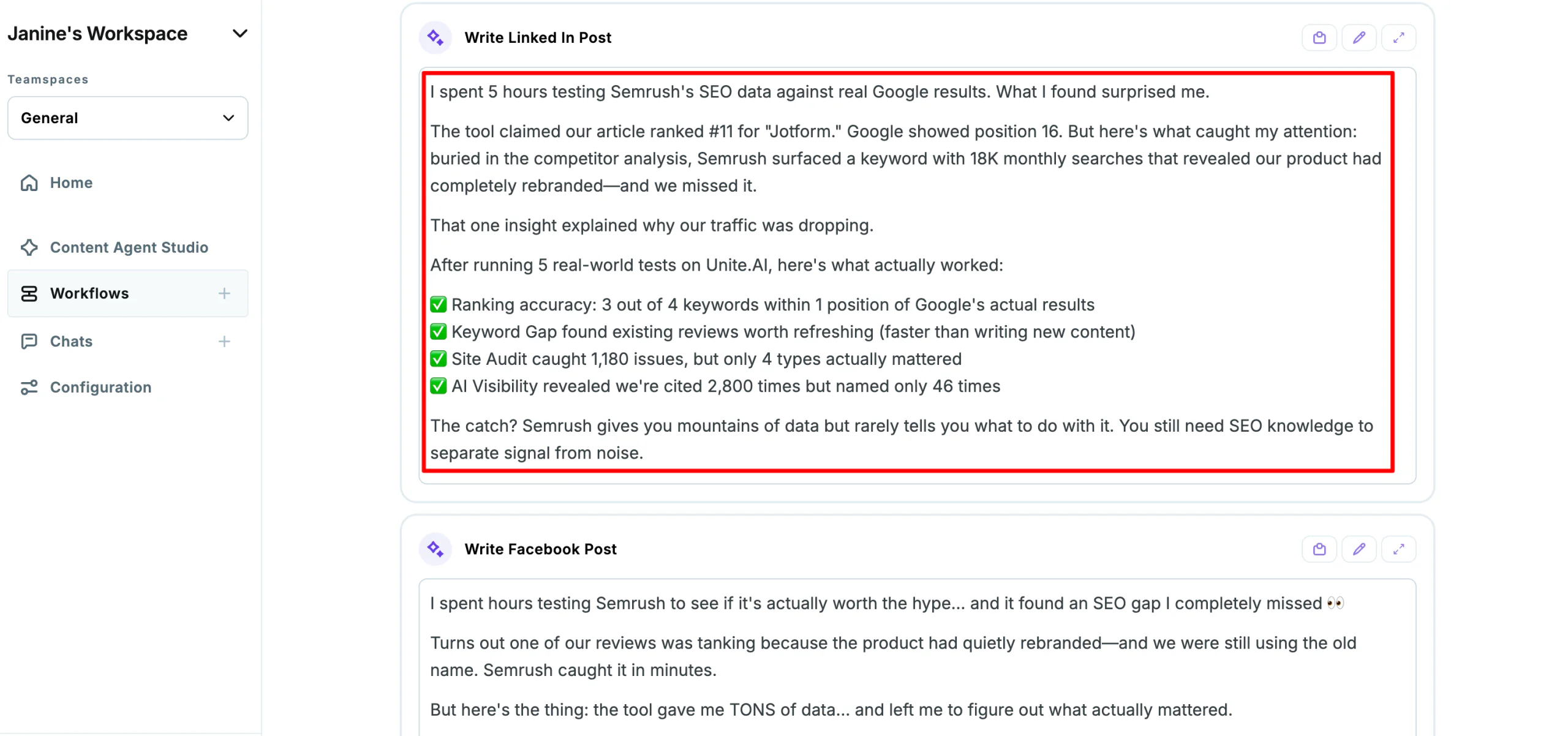
First, the scrape worked. The workflow pulled the full article. It then wrote all five pieces in one run.
Here’s the opening of the LinkedIn post:
“I spent 5 hours testing Semrush’s SEO data against real Google results. What I found surprised me.
The tool claimed our article ranked #11 for “Jotform.” Google showed position 16.
But here’s what caught my attention: buried in the competitor analysis, Semrush surfaced a keyword with 18K monthly searches that revealed our product had completely rebranded—and we missed it.”
It followed that with a checklist of results, pulled straight from the review:
“✅ Ranking accuracy: 3 out of 4 keywords within 1 position of Google’s actual results
✅ Keyword Gap found existing reviews worth refreshing (faster than writing new content)
✅ Site Audit caught 1,180 issues, but only 4 types actually mattered
✅ AI Visibility revealed we’re cited 2,800 times but named only 46 times”
The marketing email opened with the subject line:
“The SEO gap hiding in plain sight (even pros miss this)” and walked through all five tests in order, one short paragraph each.
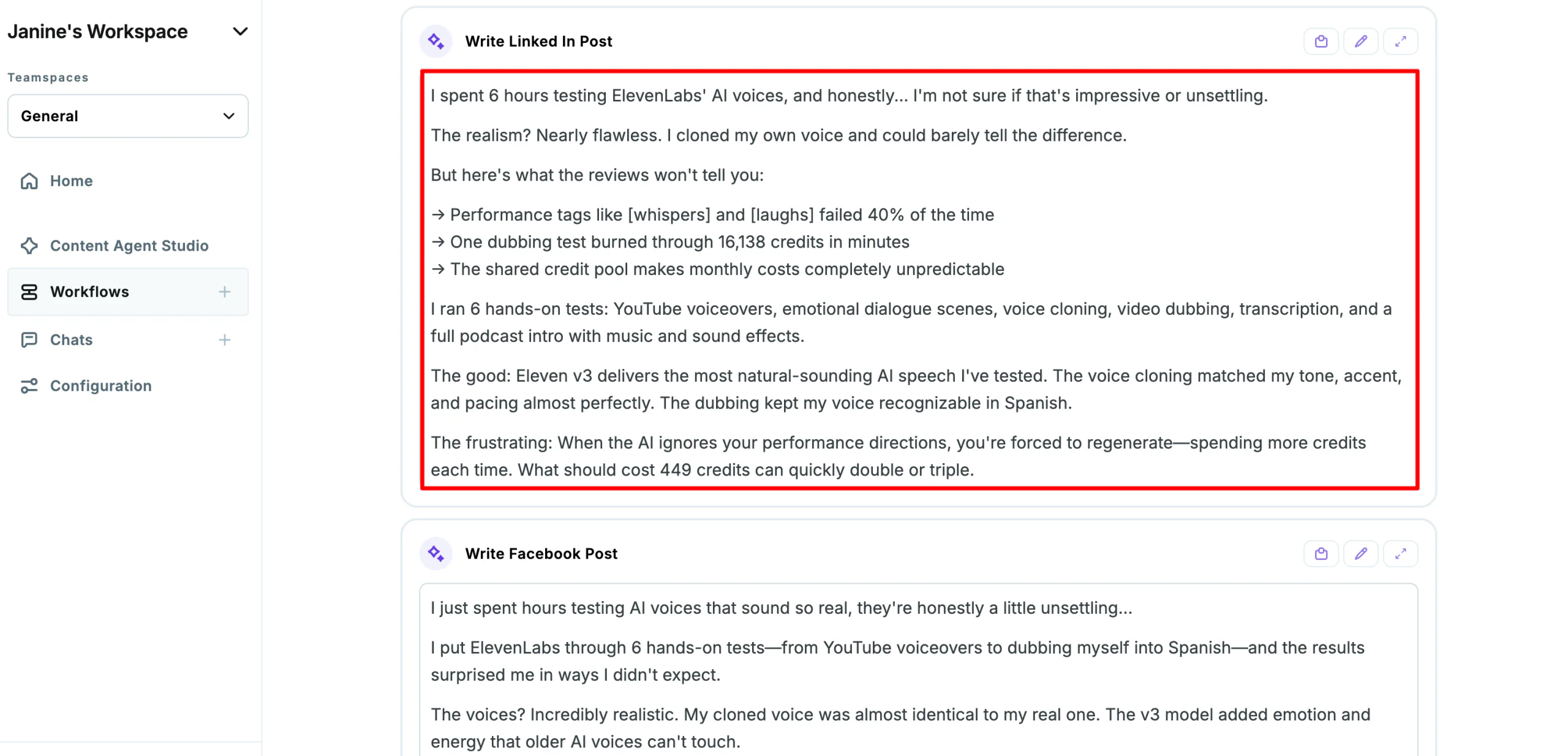
To check consistency, I ran the same workflow on my ElevenLabs review. It’s a very different article, about AI voices rather than SEO data.
Here’s how the LinkedIn post opened:
“I spent 6 hours testing ElevenLabs’ AI voices, and honestly… I’m not sure if that’s impressive or unsettling.
The realism? Nearly flawless. I cloned my own voice and could barely tell the difference.
But here’s what the reviews won’t tell you:
→ Performance tags like [whispers] and [laughs] failed 40% of the time
→ One dubbing test burned through 16,138 credits in minutes
→ The shared credit pool makes monthly costs completely unpredictable”
My Take
This was the most impressive output I got from Copy.ai. In both runs, it clearly read the article instead of writing generic promotional copy.
The numbers from the Semrush review were correct: the Jotform ranking (11 vs. 16), three of four keywords within one position, the 18K-search keyword, 1,180 audit warnings with 928 from a single issue, only 4 of 10 keyword suggestions worth targeting, and AI assistants citing Unite.ai 2,800 times but naming it only 46 times. It also got the right three alternatives.
The ElevenLabs run was just as accurate on the basics: the 16,138-credit dubbing test, the 449-credit voiceovers, the shared credit pool, and my cloned voice matching my tone, accent, and pacing. The hooks were often strong too.
But it also made things up, and that’s a problem for content published under my name:
- Invented effort: “I spent 5 hours testing” in the Semrush run became “I spent 6 hours” in the ElevenLabs run. Both times, the number of hours matched the number of tests in the article, which suggests it made up the time from the test count. Both emails also invented a backstory (“I just spent weeks…”), and the Semrush one added a story about optimizing a slipping review that never happened.
- An invented statistic: “Performance tags… failed 40% of the time” isn’t in my ElevenLabs review. I said the model missed “a good portion” of the tags, but I never measured a percentage.
- Getting the main finding wrong: The biggest discovery in my Semrush review was that Turbolearn, a tool we’d reviewed, had rebranded as Turbo AI. The LinkedIn post called it “our product,” and the X post called it “a competitor rebrand.”
- Contradicting my verdict: One X post said the ElevenLabs voices were “so realistic I had to double-check they weren’t human.” My review actually says people could probably still tell they were AI-generated.
- A wrong price: The Semrush LinkedIn post mentioned a “$130/month price tag.” That price isn’t in my review.
- Posts X can’t publish: The X posts were about 430 and 700 characters, well over the 280-character limit for a standard account.
The two runs also sounded almost identical. They both followed the same formula, like “I spent X hours” openers, emoji checklists, and “link in bio.” If you ran this across 50 articles, all 50 would sound the same.
In terms of editing, the Facebook posts and Instagram captions only needed light edits (and fewer emojis). The LinkedIn posts needed the invented details and errors removed. The emails needed their openings rewritten. The X posts needed full rewrites.
Overall, this is still a real time saver. Five drafts with mostly accurate stats beats starting from scratch, and it did the job in one click.
However, the workflow is consistent in its mistakes as well as its strengths. Every draft needs fact-checking against the original article before it goes out.
Results & Output Quality
Here’s how Copy.ai’s output held up across my testing:
- Copy quality: Copy.ai Chat’s short-form copy was generic. Of 10 pieces, only one subject line was usable, seven needed light edits, and two needed rewriting. Meanwhile, the Repurpose Blog Post workflow was much stronger. Its drafts had decent hooks built around specific findings, and most needed light to moderate edits rather than rewrites.
- Accuracy: This was mixed. Infobase facts came through correctly, and every test result the workflow pulled from my Semrush and ElevenLabs reviews was right. But the workflow also invented details, such as “I spent 5 hours,” a made-up backstory, and a “40%” failure rate I never measured. It also quoted the wrong price.
- Voice: Brand Voice didn’t capture how I write. Copy.ai leaned on hype phrases (“Unlock the Potential of AI,” “empower your AI journey”) and emojis. ChatGPT sounded more like me with the same examples pasted into the chat.
- Consistency: The workflow was consistent, but so were its mistakes. Both runs used the same “I spent X hours” opener, and both produced X posts over the 280-character limit.
- Reliability: One of the three features I tested (Content Agent Studio) failed and wouldn’t generate content, even after multiple attempts at trying to solve the problem.
- Speed: All of the workflows generated and responded in a matter of seconds.
- Credit cost: I wasn’t able to calculate the exact amount of credits consumed for the tests, but by the end only 37/10,000 credits were consumed, so there was plenty left.
- Editing load: Expect to spend time on every output. For the Chat copy, that means rewriting for a more accurate tone of voice. For the workflow drafts, it means checking every number and first-person claim against the original article.
- Value: The $29 Chat plan didn’t beat ChatGPT for my kind of copy. The $249 Agents plan only makes sense if repurposing content at volume is a big part of your team’s week, and you have someone to fact check it.
How to Get Good Results with Copy.ai
Here’s what made the biggest difference to the output in my testing:
- Set up Infobase first, as it was the part of Copy.ai that worked most reliably. Add your company facts, policies, and product details once, and reference them with a #.
- Start with a prebuilt workflow. The Repurpose Blog Post template produced my best results with nothing more than a URL.
- Fact-check every number and first-person line. The workflow got the facts from my articles right but also invented details like “I spent 5 hours.” Anything written in your voice needs a human check before it goes out.
- Give it a final voice pass even with Brand Voice applied to remove hype, emojis, and generic hooks.
- Test before you run in bulk. Run a workflow on one or two rows, check the output, then use the table to run the rest.
- Test the features you’re paying for early. If Content Agent Studio or a specific workflow is your reason for upgrading, try it right away so you can still ask for a refund if it doesn’t work.
Top 3 Copy.ai Alternatives
Here are the best Copy.ai alternatives I’ve tried that I’d recommend.
Jasper
Jasper is the closest comparison to Copy.ai because both made the same move: from AI copywriter to platform for teams. The difference is what each one is built around.
On the one hand, Jasper is built for marketing content and keeping your brand consistent. Its Brand IQ (Brand Voice, Style Guide, Visual Guidelines, Knowledge Base) and Canvas workspace are designed to keep a whole team’s content on brand, and its GEO Agent tracks how you appear in AI search. Meanwhile, Copy.ai focuses more on sales, with tools for finding prospects, managing leads, connecting CRMs, and running tasks in bulk.
In terms of pricing, Jasper lands between Copy.ai’s Chat plan and Agents plan. And neither tool nailed short-form copy in my testing. Jasper gave me bland posts with bracketed placeholders. Copy.ai got the facts right from its Infobase, but its posts read like generic promotion rather than my tone-of-voice.
Choose Jasper if brand-consistent marketing content is the priority. Otherwise, choose Copy.ai if you’re automating sales and outreach.
Read my Jasper AI review, my Jasper AI vs Copy AI comparison, or visit Jasper!
Anyword
Anyword is the better fit if what you really want is the Copy.ai of a few years ago: short-form marketing copy done well.
Where Copy.ai focuses on automating the process around content, Anyword focuses on whether the copy itself will perform. It gives each variation a predictive performance score, so you’re choosing a headline or ad based on more than your gut. Copy.ai doesn’t try to predict which version will convert.
Anyword’s Starter plan is $49/month for one seat, and is $99/month for three seats. Both have a 7-day trial limited to 2,500 words. That’s more than Copy.ai’s Chat plan, but it’s a tool built specifically for ads, landing pages, and emails.
Choose Anyword if you’re a performance marketer optimizing ad and landing page copy. Otherwise, choose Copy.ai if you need automation across sales and marketing.
Read my Anyword review or visit Anyword!
ChatGPT
ChatGPT is the alternative most Copy.ai Chat buyers should honestly consider, because Copy.ai Chat runs on many of the same kinds of models.
For one-off writing, ChatGPT gives you the newest OpenAI models directly, plus deep research, file uploads, image generation, and custom GPTs. It has a free tier, and Plus is $20/month.
Copy.ai Chat is $29/month but covers 5 seats, lets you switch between OpenAI, Anthropic, and Gemini models, and applies a shared Brand Voice and Infobase across the team. That shared context is the main thing ChatGPT doesn’t do as neatly for a small team.
Where ChatGPT can’t compete is Workflows: bulk runs across a table of accounts, CRM connections, and repeatable sales processes. In my testing, ChatGPT beat Copy.ai at short-form copy even when I gave both tools the same examples and website information. ChatGPT wrote about specific reviews in a first-person voice that sounded like me, while Copy.ai’s posts stayed promotional and general.
Choose ChatGPT if you’re a writer or want the most capable general assistant. Otherwise, choose Copy.ai if a team needs shared brand context or automated GTM workflows.
Explore more options here: best AI assistants or visit ChatGPT!
Copy.ai Review: The Right Tool For You?
What I liked most about Copy.ai was the Repurpose Blog Post workflow. I gave it a URL, and it read my entire Semrush review and came back with five drafts for different channels built around the right stats. It did the same with my ElevenLabs review.
However, I didn’t like how much I still had to check and fix. The workflow invented details, made up a statistic, quoted the wrong price, and misread my Semrush review’s main finding. The Brand Voice didn’t sound like me either. Its copy was full of phrases I’d never use, and ChatGPT did a better job with the exact same examples.
But what I was most disappointed in was how many things just didn’t work. Content Agent Studio, one of the main reasons to pay for the Agents plan, kept saying I needed three examples when I’d already given it three. I didn’t expect that from a product this established.
Overall, I’d recommend Copy.ai to B2B marketing teams that repurpose a lot of content and have someone to fact-check the drafts. A workflow that turns every article into five first drafts can save a lot of time.
But if you’re a writer or you mainly want better copy, the output doesn’t justify $249/month. A general AI assistant will give you better writing for less. So if that’s the case, consider these alternatives:
- Jasper is best for marketing teams that need content that’s consistent with their brand and AI search visibility.
- Anyword is best for performance marketers who want predictive scoring on ad and landing page copy.
- ChatGPT is best for writers who want the most capable AI assistant for the price.
Thanks for reading my Copy.ai review! I hope you found it helpful. If you want to try Copy.ai for yourself, you can sign up here and see what it can build for you.
Frequently Asked Questions
Is Copy.ai free?
No, Copy.ai isn’t free. When I signed up, I had to choose a paid plan before I could use anything. The cheapest option is the Chat plan at $29/month.
How much does Copy.ai cost?
Copy.ai offers two plans: Chat at $29/month (5 seats, unlimited chat words, and OpenAI, Anthropic, and Google models) and Agents at $249/month (10 seats, 10,000 workflow credits per month, and Content Agent Studio).
What are Copy.ai workflow credits?
Workflow credits are what Copy.ai charges for each workflow run. A run’s cost depends on how many steps it has, how much content it generates, and whether it uses heavier Actions like web research.
Is Copy.ai still an AI writing tool?
Copy.ai is still partially an AI writing tool. Chat and the content workflows still write copy, but Copy.ai now positions itself as a go-to-market AI platform for sales, marketing, and operations teams. Its short-form copy was more generic than ChatGPT’s, so it isn’t the tool I’d pick if writing quality is your main goal.
What AI models does Copy.ai use?
The models Copy.ai uses are OpenAI, Anthropic, and Google Gemini models in Chat, and Perplexity for research steps in Workflows. You can choose a different model for each workflow step.
Who owns Copy.ai?
Copy.ai was founded in 2020 by Paul Yacoubian and Chris Lu. By October 2025, it was acquired by Fullcast which is a revenue planning company.
Can I use Copy.ai content commercially?
Yes, Copy.ai content can be used commerically. But as with any AI tool, you’re responsible for fact-checking what it writes before you publish it.
Is Copy.ai better than ChatGPT?
For writing quality, ChatGPT was better than Copy.ai in my testing. Copy.ai makes more sense when a team wants shared context and workflows that repurpose content in bulk, which ChatGPT isn’t built for.
Is Copy.ai worth it?
Copy.ai is only worth it depending on your volume. The Repurpose Blog Post workflow can save a content team a lot of time by turning each article into five first drafts.









