
Voice Generators
Speechify Review: Snoop Dogg Read My Paper at 4.5x Speed

 Add Unite.AI to your preferred sources on Google
Unite.AI may receive compensation when you use links to products we review. This does not influence our editorial evaluations. Read our affiliate disclosure.

You open a long PDF, planning to “just skim it.” Suddenly, it’s 11 pages later, and your brain is already done.
Most people don’t struggle with reading itself. They struggle with the sheer volume of it. Emails, articles, research papers, documents. It never really stops.
But that’s exactly where Speechify changes the game. It turns anything on your screen into natural-sounding audio so it can be listened to instead of read.
Heck, I got Snoop Dogg to read me a research paper at 4.5x speed! More on that later…
What started as a tool built by a college student with dyslexia has grown into one of the largest AI speech platforms in the world, now serving tens of millions of people worldwide.
That scale says something. The way information is consumed is shifting fast. I mean, look at the booming popularity of audiobooks and podcasts in the last few years.
Instead of endless scrolling, Speechify turns reading into listening you can take anywhere. During a commute, a walk, or even while doing something else entirely, the “reading time” gets reclaimed without losing the information.
The result is less friction, more absorption, and a completely different relationship with long-form content.
In this Speechify review, I’ll discuss the pros and cons, what it is, who it’s best for, and its key features. Then, I’ll show you how I used Speechify to upload a file and start listening with engaging AI voices so you can, too.
I’ll finish the article by comparing Speechify with my top three alternatives (ElevenLabs, Murf, and Veed.io). By the end, you’ll know which tool is right for you. Let’s get into it.
Verdict
Speechify is a reliable tool for turning documents, webpages, and images into natural-sounding audio, with useful features like OCR, voice typing, and syncing across devices. It’s very easy to use, but the price and locked premium voices may be drawbacks for some.
Pros and Cons
- Reads Google Docs, PDFs, webpages, books, emails, and images out loud for easy long-form listening
- Natural-sounding voices with a large library of 1,000+ voices and 60+ languages
- OCR support
- Cross-device sync
- Offline listening on supported plans
- Productivity tools like voice typing, summaries, and AI reading features
- Great for accessibility and multitasking, especially for people who prefer audio over reading
- Very user-friendly with a clean interface
- Available as an extension
- Premium pricing may be too high for some compared to basic text-to-speech tools
- Customer support can be slow or limited at times
- Pronunciation of technical or academic jargon isn’t always accurate
- Some advanced features may feel unnecessary for basic use
- Engaging voices are exclusively available on the paid plans
What is Speechify?
Speechify is a text-to-speech app that reads digital text like emails and webpages aloud and can also scan printed pages with OCR (Optical Character Recognition) technology to listen to books, PDFs, and news articles.
It’s for anyone who wants to listen instead of read, especially those with dyslexia, ADHD, or other reading challenges.
Founded by Cliff Weitzman
Here’s the backstory. Speechify was founded in 2017 by Cliff Weitzman, who built Speechify to help manage his own dyslexia.
He wasn’t some Silicon Valley guy looking for a market gap. He was a college student who needed a tool that didn’t exist yet, so he built it himself.
That origin story shows in the product. It doesn’t feel like something made by people guessing at what struggling readers need. It feels like something made by someone who lived it.
The World’s Largest AI Speech Provider
Speechify has grown into something massive since its launch.
It’s one of the biggest AI text-to-speech apps on the market, serving over 55 million users. They even develop and train their own AI voice models in-house rather than relying on third-party text-to-speech APIs.
We are far from talking about a scrappy little startup anymore.
Cross-Device Support
Speechify runs on pretty much everything: iOS, Android, Chrome, Edge, Mac, Windows, and online. So if you’re switching between your phone on the commute and your laptop at your desk, it follows you.
It sounds insignificant, but cross-device support is one of those features you stop noticing until it’s missing. Being able to start listening on one device and continue on another without any friction makes the entire experience feel seamless.
2025 Apple Design Award Winner
In 2025, Speechify won an Apple Design Award in the Inclusivity category. Apple’s annual awards are very selective, so Speechify’s win is a strong signal that its design and accessibility experience stood out.
Core Promise
At its core, Speechify is built around four things:
- Read
- Write
- Listen
- Get answers
All powered by Voice AI.
So it’s not just a text-to-speech tool anymore. It’s grown into a full AI reading and writing assistant.
You can have documents read aloud to you, generate written content, and ask questions about what you’re reading.
Who is Speechify Best For?
Speechify is best for people who want to listen, write, and interact with a lot of text:
- People with reading or accessibility needs.
- Writers, editors, students, and researchers who have to get through long documents faster or rest their eyes, and even use Speechify to quiz themselves on specific material.
- Multitaskers who want to listen to articles, PDFs, webpages, or books while commuting, exercising, or doing chores.
- Content creators who want to use AI Podcasts to turn scripts into conversational audio and Voice Typing to turn spoken ideas into written text.
- Professionals and lifelong learners who work through long PDFs, contracts, and research papers, and want to use Voice Typing to dictate emails and drafts faster than typing.
Speechify Key Features
Speechify turns text into audio, dictates text by voice, and helps you interact with documents:
- Reads Google Docs, PDFs, webpages, and books aloud.
- 1,000+ lifelike voices in 60+ languages, with playback up to 4.5x speed.
- Voice Typing lets you dictate text instead of typing it.
- Take a screenshot or image of text and have it read aloud with OCR.
- Syncs across desktop and mobile devices.
- Use the AI assistant to ask questions and get summaries, and quiz yourself on the content.
- AI Podcasts turns documents into conversational, multi-host audio discussions.
- Voice Cloning lets you listen to content in custom voices.
- Highlights text while it reads.
- Offline listening and downloads.
- Importing from cloud drives in one click (Drive/Dropbox ).
- Voice Generator lets you create and customize AI-generated voices.
How to Use Speechify
Here’s how easy it is to use Speechify to upload a file and start listening with engaging AI voices:
- Sign Up for Speechify
- Upload a File
- Start Listening
- Swap the Narrator
- Change the Speed
- Create an AI Podcast
- Use Voice Typing for Dictation
Step 1: Sign Up for Speechify

Start by going to speechify.com and selecting Try For Free.
Step 2: Upload a File
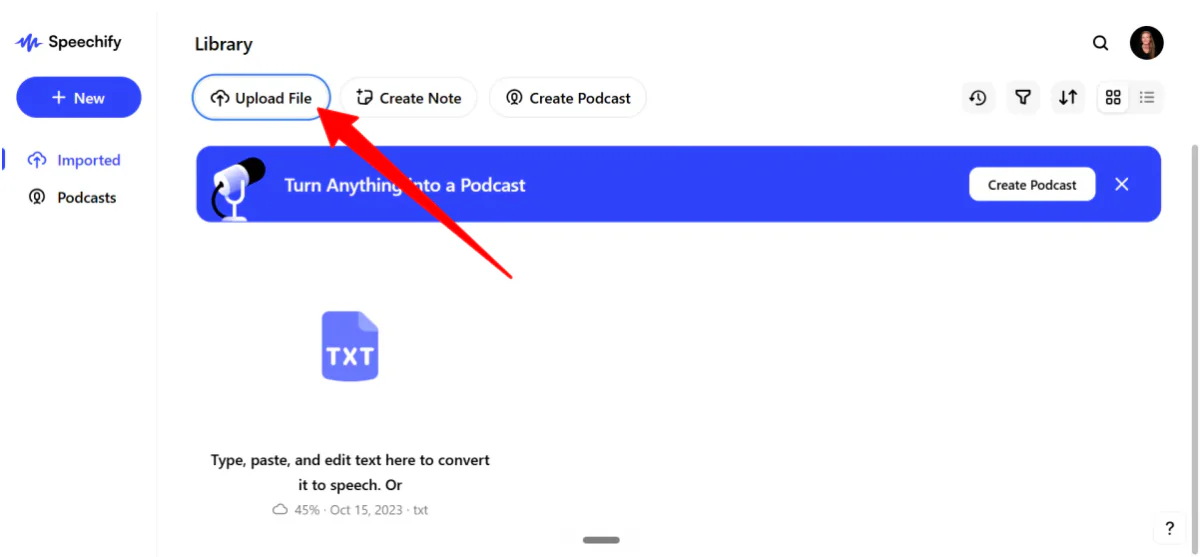
Once you’re in, go to Upload File.

Speechify provides a couple of ways to upload files:
- Drop PDF, DOC, DOCX, TXT, MD, EPUB, RTF, or HTML files
- Google Drive
- Dropbox
- OneDrive
To see if this can actually replace human reading, I decided to feed it the most brutal text I could find.
I uploaded a 15-page PDF titled Attention is All You Need by Vaswani et al. It’s a 2017 research paper that invented the Transformer architecture and made modern AI (ChatGPT, Midjourney, etc.) possible.
Step 3: Start Listening

Once your document appears, click any line of text to start playing.
On the free plan, you’re assigned a robotic-sounding text-to-speech voice. It works, but listening to a 15-page academic paper read by a generic GPS voice will give you mental fatigue within five minutes.
Step 4: Swap the Narrator
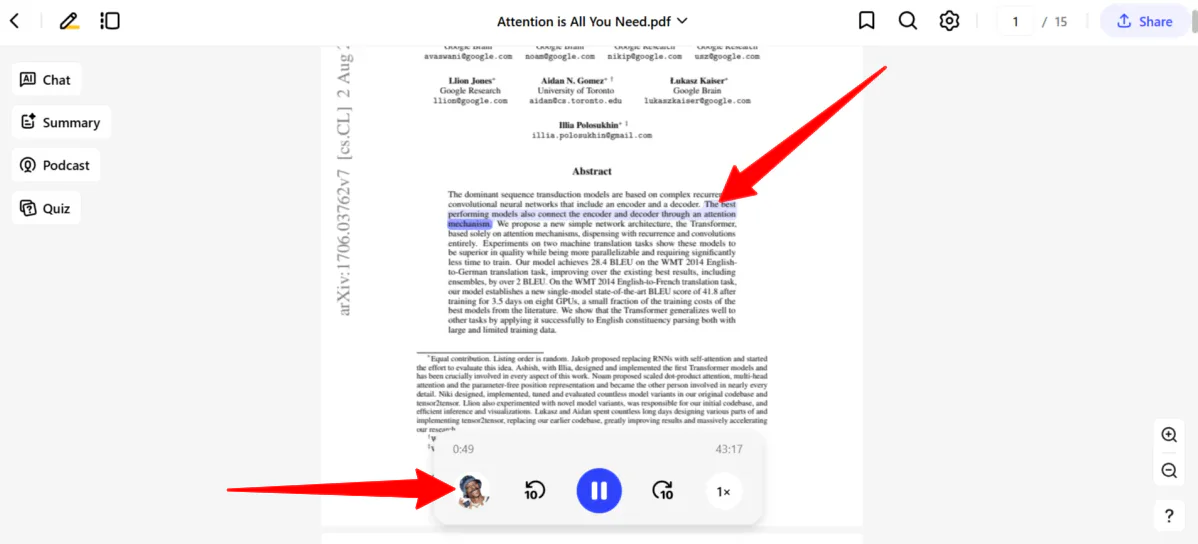
To fix this, I swapped the narrator to one of Speechify’s premium celebrity clones: Snoop Dogg.
Hearing Snoop drop bars of complex machine-learning theory was pretty unreal. The voice clone is surprisingly natural, captures real human inflection, and instantly makes dry academic text feel conversational.
However, to access premium clones like Snoop or Gwyneth Paltrow, you have to upgrade to the paid plan. If you plan to listen for hours at a time, the lack of cognitive fatigue makes the upgrade worth it.
Step 5: Change the Speed
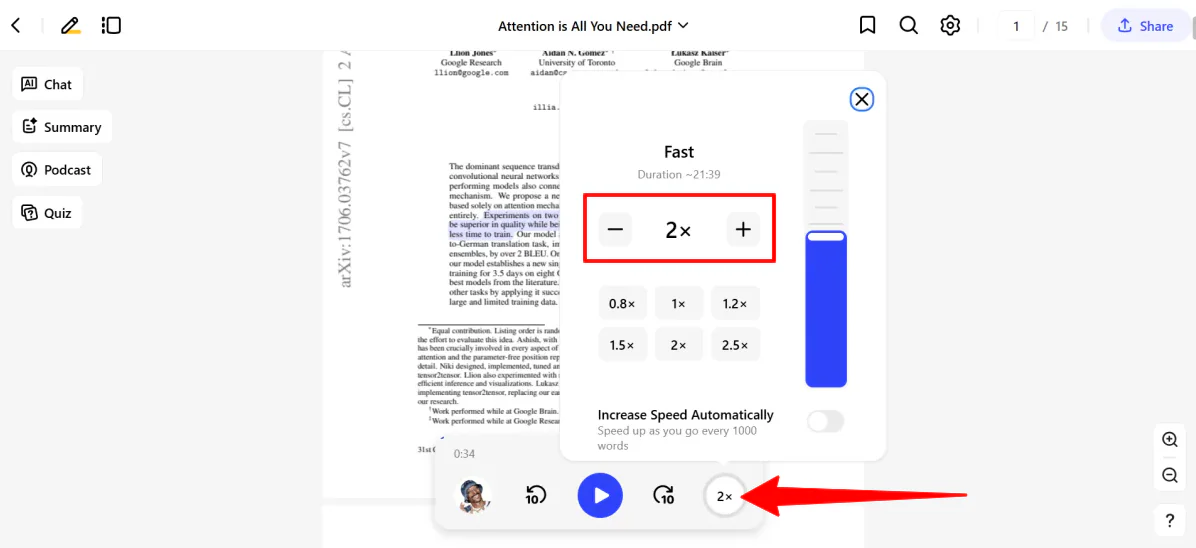
Most people talk at around 150 words per minute. Speechify lets you crank that all the way up past 4x speed.
I pushed the slider straight to 2x speed. At twice the speed, it sounds incredibly intense (almost like an alien language if you aren’t paying close attention).
But here’s where the AI stands out: the words stay perfectly crisp; your brain just has to sprint to keep up with Snoop’s hyper-speed pace.
If you’re just starting, dial it down to 1.2x or 1.5x to build up your listening stamina. Unless you have superhuman processing skills, don’t even bother attempting 4x.
Step 6: Create an AI Podcast
But Speechify has evolved past basic reading.
If you are using it for content creation, workflow automation, or deeper studying, you need to use these two features: AI Podcasts (turns documents into audio) and Voice Typing (turns your spoken words into written text).
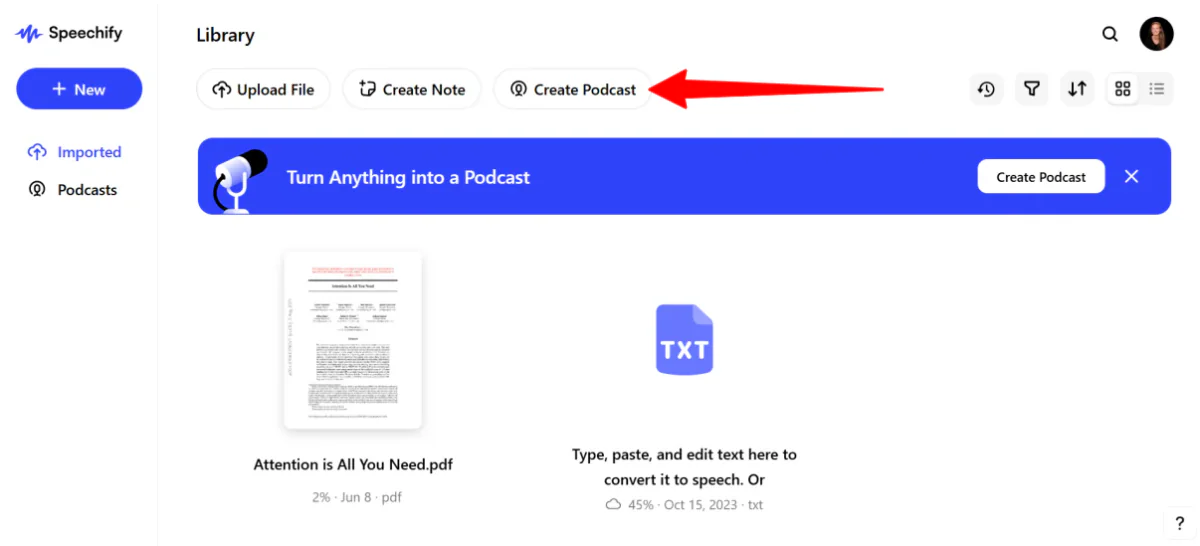
If straight narration gets boring, you can turn your document into an AI Podcast. From the dashboard, go to Create Podcast.

In the new window, attach a file or paste text, select a style (thoughtful talk, late night show, lecture, or storytelling), choose a language, and hit Create.

About a minute later, the AI podcast will be ready! Pretty crazy how fast that is.
Instead of just reading the text word-for-word, Speechify generates a fully scripted, multi-host, conversational podcast episode.
I had two AI hosts break down, debate, and explain the “Attention is All You Need” paper as if they were recording a real show. It makes dense material significantly more entertaining to consume while driving or exercising.
Step 7: Use Voice Typing for Dictation
Now for Voice Typing for flawless dictation. If you want to create content or write essays faster, you can use Speechify to type at the speed of your thoughts.
To use it, toggle the Voice Typing tool (available through their app or Chrome extension) and start speaking naturally into any document or text field.

Here is exactly what I said verbatim:
“So um… I am trying to see if Speechify can actually type as fast as I think, which is like… supposedly five times faster than normal typing. But uh, the real test is whether it can fix my bad grammar and totally remove all of these awkward filler words like ‘like’ and ‘um’ without me having to manually edit it later. Let’s see if it actually works or if it just looks like a massive mess.”

Here’s what Speechify added to the document:
“So, I am trying to see if Speechify can actually type as fast as I think, which is like supposedly five times faster than normal typing, but the real test is whether it can fix my bad grammar and totally remove all of those awkward filler words like “like” and “like” without me having to manually edit it later. Let’s see if it actually works or if it just looks like a massive mess.”
It cleaned up most of the filler words, but it still duplicated a few phrases and didn’t fully correct everything. Overall, it got me most of the way there, but I’d still recommend doing a quick review and tweaking the final text.
Overall, Speechify made it easy to turn long, dense material into audio and even helped clean up messy speech into readable text. It wasn’t perfect, but it saved time and made both listening and writing feel much more efficient and engaging.
Top 3 Speechify Alternatives
Here are the best Speechify alternatives I’ve tried.
ElevenLabs
The first Speechify alternative I’d recommend is ElevenLabs.
ElevenLabs (through its ElevenReader app) focuses on turning anything you read (books, PDFs, articles, etc.) into a high-quality listening experience. It uses extremely natural AI voices (there are 1,000+ of them) that use audiobook-style narration.
Both platforms let you listen to PDFs, webpages, and documents on the go, making it easier to learn and multitask.
However, ElevenLabs stands out with its ultra-realistic voice quality and audiobook-first experience. It gives you access to a massive library of 200,000+ audiobooks and customizable narrators that feel closer to professional storytelling.
Meanwhile, Speechify is more of an all-in-one reading assistant. It has a broader feature set, like voice typing, OCR, cross-device syncing, summaries, and other tools built for more efficient studying and work.
Choose ElevenLabs for the most natural audiobook-style listening experience. Otherwise, choose Speechify for an all-in-one reading and study tool with dictation, OCR, and other productivity features.
Read my ElevenLabs review or visit ElevenLabs!
Murf
The next Speechify alternative I’d recommend is Murf. It’s an AI voice platform built for fast, customizable text-to-speech, voiceovers, and dubbing.
Both Speechify and Murf turn text into natural audio and support a wide range of use cases like learning, content consumption, and accessibility.
However, Murf is more focused on professional voice production at scale. It comes with ultra-low latency voice generation, a powerful studio for full voiceover control, API access, and AI dubbing for translating and localizing content.
Meanwhile, Speechify is more focused on personal reading, studying, and productivity. It comes with features like OCR, voice typing, AI podcasts, and the ability to listen to files across devices.
For everyday reading, studying, and accessibility, choose Speechify. For scalable voiceovers and AI dubbing, choose Murf.
Read my Murf review or visit Murf!
Veed.io
If you are looking at Speechify specifically for its content creation tools (like its AI Voice Generator or AI Podcasts), then Veed.io is a powerful alternative to consider.
It’s an AI video creation and editing platform that helps you turn text scripts into videos in minutes. It comes fully equipped with editing tools, automated captions, and AI avatars.
Here’s a video I made with Veed’s automated features in a matter of minutes:
Both platforms help you repurpose written information into more engaging formats. However, their core focus is entirely different.
Veed.io stands out for its full AI video creation suite. It features text-to-video generation, automatic subtitles, realistic AI avatars, and brand styling tools designed to make your content ready for social media.
Meanwhile, Speechify focuses on audio-based productivity. Its ecosystem is built for text-to-speech reading, voice typing, and turning heavy documents into listenable, conversational audio.
Choose Veed.io if your primary goal is AI video creation, automated video editing, and branded social media content. Otherwise, choose Speechify for premium reading, listening, and voice tools tailored for productivity, study assistance, and accessibility.
Read my Veed.io review or visit Veed.io!
Speechify Review: The Right Tool For You?
After putting Speechify through everything from dense AI research papers to messy voice dictation, it’s clear this isn’t just a basic text-to-speech tool. It changes how you interact with information.
Long PDFs become something you can actually get through while walking or commuting, and voice features like AI Podcasts and Voice Typing make it feel closer to an all-in-one productivity system than a simple reader.
The experience is strongest when you lean into its strengths:
- Listening instead of reading
- Speeding up information intake
- Turning spoken ideas into clean text
But it’s not flawless. The biggest drawback for me is that premium voices are locked behind a paywall, and some technical pronunciation can slip. But the time saved is hard to ignore.
If your workflow involves a lot of reading, studying, or content consumption, Speechify can easily become part of your routine. But if you prefer traditional reading or only need occasional text-to-speech, you might want to try one of these alternatives:
- ElevenLabs is best for realistic audiobook-style listening.
- Murf is best for professional voiceovers and AI dubbing.
- Veed.io is best for turning scripts into AI videos.
Thanks for reading my Speechify review! I hope you found it helpful. Try Speechify for yourself and see how you like it.
Frequently Asked Questions
Is Speechify actually free?
Speechify requires a paid plan to access all features.
What are the downsides of Speechify?
Speechify is often praised for its speed and accessibility, but it has some downsides. The main issues are high subscription costs and inaccurate reading of technical text, acronyms, etc.
Is Speechify really worth it?
Speechify is worth it if you read a lot, prefer listening, or have reading difficulties like dyslexia. But it can be expensive, and for light use like occasional articles, free tools may be enough.
Is there a better app than Speechify?
The best Speechify alternative depends on what you need it for. For audiobook-style listening, consider ElevenLabs. For professional voiceovers and AI dubbing, try Murf. And for turning scripts into AI videos, try Veed.io.



