Best Of
10 Best AI Music Video Generators (September 2026)

 Add Unite.AI to your preferred sources on Google
Unite.AI may receive compensation when you use links to products we review. This does not influence our editorial evaluations. Read our affiliate disclosure.
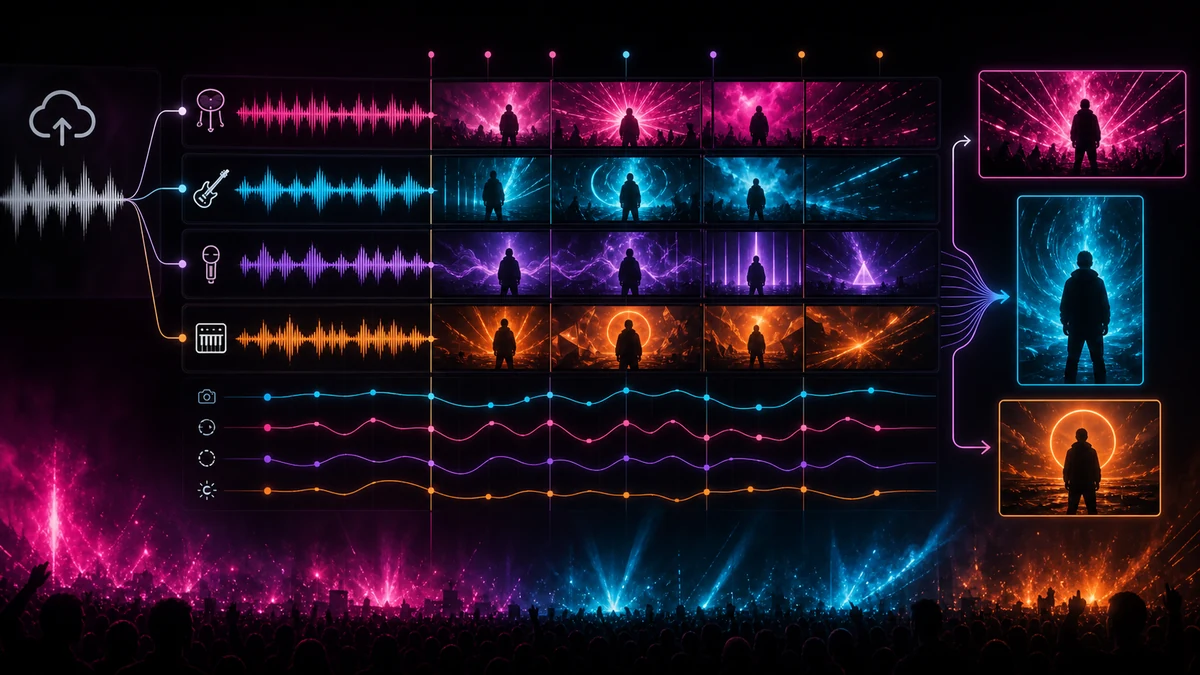
AI music video generators are becoming distinct from general-purpose AI video tools. The strongest platforms do more than create isolated clips: they analyze an uploaded song, detect its structure and energy, synchronize edits or animation to the music, generate lyrics and captions, and export formats built for YouTube, TikTok, Instagram Reels, and Spotify Canvas.
The products on this list cover several approaches. Some can automatically turn a complete track into a finished video, while others provide timeline-based control over scenes, prompts, characters, camera movement, and audio-reactive effects. Music-focused editors may also create lyric videos, visualizers, album-art animations, promotional cuts, and vertical content from the same release.
A useful music-video platform should be evaluated differently from a general text-to-video generator. Important factors include whether it accepts a complete song, understands beats or stems, supports full-length output, maintains visual consistency, provides commercial rights, and makes revisions affordable. Artists should also verify that they own or have permission to use the music, lyrics, artwork, performer likenesses, and reference media included in a project.
Comparison Table of Best AI Music Video Generators
| AI Tool | Best For | Price (USD) | Features |
|---|---|---|---|
| Neural Frames | Professional audio-reactive videos with deep creative control | Free to start / from $26/mo annually | Eight-stem analysis, Autopilot, timeline editor, character consistency, lyric videos, multi-model access, 4K |
| Freebeat | Fast full-song, dance, lyric, and social music videos | Free / paid from $4.99/wk | Song-link and file import, beat-aware scenes, lyrics, dance videos, Seedance and Veo models, vertical and horizontal exports |
| Rotor Videos | Stock-based music videos, lyric videos, and release assets | From $5.99 per credit | Music analysis, automatic clip editing, lyric videos, album-art videos, Spotify Canvas, Apple Music assets |
| Kaiber | Stylized Beat Sync videos with an editable creative canvas | $5 trial / from $10/mo | Beat Sync, Auto-Clip, batch creation, lyric videos, Canvas, timeline editor, premium image and video models |
| One More Shot AI | Automatic full-length videos with optional scene-by-scene control | Free to try / Auto from $0.05/sec | Song analysis, Auto and Project modes, consistent AI artists, lip sync, release assets, 4K and multi-format exports |
| Plazmapunk | Prompt-driven AI music videos with a scene editor | Free / from EUR 9.99/mo | Music upload, synced AI visuals, multiple aspect ratios, Gemini scene editor, style enhancement, HD export |
| Revid AI | Beat-synced music and lyric videos for short-form platforms | Free trial / from $39/mo | Music-to-video, animated lyrics, beat sync, singer lip sync, social publishing, 100+ AI video tools |
| TwoShot | AI-generated videos and audio-reactive visualizers in one studio | Free credits / Pro $9.50/mo | Audio-aware video, Seedance and Veo, spectrum and waveform engines, timeline studio, lyric videos, no-watermark exports |
| HeyGen | Beat-synced performer and avatar-based music videos | Free / Creator $29/mo | Full-song generation, avatars, lip sync, captions, reference images, 1080p and 4K paid exports |
| Adobe Firefly | Building commercially safer music-video scenes inside Adobe workflows | Free / Standard $9.99/mo | Text and image to video, 5- and 8-second shots, camera controls, AI video editor, soundtracks, Premiere integration |
*Promotions, taxes, model selection, credits, song length, resolution, frame rate, and repeated generations can materially change the final cost.
10 Best AI Music Video Generators for Musicians
1. Neural Frames
Neural Frames is a music-first AI video platform built around the relationship between sound and visuals. Artists can upload a finished track and use Autopilot to generate a complete video, build scenes through a timeline-based editor, or work frame by frame for more deliberate control over prompts, movement, characters, and transitions.
Its strongest differentiator is audio analysis. Neural Frames can separate a song into eight stems and map drums, bass, vocals, and other components to visual parameters. This makes it possible to trigger color changes, motion, cuts, or effects from specific musical elements rather than relying only on overall volume. The platform also supports lyric extraction, character consistency, short-form formats, horizontal-to-vertical conversion, and leading third-party video models.
The platform is suitable for full-length YouTube music videos, lyric videos, Spotify Canvas loops, social clips, and experimental audio-reactive animation. Higher plans include 4K upscaling and larger credit pools, while all generated videos remain under the creator’s ownership subject to the rights attached to uploaded music and reference material.
Pros and Cons
- Purpose-built for musicians rather than adapted from a general video generator
- Eight-stem analysis provides unusually detailed audio reactivity
- Offers automatic, timeline-based, and frame-by-frame creation modes
- Supports character consistency, lyrics, social formats, and several video models
- Paid plans include 1080p or 4K upscaling without a separate export charge
- Professional full-length generation can consume a large number of credits
- Advanced audio mapping and timeline controls require time to learn
- The lowest paid tier is not recommended for heavy Autopilot use
- Complex videos may still require multiple renders and manual scene correction
Pricing (USD)
- Free: Free account access for testing clips and core workflows.
- Neural Knight: $26/month when billed annually, with 2,400 monthly credits, seven models, stem extraction, and 1080p upscaling.
- Neural Ninja: $66/month annually, with 7,200 credits, ten models, and 4K upscaling.
- Neural Nirvana: $199/month annually, with 24,000 credits and priority 4K upscaling.
- Monthly billing: Available at higher effective rates than the annual prices shown above.
2. Freebeat
Freebeat turns uploaded audio or links from services such as YouTube, TikTok, Suno, Udio, Spotify, and SoundCloud into beat-aware video. Its guided workflow is designed for creators who want a complete result quickly rather than assembling dozens of independent AI clips in a conventional editor.
The platform can generate dance videos, lyric videos, performance-style scenes, and stylized music videos while aligning visuals with the track’s rhythm, mood, and structure. It also provides text-to-video and image-to-video tools and access to current video and image models, including Seedance and Veo options under applicable plans.
Freebeat is particularly useful for independent musicians producing regular content for TikTok, Reels, Shorts, and YouTube. It is easier to operate than a professional timeline system, but the automated approach provides less frame-level control. The quality and number of videos available from a subscription also depend on the models selected and the amount of regeneration required.
Pros and Cons
- Fast song-to-video workflow with little editing knowledge required
- Accepts uploaded tracks and links from several music platforms
- Supports dance, lyric, performance, text-to-video, and image-to-video modes
- Creates horizontal, vertical, and square content for major platforms
- Provides access to current premium video and image models
- Automatic results provide less detailed control than a timeline-based editor
- Credit use varies substantially between models
- The lowest plans are limited to 720p output
- Published prices frequently include temporary promotional discounts
Pricing (USD)
- Free: Limited credits and access for testing the platform.
- Basic: Currently displayed at $4.99 for one week during a promotion, with a standard price of $6.99/week and 1,990 credits.
- Pro: Currently displayed at $26.99/month during a promotion, with a standard price of $34.99 and 10,000 credits.
- Ultimate: Currently displayed at $39.99/month during a promotion, with a standard price of $49.99 and 19,000 credits.
- Creator: Currently displayed at $199/month during a promotion, with a standard price of $249 and 95,000 credits.
3. Rotor Videos
Rotor Videos is built specifically around the practical release needs of musicians. It analyzes an uploaded song and automatically cuts selected stock footage or artist-supplied clips to the music, allowing users to produce a polished video without manually aligning every edit to the track.
The platform offers several distinct products rather than one generic generator. Artists can create full music videos, lyric videos, album-art videos, Spotify Canvas loops, and visual assets for Apple Music. Users can preview a project before purchasing the final download, which makes the service attractive to musicians who prefer paying for completed assets instead of maintaining a monthly creative-software subscription.
Rotor’s approach relies more heavily on professionally shot footage, templates, and automated editing than on generating every visual from scratch. That can produce more predictable results than fully generative platforms, although it offers less freedom for artists seeking unique fictional worlds or recurring AI characters.
Pros and Cons
- Designed specifically for artists, labels, and music releases
- Automatically edits supplied or stock clips to the uploaded track
- Creates full videos, lyric videos, Canvas loops, and album-art animations
- Users can build and preview projects before paying to download
- Purchased music videos can be published and monetized
- Relies on stock footage or uploaded clips rather than fully original AI visuals
- Each finished asset consumes a separate number of credits
- Fine-grained scene control is more limited than in a conventional editor
- Premium styles and footage can increase the credit cost
Pricing (USD)
- Credits: Begin at $5.99 each, with pricing improving on larger credit purchases.
- Music video: Three credits.
- Album-art video: Two credits.
- Lyric video: Four credits.
- Premium options: Selected styles or clips can require an additional credit.
- Enterprise: Custom and embeddable solutions are available.
4. Kaiber
Kaiber’s Beat Sync workflow creates batches of short music-driven videos from audio and visual source material. Artists can upload a track, select images or video, generate several variants at once, and let the platform automatically clip and synchronize the material for social releases or longer edits.
Beat Sync is connected to Kaiber’s broader Superstudio environment. Canvas provides access to multiple image and video models, while Editor allows scenes to be assembled, trimmed, and revised on a timeline. The platform also supports lyric and caption videos, loops, animations, image-to-video, video transformation, and broader visual development.
Kaiber sits between automatic music-video tools and advanced generative video suites. It offers more control and model choice than a one-click service, while Beat Sync reduces the manual work involved in cutting clips to music. Access to Beat Sync begins with the Creator plan, rather than the entry-level Starter subscription.
Pros and Cons
- Beat Sync is designed specifically for music-driven short-form video
- Auto-Clip can align source video with a track automatically
- Combines batch creation, Canvas, and a timeline editor
- Supports lyric and caption videos
- Unused subscription credits roll over while the plan remains active
- Starter does not include Beat Sync
- Credits are consumed across images, video, audio, and different models
- It is less automatic than full-song generators such as Freebeat
- Artists may need to generate many clips and assemble them manually for a complete song
Pricing (USD)
- Five-day trial: $5 with 500 credits and access to Canvas, Editor, and Beat Sync.
- Starter: $10/month, or $8/month annually, with 500 monthly credits but no Beat Sync.
- Creator: $29/month, or $23/month annually, with 1,500 credits and Beat Sync batches of up to two videos.
- Pro: $99/month, or $79/month annually, with 5,000 credits and batches of up to ten videos.
- Visionary: Custom pricing with unlimited credits and white-glove support.
5. One More Shot AI
One More Shot AI can produce a complete music video automatically or allow the creator to build and revise it scene by scene. Auto Mode analyzes the uploaded track, detects tempo and structure, selects visual concepts, places transitions, and generates a finished result. Project Mode provides control over individual clips, characters, styles, and effects.
The platform supports consistent virtual artists, reference images, lip-synced performance scenes, and visual directions including cinematic, anime, 3D, watercolor, abstract, and retro treatments. It can export horizontal, vertical, square, and Spotify Canvas formats, while the Content Studio can produce covers, banners, release graphics, and promotional cuts that share a visual identity.
One More Shot is more ambitious than a basic music visualizer because it attempts to produce narrative or performance-based scenes for an entire track. Its token-based pricing is highly dependent on song length, model choice, and whether the artist accepts the automatic result or performs several rounds of refinement.
Pros and Cons
- Offers both automatic full-song generation and detailed Project Mode editing
- Supports recurring AI performers and reference-based identity consistency
- Includes lip sync and multiple visual styles
- Creates YouTube, social, square, and Spotify Canvas outputs
- Can generate additional release assets from the same creative direction
- Token requirements rise with song length and model quality
- Complex narrative results may require substantial scene-by-scene correction
- The complete plan grid is displayed inside the application rather than fully on the public website
- Generated performer likenesses require careful consent and disclosure practices
Pricing (USD)
- Free: A no-card free tier is available for initial testing.
- Auto Mode: Uses 33 tokens per second and starts at approximately $0.05 per second on the Hyper plan.
- Project Mode: Averages approximately ten tokens per second, depending on model and clip length.
- Hyper example: $83.50/month when billed annually; the company’s calculator estimates approximately $11.57 for a 3.5-minute Auto Mode video.
- Business: Custom plans for labels, distributors, and agencies.
6. Plazmapunk
Plazmapunk is a dedicated song-to-video service that generates visual sequences from uploaded music and a written creative direction. The free workflow can produce a one-prompt video, while paid plans unlock additional aspect ratios, preview images, high-definition output, commercial licensing, and an editable scene workflow.
The Scene Editor uses Gemini to help creators build and revise individual sections instead of regenerating an entire project from scratch. Users can enhance a style, adjust prompts, and prepare different versions for horizontal, vertical, square, or other platform requirements.
Plazmapunk is especially approachable for musicians who want original generated imagery without learning a professional editing suite. It offers more scene control than many one-click tools, but the finished quality still depends on prompt clarity, the generated source visuals, and how many credits the artist can allocate to revisions.
Pros and Cons
- Built specifically to turn uploaded music into AI-generated video
- Free tier does not require a credit card
- Paid plans include a Gemini-powered scene editor
- Supports major social and video aspect ratios
- Credits roll over on paid plans
- The free plan is limited to 4:3 and does not include the Scene Editor
- Credit use depends on video generation and upscaling choices
- Full-length projects may require extensive manual scene refinement
- Paid output is limited to Full HD rather than 4K under the current plan comparison
Pricing
- Free: EUR 0 with 200 starting credits, custom music upload, 4:3 output, and one-prompt video.
- Punk: EUR 9.99/month with 4,000 credits, all aspect ratios, Scene Editor, Full HD, no watermark, and commercial rights.
- Professional: EUR 29.99/month with 15,000 credits and Gemini Pro in the Scene Editor.
- Producer: EUR 79.99/month with 50,000 credits and priority support.
7. Revid AI
Revid AI provides a dedicated Music to Video workflow alongside animated lyric, lyrics-to-video, audio-to-video, and genre-specific video generators. Artists can upload an audio file or use a Spotify, Suno, or SoundCloud link, then create visuals synchronized to beats or lyrics.
The platform is oriented toward social distribution. Generated videos can be edited and published for TikTok, Instagram, and YouTube, while Revid’s wider suite adds captions, hooks, scripts, avatars, face swaps, podcasts, voiceovers, application programming interfaces, and automated publishing tools.
Revid is strongest for short-form music promotion and lyric-driven content rather than high-control cinematic production. It provides a broad set of creator tools and ownership of finished content, but the number of credits consumed depends on video length, selected models, and optional elements such as lip sync or generated sound.
Pros and Cons
- Dedicated music-to-video and animated lyric workflows
- Accepts files and links from several music services
- Designed for TikTok, Instagram, and YouTube publishing
- Offers singer lip sync and more than 100 related AI video tools
- Paid users retain ownership of generated content
- The platform is optimized more for social content than long cinematic videos
- Hobby pricing is relatively high for occasional use
- Credit costs vary across the large number of tools and models
- The promotional Growth price may change for new subscribers
Pricing (USD)
- Free trial: No credit card required, with three free music-video creations advertised on the music category page.
- Hobby: $39/month.
- Growth: Currently promoted at $39/month, reduced from $99, with 2,000 monthly credits and three Auto Mode workers.
- Ultra: $199/month with 12,000 credits and ten Auto Mode workers.
- Higher Ultra tiers: Additional monthly credit levels are available.
8. TwoShot
TwoShot combines audio-reactive motion graphics and generative video inside one browser studio. Its visualizer engine exposes beat, waveform, bass, midrange, treble, and frequency-spectrum data to animated effects, while audio-aware video models such as Seedance can create cinematic footage influenced directly by the track.
Creators can mix visualizer sections, generated narrative clips, images, lyrics, and music on a multitrack timeline. The same platform also includes music generation, stem separation, sound effects, image creation, video enhancement, and a large royalty-free audio library.
TwoShot is a newer entrant than several platforms above it, but it offers a compelling blend of true audio reactivity and current generative models. Free signup credits produce unwatermarked output, while paid plans add commercial rights and a larger monthly allowance.
Pros and Cons
- Combines frame-accurate visualizers with generative AI video
- Analyzes beats, frequencies, waveform, and dynamic energy
- Provides a multitrack studio for mixing different visual approaches
- Free-credit output has no watermark or resolution cap
- Includes music creation, stems, sound effects, and other audio tools
- It has a shorter public track record than established music-video platforms
- Generative clips can consume credits rapidly
- Commercial rights are associated with paid plans rather than free experimentation
- A polished full-length narrative still requires scene selection and timeline editing
Pricing (USD)
- Free: Signup credits with access to the same core models and unwatermarked output.
- Pro: $9.50/month with approximately 1,500 credits.
- Credit packs: One-time packs begin at $15.
- Visualizer Basic tier: Includes 250 free monthly credits for lower-cost visualizer workflows.
9. HeyGen
HeyGen now provides a dedicated AI Music Video Generator that can accept an uploaded track or prompt and build a complete, beat-synchronized video scene by scene. It is particularly useful when a project involves a performer, virtual avatar, singing character, or reference image that needs to remain recognizable across the video.
The wider HeyGen platform adds avatars, lip sync, captions, voice cloning, multilingual translation, image-to-video, and social formats. This makes it useful for musicians who want performance-driven visuals, translated versions, or promotional clips featuring a consistent digital artist.
HeyGen is still a broad professional video platform rather than a music-only product. It ranks below the specialist tools because many of its strongest capabilities center on avatars and business video, but its dedicated song workflow and mature identity tools make it relevant for artist-led projects.
Pros and Cons
- Dedicated tool analyzes a song and creates a complete beat-synchronized video
- Strong avatar, performer, lip-sync, and identity-consistency capabilities
- Supports captions, voice tools, translations, and social formats
- Free plan allows users to test the platform without a credit card
- Paid plans provide 1080p or 4K export and watermark removal
- The platform is not primarily designed for musicians
- Generative and avatar features share a common credit allowance
- Character-based videos can create consent and disclosure concerns
- High-volume or 4K production requires more expensive plans
Pricing (USD)
- Free: Up to three videos per month with limited premium-feature trials.
- Creator: $29/month, or $24/month annually, with 600 credits, 1080p export, and watermark removal.
- Pro: Starts at $49/month with 1,000 credits and 4K export.
- Business: $149/month plus $20 per additional seat.
- Enterprise: Custom pricing and organizational controls.
10. Adobe Firefly
Adobe Firefly offers a dedicated music-video workflow for creating individual visual scenes from text or images. It can generate five- or eight-second clips, with controls for camera angle, movement, composition, lighting, and style. Artists can combine these clips with original footage inside Firefly’s browser editor or move them into Premiere and other Creative Cloud applications.
Unlike automatic song-to-video platforms, Firefly does not primarily analyze a complete track and generate a finished music video in one step. Its strength is controlled shot creation and post-production. The platform can also generate soundtracks and effects, edit clips with prompts, access partner models, and assemble uploaded and generated media on a timeline.
Firefly belongs on the list for musicians who already have a visual concept or editor and want commercially safer generated footage. Adobe’s proprietary Firefly Video Model is designed around licensed and public-domain training material, while partner models have their own terms and should be evaluated separately.
Pros and Cons
- Provides controlled text-to-video and image-to-video shot generation
- Integrates with the Firefly editor, Premiere, Photoshop, and Adobe Express
- Supports camera, lighting, composition, and motion controls
- Adobe’s own video model is positioned for commercially safer use
- Includes access to audio tools and several partner video models
- Generates short scenes rather than automatically building a complete full-song video
- Artists must edit and synchronize clips to the music themselves
- Premium video and partner models consume generative credits
- Partner models may have different commercial and training-data terms
Pricing (USD)
- Free: Limited daily generations.
- Standard: $9.99/month with 2,000 generative credits.
- Pro: $19.99/month with 4,000 credits, Photoshop on web and mobile, and Adobe Express Premium.
- Pro Plus: $49.99/month with 10,000 credits.
- Premium: $199.99/month with 50,000 credits and unlimited access to the Adobe Firefly Video Model under the current plan terms.
How to Choose the Right AI Music Video Generator
Begin with the kind of finished asset required. A full-length narrative video, a performance video, a lyric video, an audio visualizer, a Spotify Canvas loop, and a fifteen-second social clip are different products. Platforms that excel at one format may be inefficient or expensive for another.
Audio analysis is the next major distinction. Some tools merely place the uploaded track beneath generated clips, while stronger music-specific platforms detect beats, sections, lyrics, stems, or dynamic changes and use those signals to drive edits and movement. Stem-level control is especially useful when visuals must respond differently to drums, vocals, bass, and melody.
Consider the balance between automation and control. Automatic platforms can deliver a first draft in minutes, but the result may use generic scenes or make creative choices the artist would not approve. Timeline editors, scene tools, character references, and re-render controls take longer to use but make a coherent visual identity more achievable.
Pricing should be estimated per completed song rather than by the advertised subscription. A three-minute track may require dozens of individual clips, repeated generations, upscaling, lip sync, and several aspect ratios. Compare credit consumption, rollover, resolution, watermarking, commercial rights, and whether revisions regenerate the complete project or only one scene.
Rights and disclosure are equally important. Artists must control the music and lyrics being uploaded and obtain permission for performer likenesses, reference images, stock clips, trademarks, and copyrighted characters. Synthetic singers or realistic digital performers should be disclosed when viewers could mistake them for real people.
The best workflow often combines tools. A musician may use an automatic platform for the first full draft, a specialist visualizer for an instrumental section, a generative video suite for hero shots, and a conventional editor for final timing, color, titles, and delivery.
FAQ: AI Music Video Generators
How do AI music video generators synchronize visuals with a song?
Music-focused platforms analyze rhythm, tempo, energy, song structure, and sometimes lyrics or separated stems. They use those signals to time cuts, transitions, movement, effects, captions, and changes in visual intensity.
Can an AI generator create a complete full-length music video?
Yes. Several platforms can process a complete song automatically, but results vary. A fully automatic draft may still need scene replacement, continuity work, lyric correction, color adjustments, and final editing.
What is the difference between an AI music video and a music visualizer?
A visualizer uses waveforms, particles, geometry, frequency data, or abstract animation that reacts to the track. A music video typically contains scenes, characters, environments, performance, or a narrative. Some platforms combine both approaches.
Can I create lyric videos with these tools?
Many music-specific platforms can extract, import, time, and animate lyrics. Automatic transcription should always be checked because names, slang, layered vocals, and effects can produce errors.
How much does an AI music video cost?
Simple social clips or visualizers may cost only a few dollars, while a polished full-length project can require a substantial monthly plan or repeated credit purchases. The final cost depends on song length, model quality, resolution, number of scenes, lip sync, and revisions.
Can AI-generated music videos be monetized?
Most paid plans provide commercial rights to generated output, but the artist must also possess the necessary rights to the song, lyrics, source footage, artwork, voices, characters, and performer likenesses. Platform terms should be checked for the exact model used.
Which format should musicians export?
YouTube commonly uses horizontal 16:9 video, TikTok and Instagram Reels use vertical 9:16, Instagram feeds may use square 1:1, and Spotify Canvas uses a short vertical loop. Creating several versions from the same project can reduce later editing work.