AI Tools 101
Jotform Review: Forms That Build Themselves in Seconds

 Add Unite.AI to your preferred sources on Google
Unite.AI may receive compensation when you use links to products we review. This does not influence our editorial evaluations. Read our affiliate disclosure.

Have you ever struggled to put together a form and thought there had to be a better way? It turns out over 35 million people worldwide have had that moment and found their way to Jotform.
It’s not hard to see why. Whether you’re building a simple customer survey, a client intake with payments, or a full approval workflow, Jotform handles it without making you feel like you need a computer science degree.
From my experience, it’s less like using a tool and more like having an assistant for anything data collection-related. Seriously.
You give it a prompt, and it’ll add conditional logic if you ask it to. Continue telling the AI what you want changed, and it’ll have it done for you in seconds.
In this Jotform review, I’ll discuss the pros and cons, what it is, who it’s best for, and its key features. Then, I’ll show you how I used it to generate and edit a registration form for a 3-day yoga retreat.
I’ll finish the article by comparing Jotform with my top three alternatives (Fillout, Formaloo, and Formless). By the end, you’ll know which tool is right for you.
Verdict
Jotform makes building professional forms quick and easy, with features like AI customization, workflows, integrations, and team collaboration. The free plan is limited, and some features take a bit to learn, but it’s a flexible, mobile-friendly tool for businesses, nonprofits, and healthcare.
Pros and Cons
- Easy drag-and-drop interface for fast form building
- Advanced conditional logic for dynamic user flow
- AI customization, agents, and 20,000+ templates
- 150+ integrations (Slack, payments, Google Sheets) + workflows
- Real-time notifications and mobile app (offline support)
- HIPAA compliance + analytics for secure insights
- Real-time team collaboration with permissions
- Mobile-friendly across devices
- Free plan is limited, and paid plans can feel expensive for advanced features
- Interface can get crowded or tricky with complex forms
- Logic/widgets can take time to learn
- Design options can feel limiting
- Mobile previews aren’t always accurate
- Analytics/reporting are basic
What is Jotform?
Jotform is an online, no-code tool that lets you build forms, workflows, and apps to collect and manage information without coding.
Jotform was founded in San Francisco, CA, in 2006. Today, it’s trusted by over 35 million users worldwide, including organizations in healthcare, education, e‑commerce, and the nonprofit sector.
Key Differentiators
The core promise of Jotform is simple: build powerful, professional forms without writing a single line of code. From my experience, it definitely lives up to that promise.
Conditional Logic
The difference between Jotform and its alternatives (like Google Forms) is that it has more advanced conditional logic baked right in. You set the rules, and the form adjusts in real time for whoever’s filling it out. A game changer to say the least.
Payment Collection
But forms are just the starting point. What got me was how much Jotform does beyond just collecting data.
For one, you can take paymentsectly through a form, with no external checkout page. That’s huge if you’re running a small business or selling event tickets!
Workflow Automation
There’s also workflow automation, which is a fancy way of saying you can set up automatic emails, approvals, or task assignments the moment someone submits a form. These automations can easily save you hours every week.
Jotform AI
Their newest feature is called Jotform AI, which is their push into AI form building. Rather than just being a drag-and-drop builder, Jotform is evolving with technology by letting its users describe what they need and generating forms instantly.
Bottom line, Jotform is much more than a simple form builder. It’s more like a data collection and automation platform that’s really easy to use.
Who is Jotform Best For?
Jotform is best for individuals and teams wanting flexible, no-code form building with automation and integrations:
- Small businesses and freelancers can use Jotform for lead capture, order forms, payments (40+ gateways), and client onboarding.
- Nonprofits and event organizers can use Jotform’s 20,000+ templates for registrations, donations, and surveys.
- Healthcare providers can use Jotform’s HIPAA-compliant plans for secure patient intake and consents.
- Marketing teams can use Jotform’s workflows for CRM integrations and analytics.
- Educators and e-commerce businesses can use Jotform’s mobile forms, quizzes, and real-time notifications.
- Enterprises that value scalability with team permissions can use Jotform’s AI agents to guide people through forms and 150+ app connections like Slack or Google Workspace.
Jotform Key Features
Here is Jotform’s set of no-code tools for form building and automation:
- Generates forms with relevant fields, logic, and designs from text prompts, documents, or images in seconds.
- Edit your forms however you want (whether that’s generating text, creating themed layouts, or adding brand elements) by chatting with the AI assistant (Form Copilot).
- AI agents that can guide people through forms, answer questions, and turn forms into more interactive conversations.
- Drag-and-drop form builder quickly creates custom forms from 20,000+ templates.
- Conditional logic dynamically shows/hides fields based on user responses for better form flow.
- Jotform Cards present one question per page for higher engagement.
- 40+ payment gateways like Stripe and PayPal for secure payment collectionectly in forms.
- Jotform Mobile Forms give you real-time notifications on the Jotform mobile app the moment someone responds to a form.
- Jotform PDF Editor automatically converts form submissions into PDF documents that can be customized and match your branding.
- Built-in analytics, reports, and dashboards track performance across forms for better responses and conversion rates.
- Workflow automations trigger emails, approvals, or app integrations (like Google Drive, Slack, and Airtable) on submission.
- Jotform Teams lets you share forms with your team and control who can see or edit things with-based permission.
- 150+ Jotform integrations to improve marketing workflows.
- Effortlessly view forms across devices, including phones and embedded on websites.
How to Use Jotform
Here’s how I used Jotform to generate and edit a registration form for a 3-day yoga retreat:
- Sign Up for JotForm
- Create a Form
- Send a Prompt
- Generate a Form
- Add a Payment Connection
- View the Preview
- Edit the Form
- Add Elements
- Change the Theme
- Share & Publish the Form
- View the Form Analytics
Step 1: Sign Up for Jotform

I started by going to jotform.com and selecting “Create with Jotform AI” on the top right.
Step 2: Create a Form

The interface was really clean and easy to navigate: my projects were in the center, and templates, integrations, features, and support were at the top.
I wanted to create a form with AI, so I went to “Create.”

There are all kinds of things you can create with Jotform:
- Forms with logic, automation, and payments
- AI agents that guide users and answer questions
- Automated workflows to streamline approvals
- Downloadable mobile apps that don’t require any coding
- Documents that can be signed on any device
- Collaborative tables that can be synced and managed
- Reports that can be generated from online form data
- Boards that organize tasks to ensure things are on track
I selected “Form.”
Step 3: Send a Prompt

Next, Jotform asked me to describe my form with text. I was actually able to use the microphone on my device to describe my idea, and Jotform captured it perfectly.
Here’s the prompt I gave it:
“Create a registration form for a 3-day yoga retreat. Include fields for dietary restrictions, emergency contact, and a $50 deposit via Stripe. If they select ‘VIP,’ show a field for a T-shirt size.”
Besides a registration form, there are all kinds of forms you can create: newsletter signups, client feedback, or project requests.
There were also several ways to create a form with Jotform: from scratch, by converting an existing form, turning a PDF into an online form, collecting signatures, or using a template. I described my form idea and sent it.
Step 4: Generate a Form

Seconds later, Jotform generated my form! It was cool watching it come together without me having to touch anything.
Referring back to the prompt I gave it, Jotform nailed it. It generated a registration form for a 3-day yoga retreat, including fields for dietary restrictions and an emergency contact.
Step 5: Add a Payment Connection

At the bottom was a $50 payment deposit, as per my prompt. I could click the hyperlink to easily add Stripe as the payment method (among a wide range of others, like PayPal (PYPL ) and Square).
Step 6: View the Preview

Also, when previewing the form (the toggle on the top right), the T-shirt size only appeared when I chose “VIP.” This is Jotform’s conditional logic in action.
The generated form was perfectly aligned with my prompt! Jotform doesn’t just understand and create basic forms. It effortlessly handles more complex logic, integrations, and real-world cases with impressive accuracy.
Step 7: Edit the Form

Editing the form was as easy as selecting sections and tweaking the properties from the right panel. I could change the field label, alignment, what was required and not, duplicate the field, and edit the options.
Step 8: Add Elements

Adding more elements to my form was as easy as dragging and dropping them from the left panel (basic, payments, and widgets).
Step 9: Change the Theme

While Jotform got my prompt right, the form itself was lacking personality. I wanted to see if I could change the theme.
I told the AI copilot on the bottom right, “Change the theme to a minimalist botanical style.”

Seconds later, the theme looked more earthy while maintaining its minimalism!
There are plenty of other features in Jotform (like configuring workflows and connecting integrations in the Settings), but that’s how easy it is to generate and edit a form.

Once I was happy with everything, I previewed the form to make sure everything was connected and working the way I wanted. To preview my form, I turned on the preview toggle on the top right to get a sense of the user experience.
Step 10: Share & Publish the Form

From there, I selected “Publish.” I was impressed with the number of ways to share and publish my form:
- Direct link
- Embed on webpage
- Publish on a third-party platform (WordPress, Shopify, etc.)
- Assign to others
- Share or schedule a reminder email
- Prefill forms with data
- AI agents to turn forms into conversations
- Download as fillable PDF
Step 11: View the Form Analytics
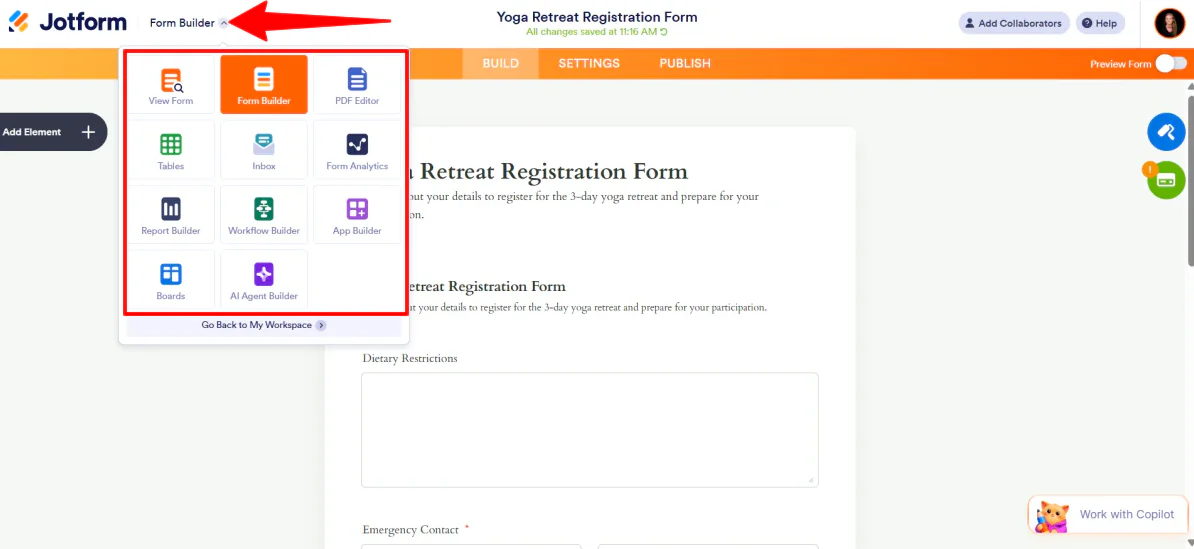
On the top left (next to the Jotform logo), I noticed a down arrow that revealed more features. I could view forms, access the PDF editor, and more.

There are even form analytics to track the performance of all my assets on a custom dashboard. The data is broken down by week, month, or all-time, and I was able to view the data based on traffic, device, platform, and location.
Overall, Jotform made it incredibly easy to turn my prompt into a professional form that worked in seconds. I found it easy to use, while still giving me the flexibility to handle the logic, payments, and customization without any hassle.
Top 3 Jotform Alternatives
Here are the best Jotform alternatives I’ve tried:
Fillout
The first Jotform alternative I’d recommend is Fillout. I built a form with it, and it’s one of the most intuitive platforms I’ve used for creating smart forms, surveys, and quizzes. It comes complete with conditional logic, analytics, and 50+ integrations.
Both Jotform and Fillout are no-code form builders, so either one works well for data collection and workflow management.
But where Fillout really separates itself from Jotform is design flexibility. You can fully white-label your forms, customize themes, swap fonts, and add your own logo. There’s even custom CSS if you want to go deep, and it integrates nicely with tools like Notion, Google Sheets, HubSpot, Salesforce, and Slack.
Meanwhile, Jotform is the stronger pick for AI form building, workflow automations, PDF generation, and HIPAA-compliance.
For forms with better design flexibility that integrate with your existing tools, choose Fillout. For advanced AI features, powerful automations, excellent data security, and more integrations, choose Jotform.
Read my Fillout review or visit Fillout!
Formaloo
The next Jotform alternative I’d recommend is Formaloo. I tested it myself, and it’s one of the more impressive no-code platforms out there. You can build smart forms, branded surveys, dashboards, and even custom business apps, all with AI baked in.
Both Jotform and Formaloo are solid no-code form builders, so either works well for data collection and workflow automation.
But where Formaloo really stands out is its AI personalization. Its forms can remember users, adapt questions in real time, pre-fill known information, and auto-save progress so incomplete submissions aren’t lost forever.
I also loved how clean the dashboard was. And with 200+ templates across almost every industry, you’re rarely starting from scratch.
Meanwhile, Jotform has the edge in advanced automation and AI agents for form guidance and interactivity.
For forms that adapt to each user, surface richer data, and deliver deeper AI insights, choose Formaloo. For deeper automations and more robust integrations, choose Jotform.
Read my Formaloo review or visit Formaloo!
Formless by Typeform
The final Jotform alternative I’d recommend is Formless by Typeform. It’s an AI platform that flips the traditional form experience on its head. Instead of static fields, you get interactive, conversational forms that are engaging and feel personal.
Both Jotform and Formless are no-code builders, so either one works for data collection, workflow automation, and improving how users interact with your content.
But where Formless really separates itself is the conversational AI experience. You can train the AI on your own data, it responds to users in 120+ languages, and the whole thing feels more like a two-way chat than a boring form.
Meanwhile, Jotform is the better option for advanced form logic, more robust workflow automations, PDF generation, AI agents, and more native integrations.
For forms that feel alive, personal, and genuinely engaging, try Formless by Typeform. But if you need robust business workflows, excellent security, and full AI form customization, choose Jotform.
Jotform Review: The Right Tool For You?
Building my 3-day yoga retreat registration form with Jotform was a smooth and effortless experience. I gave it my prompt, and the AI generated a fully structured form (conditional logic, payment collection, and all) in seconds.
On top of that, editing was effortless. I could ask the AI to make changes for me, or add elements by dragging and dropping them right onto the form. Once everything was in place, the publishing options gave me everything from aect link to an embeddable form to a full AI agent.
If you want a no-code form builder that combines building with AI, workflow automation, payment integrations, and solid security, Jotform is hard to beat. But if you’re interested in the best Jotform alternatives, here’s what I’d recommend:
- Fillout is best for full design flexibility, eye-catching forms, and seamless integration with tools like Notion, HubSpot, and Google Sheets.
- Formaloo is best for personalized forms that remember users, adapt dynamically, and surface deeper insights from your data.
- Formless by Typeform is best for creating interactive forms that feel like a conversation, support multiple languages, and provide highly engaging user experiences.
Thanks for reading my Jotform review! I hope you found it helpful.
Jotform offers a free plan with every feature included. You can generate 5 forms with 100 monthly submissions. Try it for yourself and see how you like it!
Frequently Asked Questions
How trustworthy is Jotform?
Jotform is a legitimate online form builder trusted by companies like Adobe (ADBE ) and Red Bull.
What do people use Jotform for?
Jotform makes it easy to create registration forms, surveys, and applications across industries like education, non-profits, and healthcare.
What is better, Google Form or Jotform?
Jotform is generally better than Google Forms if you want more features, customization, and automation. Google Forms is simpler and free for basic use.
Is Jotform actually free?
Yes, Jotform’s free Starter plan includes every feature and lets you create 5 forms, 100 monthly submissions, 100 MB of storage, and 500 total submissions. It’s perfect for small projects or individual use.