AI Tools 101
Narration Box Review: I Made Expressive AI Voiceovers

 Add Unite.AI to your preferred sources on Google
Unite.AI may receive compensation when you use links to products we review. This does not influence our editorial evaluations. Read our affiliate disclosure.

Have you ever finished writing a script, only to realize the hardest part was still ahead: recording the voiceover? Getting the delivery right, sounding natural, and re-recording mistakes can quickly turn a simple project into a much bigger task.
That’s why AI voice tools have become so enticing for creators. According to GlobalNewswire, the global text-to-speech market is expected to continue growing rapidly (from USD 4 billion in 2024 to USD 7.6 billion by 2029) as more businesses and creators look for faster ways to produce audio content without hiring voice talent for every project.
But not every AI voice generator feels like a real production tool. Many simply turn text into speech and leave you with limited control over how the final audio sounds.
That’s where Narration Box takes a different approach. Instead of being just a text-to-speech tool, it focuses on AI voice production with features like voice cloning, emotional tags, and a library of over 1,500 AI voices across 80+ languages and accents.
In this Narration Box review, I’ll share my experience creating a multi-speaker project, and whether it’s worth using for YouTube videos, podcasts, audiobooks, courses, and other long-form content.
Verdict
Narration Box is a strong AI voice platform with realistic voices, voice cloning, and expressive controls for creators and teams. While some features require paid plans, it’s a solid option for long-form narration, audiobooks, and scalable audio production.
Pros and Cons
- 1,500+ AI voices across 80+ languages and accents.
- Create an AI voice clone in 10 seconds to resuse a consistent voice across projects.
- Emotional tags (like “whispering” and “laughing” for more expressive AI voiceovers.
- Built for long-form narration, audiobooks, courses, and video narration.
- Supports creators and teams that need fast audio production at scale.
- The voices are expressive and sound realistic.
- Easy to use with a user-friendly interface.
- Voice realism can vary depending on the voice and use case.
- Some advanced features (like higher quality exports and no watermarks) are limited to paid plans.
- Voices sound realistic but may not have the same nuance as a professional narrator.
- If you only need occasional simple text-to-speech, it may be more tool than you need.
- Occasional playback issues, including emotion tags being read aloud instead of applied.
- Custom pronunciation only available for Enbee 1 Voices.
- The free plan is limiting (only 500 words).
What is Narration Box?
Narration Box is not just an AI voice generator; it’s an AI voice production platform. That word “production” matters.
It’s not a “type text, get robot voice” tool. It’s built around the idea that you’re actually producing something, whether that’s a video voiceover, a course, a podcast, or an audiobook, and you need control over how it sounds, not just that it sounds like a person.
You can fine-tune things like emotion, pacing, pronunciation, and pauses to get the delivery just right. That extra level of control makes it feel less like generating a voice and more like directing a real narrator.
And when you pair that with a library of more than 1,500 AI voices across 80+ languages and accents, there’s a lot of flexibility to experiment with. The company has also introduced a newer model called Enbee V2, which is designed specifically for expressive narration and long-form audio while still letting you guide the delivery with instructions.
3 Core Offerings: Text-to-Speech, Voice Cloning, Audiobook Creation
Its core features can be broken down into three:
- Context-Aware Text-to-Speech: The AI automatically adjusts tone, emotion, and pacing to match what’s being said, making the narration sound much more natural.
- AI Voice Cloning: Create a digital version of your own voice from a short recording and use it across different projects without having to record everything yourself.
- Built-In Audiobook Creation Tools: Turn your written content into an audiobook with tools designed to handle the entire creation process in one place.
Who is Narration Box Best For?
Narration Box is best for those that need humanlike AI voiceovers without hiring voice talent or spending hours recording:
- YouTubers can create natural-sounding voiceovers for Shorts, tutorials, demonstrations, and multilingual videos without having to manually record anything.
- Podcasters can use AI voices or voice clones to turn scripts, newsletters, articles, and show notes into audio that’s ready for a podcast with multiple speakers.
- Educators can turn lesson plans and course content into narrated audio with AI voices or voice clones.
- Authors can create audiobooks with consistent narration from start to finish, making them easy to listen to for hours.
- Founders can use realistic AI voiceovers for product demonstrations, walkthroughs, and feature launches.
- Customer experience managers can create customer support audio like phone prompts, help guides, tutorials, and onboarding clips with AI voices rather than recording every message manually.
- Marketers can create audio for ads, social clips, promotions, and campaigns with multilingual AI voices.
- Filmmakers can use AI voices to create narration for trailers, pitch videos, and independent film projects.
- Enterprise teams can take advantage of role-based access, custom SLAs, and volume pricing to manage large-scale voice projects across teams.
- Game developers can create character voices, quest narration, tutorials, and localized dialogue without spending countless hours recording every line.
- Corporate communication teams can turn internal updates, training materials, and company announcements into professional audio in minutes.
- Media teams can quickly produce voiceovers for news recaps, explainers, and streaming content using AI voices and different accents.
- Accessibility teams can turn written content into audio, making information easier to consume for people who prefer listening or need screen-free options.
- Documentary creators can produce polished narration for history, nature, and educational series with AI voices that sound consistent from beginning to end.
Narration Box Key Features
Narration Box’s key features are AI text-to-speech voice generation, voice cloning, and a studio for editing narration with fine control over pacing, emphasis, pronunciation, and pauses.
- Large voice library with hundreds of 1,500 AI voices and 80+ languages and accents.
- Voice cloning to create a custom, reusable version of a voice from a sample.
- Audio tags control emotion and expression for more natural-sounding delivery.
- Editable blocks for organizing scripts and creating audio projects with multiple speakers.
- Import documents or text including entire Ebooks.
- Export to MP3, WAV, Opus, FLAC, or OGG.
Additional Tools
- Words-to-Minutes Audio Calculator: Estimate how long your audio will be based on your word count, helping you plan recordings and production timelines before you start.
- Audiobook Profitability Calculator: See potential costs, earnings, break-even points, and projected profits before investing time and money into creating an audiobook.
- ACX Compliance Checker: Check your audiobook files for key technical requirements like volume levels, background noise, audio quality, and formatting before uploading your chapters or samples.
How to Use Narration Box
Narration Box operates on a block-based system. Instead of forcing you to write a massive, flat script, it allows you to build your audio line-by-line, paragraph-by-paragraph. This makes complex edits, pacing adjustments, and multi-voice interactions incredibly simple.
Here’s how to create your first two-character dialogue:
- Sign Up for Narration Box
- Go to Text to Speech
- Add a Block
- Explore the AI Narrators
- Add a Script
- Add Another Block
- Choose Another AI Voice
- Add Another Script
- Preview the Voiceovers
- Export the Project
Step 1: Sign Up for Narration Box

Start by going to narrationbox.com and selecting “Signup.”
Step 2: Go to Text to Speech

From there, select “Text to speech.”
Step 3: Add a Block

Next, add a block. Each block acts like a single paragraph and contains its own independent text, assigned voice, and settings.
Step 4: Explore the AI Narrators

Click on the default voice profile (“Warren”) on your first block to open the library.
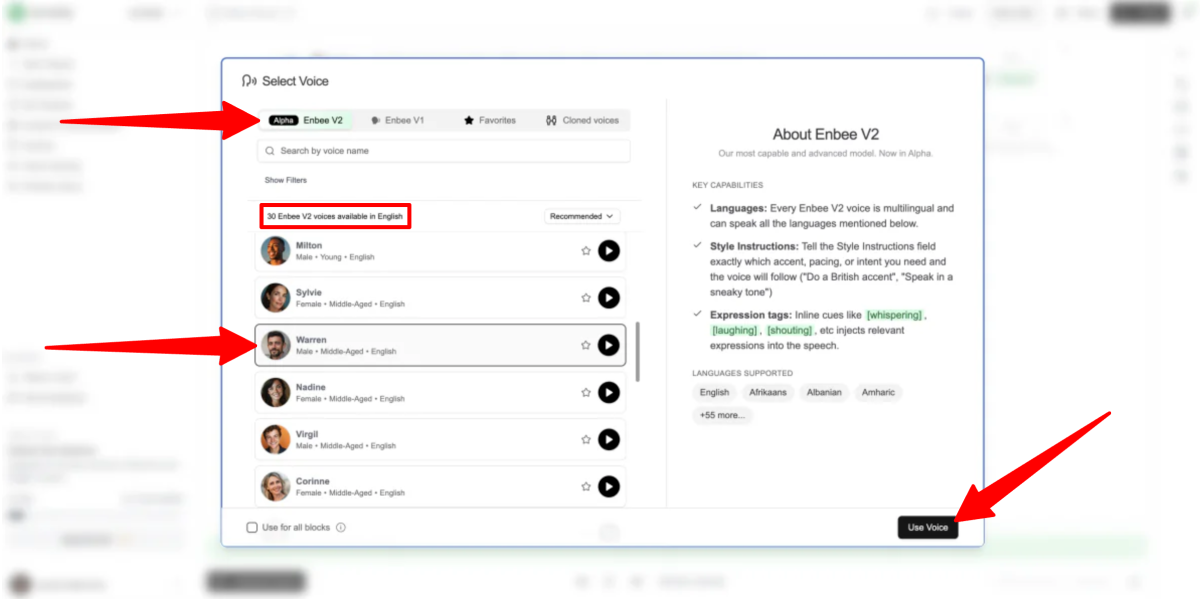
Browse through Narration Box’s library of AI Narrators.
There are 30 Enbee V2 voices available in English with a range of young to middle-aged male and female voices.
While Enbee V1 has a library of nearly 250 voices, Enbee V2 represents a major leap forward. The AI does a better job handling changes in emotion and tone. For example, switching from [whispering] to [excited] doesn’t just change the volume. The voice actually shifts its delivery, pitch, and pacing to sound more like a real narrator.
Enbee V1 features a library of expressive, pre-tuned narrators that rely on natural emotional curvature and intuitive reading. Enbee V2 represents the next generation of models, adding prompt-based style control, deep emotional variability, and multilingual capabilities.
For our opening line, let’s keep it on “Warren.”
Step 5: Add a Script

In the text field for your first block, type out your script:
“[whispering] This is a secret, but [excited] we are reviewing Narration Box for Unite.ai!”
To make the AI sound lifelike, use bracketed style tags to guide the performance.
Step 6: Add Another Block

Click “Add block” again to create a second text card directly below the first one.
Step 7: Choose Another AI Voice
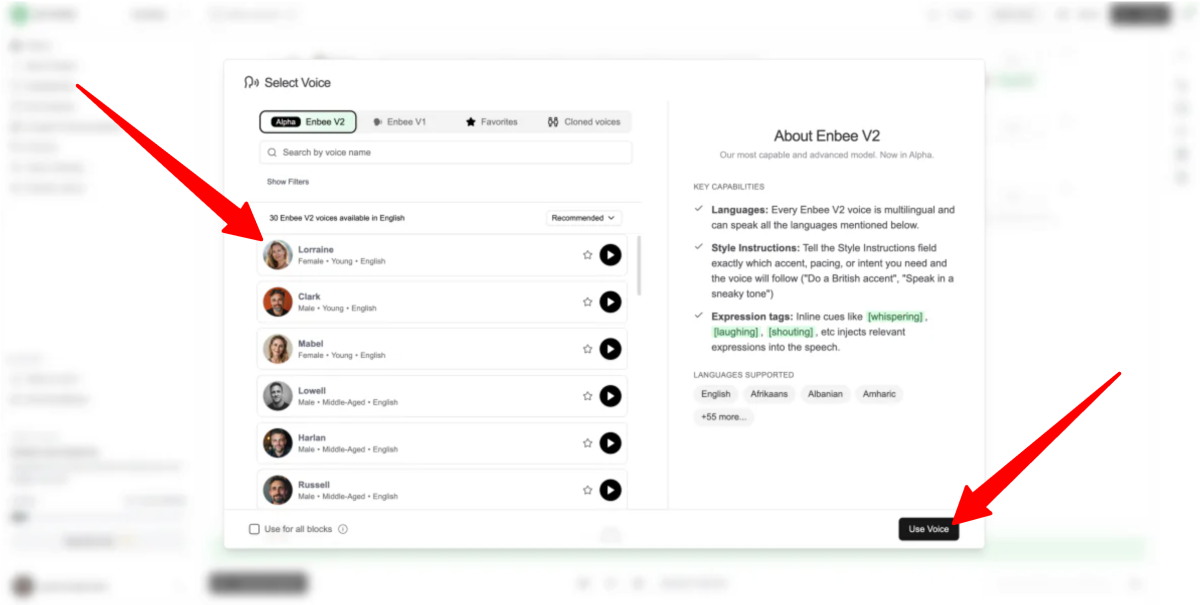
This time, choose a different voice (like Lorraine or another female narrator) to act as the second speaker.
Step 8: Add Another Script

Type their response in the new block:
“[laughs] That’s hilarious, dude, I had no idea!”
Step 9: Preview the Voiceovers

Hit the play button to process the text and render the voiceover in seconds.
Listen to the playback. If a transition sounds too abrupt, you can add a comma or an ellipsis to force natural pauses.
Step 10: Export the Project
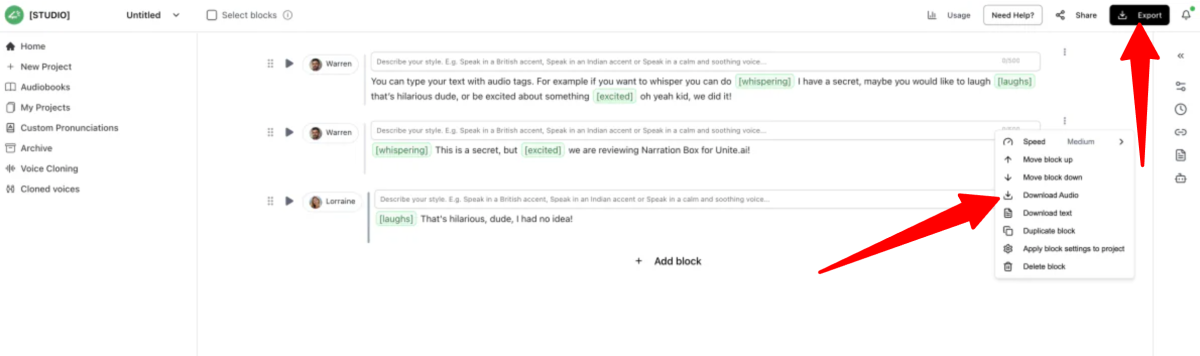
Once you are happy with how your conversation sounds, choose your export options.
You can download the individual blocks or export the entire merged project as a studio-quality MP3 or WAV file, ready to be dropped into your video editing software or podcast host!
Overall, Narration Box made creating AI voiceovers feel incredibly simple and approachable, especially with its block-based layout. Being able to seamlessly switch speakers between blocks makes it a viable tool for creating podcasts, video game dialogue, or multi-character audiobooks.
While it isn’t completely free of bugs (the occasional playback lag and the strict formatting requirements for emotional tags require a slight learning curve) it’s great for solo creators looking to bypass the costs of professional recording studios.
Top 3 Narration Box Alternatives
Here are the best Narration Box alternatives I’ve tried.
ElevenLabs
The first Narration Box alternative I’d recommend is ElevenLabs. It’s best known for offering the most realistic AI voices available, along with voice cloning, multilingual support (over 70 languages), and a user-friendly platform for creating high-quality voiceovers, podcasts, audiobooks, and more.
While both platforms make it easy to create realistic AI voiceovers, offer voice cloning, and support long-form projects, ElevenLabs stands out for its exceptionally lifelike voices. In my experience, they strike one of the best balances between sounding natural and expressive without feeling robotic or overly exaggerated.
ElevenLabs also has a larger creative suite with additional tools for video, images, music, sound effects, dubbing, and AI agents. I even saw that they recently introduced AI avatars for talking head videos. Meanwhile, Narration Box focuses more on the editing process with block-based editing, emotion tags, and features that make managing multiple speakers and long-form audio simple.
For an easy way to produce expressive voiceovers and manage larger narration projects, choose Narration Box. For the most realistic AI voices and a broader creative platform, choose ElevenLabs
Read my ElevenLabs review or visit ElevenLabs!
Murf AI
The next Narration Box alternative I’d recommend is Murf AI. It’s a powerful AI voice platform for creators, businesses, and developers who need realistic voiceovers, voice agents, dubbing, and scalable audio production.
While both platforms make it easy to create professional AI voiceovers that sound realistic, Murf AI stands out with its broader focus on business and content workflows. It offers AI voice agents for customer support, a fast TTS API for developers, AI dubbing for multilingual videos, and integrations with tools like Canva and Google Slides. Meanwhile, Narration Box is more focused on giving users the ability to really have control over their AI voice production with emotional tags, voice cloning, and long-form narration workflows.
Murf AI is better suited for businesses needing voice agents, API access, dubbing, and large-scale content production. Narration Box is a better choice for creators who want expressive voices, voice cloning, and more control over long-form narration.
Read my Murf AI review or visit Murf AI!
LOVO
The final Narration Box alternative I’d recommend is LOVO. It’s an AI voice and video creation platform that makes it easy to generate realistic voiceovers, clone voices, and create engaging content with over 500 voices in 100+ languages.
Both platforms have AI voice generation to turn text into natural speech for videos, audiobooks, podcasts, advertisements, and educational content.
However, Narration Box stands out for its long-form narration features and greater control over how voices sound. It has over 1,500 AI narrators, audiobook creation tools, a block-based editing workflow, and emotion tags to control tone, pacing, and delivery style.
Meanwhile, LOVO focuses more on content creation by combining AI voices with video editing, script writing, AI image generation, subtitles, and voice cloning through its Genny platform.
If you’re creating audiobooks or working on long-form narration projects that need detailed voice control, choose Narration Box. For creators who want to produce marketing videos, social media content, and other multimedia projects with AI voices, choose LOVO.
Read my LOVO review or visit LOVO!
Narration Box Review: The Right Tool For You?
Overall, Narration Box surprised me with how simple it made creating expressive AI voiceovers. I especially liked the block-based workflow because it made switching between speakers, adjusting delivery, and building longer audio projects feel much easier than a traditional text-to-speech tool.
The emotional tags were the standout feature. Being able to guide the AI with instructions like [whispering] or [laughing] made the voices feel more dynamic, even though the occasional playback issues and limited free plan kept it from feeling like a flawless experience.
If you’re creating audiobooks, YouTube videos, podcasts, courses, or other long-form content, Narration Box is worth trying. However, if you only need a quick text-to-speech tool for occasional use, it may offer more features than you need and you might want to consider these alternatives:
- ElevenLabs is best for creators who want the most realistic AI voices, advanced voice cloning, and a wider creative toolkit.
- Murf AI is best for businesses and teams that need AI voiceovers, dubbing, voice agents, and presentations.
- PlayHT AI is best for creators who want realistic voices with advanced controls for adjusting speed, emotion, and delivery.
Thanks for reading my Narration Box review! I hope you found it helpful. Sign up for Narration Box to get 500 words for free and see how you like it.
Frequently Asked Questions
What is a Narration Box?
Narration Box is a text-to-speech and voice cloning platform that turns written text into realistic audio. It’s popular with creators, authors, and educators because it helps them make professional voiceovers without expensive recording equipment.
Is the Narration Box free?
Narration Box offers a free plan but it’s limited to 500 text-to-speech words. For more usage, advanced features, and projects, you’ll need a paid plan.