AI Tools 101
Turbo AI Review: Great Study Notes, Unreliable Chatbot

 Add Unite.AI to your preferred sources on Google
Unite.AI may receive compensation when you use links to products we review. This does not influence our editorial evaluations. Read our affiliate disclosure.

Key PointsTurbo AI's notes and quizzes proved accurate but its chatbot confidently answered wrong…
View more
- Turbo AI's notes and quizzes proved accurate but its chatbot confidently answered wrong when details fell outside its notes.
- The free plan expired after a single lesson which undercuts Turbo AI as a trial before paying.
- Turbo AI's quiz generator over-relied on repeated calculations and skipped conceptual questions about the paper's design choices.
You finally sit down to study and realize the hardest part hasn’t even started yet. There’s a 40-minute recorded lecture, a 15-page reading, and a midterm next week. Before you can test yourself, you have to turn it all into notes, flashcards, and practice questions. That’s hours of work before any learning happens.
That’s the problem Turbo AI (formerly TurboLearn AI) is built to solve. Give it a YouTube lecture, a PDF, a slide deck, or a recording, and it turns it into notes, an interactive lesson, quizzes, flashcards, a podcast, and a chatbot.
The main thing I wanted to know if the output is accurate enough to study from. So I gave it an actual MIT lecture and a famous machine learning paper, then checked every example, quiz answer, and chatbot reply against the originals.
In this Turbo AI review, I’ll show you how it worked, where it impressed me, and where I think it still falls short. I’ll finish the article by comparing it to my top three alternatives: NotebookLM, Quizlet, and StudyFetch. By the end, you’ll know which tool is right for you!
Verdict
Turbo AI turns lectures and PDFs into mostly accurate notes, structured lessons, and quizzes with correct answers in about a minute. However, the free plan ran out after just one lesson, and Turbo’s chatbot confidently got key details wrong in two of my three questions about things its notes didn’t cover.
Pros and Cons
- Turned a 40-minute lecture into an 11-part lesson in under a minute.
- All examples in my notes matched the original lecture.
- Displays math equations and fractions correctly.
- All 21 quiz answers I checked were correct, with clear explanations.
- Explains why your answer was wrong when you make a mistake.
- Supports YouTube, PDFs, images, audio, and live recordings.
- Creates 10–50 flashcards and tracks your learning progress.
- Generates customizable AI podcasts with chapters and transcripts.
- Interactive lessons include practice questions, quizzes, and a voice tutor (“Ask Turbo”).
- Syncs notes across web, iOS, and Android.
- Free plan ran out after just one lesson for me.
- Chatbot got two of my three detailed questions wrong because it answers from Turbo’s notes, not your source file.
- Quizzes focus too much on calculations and repeat similar questions.
- Some quiz formulas had formatting errors, like a stray “\*”.
- The notes on the research paper sometimes exaggerated what the authors said.
- When I got a lesson question wrong, the feedback only showed the correct answer. I had to click “Explain in chat” to find out why.
- No public pricing page.
What is Turbo AI?

Turbo AI is an AI study tool that turns your course material into things you can study from. It was built by Rudy Arora and Sarthak Dhawan, two college students who struggled to take notes and listen to their teacher simultaneously.
In October 2025, TechCrunch reported that the app had reached 5 million users and eight-figure annual recurring revenue while staying profitable. The homepage now claims over 10 million learners worldwide.
It also has a new name. TurboLearn AI became Turbo AI, moved to turbo.ai, and kept the same accounts and apps.
From Note Generator to Lesson Builder

The biggest change since my original review is what happens when you upload something. You can upload PDFs, Word documents, YouTube videos, and lecture recordings, or add your own notes. Turbo used to give you a page of notes with buttons for quizzes, flashcards, and a podcast.
Now, the dashboard works more like a chat. You paste a link or drop in a file, Turbo tells you what it found, and you click “Generate Lesson.”
What comes back is a full study package built around a structured lesson:
- Learn: A step-by-step lesson split into sections, with warm-up questions, checkpoints, and a final quiz. It feels a lot like Duolingo, down to the XP counter.
- Notes: An editable document with headings, bullet points, rendered equations, and a key terms table.
- Quiz: Adaptive multiple-choice questions grouped by topic, with hints and explanations.
- Flashcards: Flashcards with key terms and definitions that track what you need to review.
- Podcast: A podcast-style conversation between two hosts about the material.
- Chat: An assistant that answers questions about your notes by text or voice.
Instead of reading a summary and hoping it sticks, you’re walked through the material and tested on it as you go.
Who is Turbo AI Best For?
Here’s who Turbo AI is best for:
- College students in courses with lots of lectures can turn each recorded lecture into notes, a lesson, and practice questions on the same day, rather than rewatching at 2x speed before the exam.
- STEM students can upload their course materials and get notes with properly formatted equations and step-by-step examples, making it a useful option alongside other AI math tools.
- Students who learn better by listening can turn a reading into a short podcast for the commute or the gym.
- High school students preparing for AP exams can turn class handouts and notes into quizzes and flashcards.
- Graduate students and researchers can turn dense papers into a guided lesson that explains the key ideas before they read the full paper.
- Professionals studying for certifications can turn training PDFs and recorded sessions into flashcards and quizzes without building them by hand.
Turbo AI is aimed squarely at students, with the homepage promising to help learners “ace their classes.” However, I think the AI note-taking side could also help professionals absorb training material or long documents quickly, but almost every feature is built around studying and testing yourself.
Turbo AI Key Features
Here are the key features that stood out to me:
- Generate Lesson: Turns any uploaded material into a lesson with multiple sections, warm-up questions, quick knowledge checks, and a final quiz. Both lessons I created had 11 sections and followed the same order as the original material.
- Notes Editor: Works much like Google Docs. You can change fonts, highlight text, add equations, see previous versions, and share notes with others in real time.
- Math & STEM Formatting: Displays equations and fractions in proper math formatting instead of just text, making the notes much easier to read.
- Adaptive Quizzes: Organizes questions by topic and keeps testing you until you’ve answered enough correctly. Questions you get wrong come back so you can try again.
- Explanations: Quiz answers come with an explanation that walks through the calculation or reasoning. When I chose a wrong answer on purpose, the explanation addressed my specific mistake.
- Flashcards: Create sets of 10, 20, 30, or 50 flashcards and give extra instructions about what to include. Cards move from New to Learning to Mastered as you study.
- AI Podcasts: Turns your study material into a podcast conversation. You can choose the language, pick two of five AI voices, set the length, and add instructions. Each podcast includes chapters and a full transcript.
- Chat with Your Notes: Ask questions about your notes in a side panel, bring in other documents using “@”, or speak directly to the AI with “Talk to Turbo.”
- Wide Input Support: Upload PDFs, PowerPoint presentations, other files, images, text files, and audio recordings. You can also paste YouTube links or record lectures right in the app.
- Cross-Device Sync: Access the same notes and lessons on the web, iPhone, or Android, so you can pick up where you left off.
Hands-On Testing: What Turbo AI Produced
I ran three tests on Turbo AI. For each one, I used material where I could check every answer against the original source.
Test 1: Turning a 40-Minute Math Lecture into Notes and a Lesson
For my first test, I pasted in the first lecture of MIT’s famous Linear Algebra course by Gilbert Strang. It’s 39 minutes and 49 seconds long, and much of it happens on a chalkboard.
That makes it a tough test for any YouTube summarizer, because the tool has to rebuild the math from what Strang says out loud.

In under a minute, Turbo built an 11-part lesson that followed the lecture in order. It started with the matrix form, then moved to the row picture, the column picture, and the 3D example. It finished with the “can we solve for every b?” question and matrix-vector multiplication.

The notes were a couple hundred words, with emoji headings and a key terms table at the end.
I checked every worked example against MIT’s official transcript:
- The 2×2 system (2x − y = 0, −x + 2y = 3) and its solution (1, 2): correct.
- The column picture, 1·(2, −1) + 2·(−1, 2) = (0, 3): correct.
- The 3×3 matrix and the right-hand side (0, −1, 4), giving the solution (0, 0, 1): correct.
- The modified right-hand side (1, 1, −3), giving the solution (1, 1, 0): correct.
- The matrix-vector product that equals (12, 7), worked out both by rows and by columns: correct.
It even added a point that Strang doesn’t mention, (0, 3/2) on the second line, and that was correct too.

Then I started the interactive lesson. It opened with a short warm-up and asked about my goal and how familiar I was with the topic. I answered one of the questions wrong on purpose.

My Take
These are the most accurate AI study notes I’ve gotten from a math lecture. Every number I checked matched, and the equations were formatted cleanly enough to print.

My only complaint about the notes is that they reuse the same labels for two different things. In one line, “c₁” and “c₂” are the numbers you multiply by, and in the next, they’re the columns of the matrix. That could trip up a beginner.
The lesson was well organized, but its feedback on my wrong answer only said “Not this time” and showed the correct answer. To find out why my answer was wrong, I had to click “Explain in chat.”
This was also the last thing I could do for free. When I uploaded a PDF for Test 2, Turbo told me I’d used all my free lessons.

Test 2: Turning a Research Paper into Quizzes & Flashcards
After upgrading to premium, I uploaded Attention Is All You Need, the 15-page Google paper that introduced the Transformer architecture behind today’s large language models. It’s full of equations, tables, and training details, so it’s a fair test of whether Turbo can handle technical material beyond what a typical PDF summarizer does.
I generated a quiz and a set of 20 flashcards.

The lesson took about a minute. The quiz is adaptive, so it took 21 questions for me to “master” 15.
I recalculated every answer. Every answer key was correct, including the trickier ones:
- The learning rate at step 2,000 under the paper’s warm-up schedule: 0.00035. My calculation was 0.000349.
- A sinusoidal positional encoding value: 0.73. My calculation was 0.7268.
- The parameter count of a multi-head attention block: 1,048,576.

The explanations show how it works. When I picked a wrong answer on purpose, the explanation addressed my specific mistake.
However, there were problems.
Seventeen of the 21 questions were calculations, and several repeated the same concept. Turbo asked me to divide the model size by the number of heads three times, compared attention and convolution costs twice, and asked about label smoothing twice. I got almost nothing about why the authors made their design choices or what their results showed.
The first question also had a formatting glitch: a stray “\*” appeared in red in the middle of the formula. Another question showed “+\infty” as raw code instead of the infinity symbol.

The 20 flashcards were all definitions of terms like masked self-attention, residual connection, and label smoothing. Every one was accurate, and the formulas rendered properly.

My Take
For drilling formulas and definitions, the quizzes and flashcards were useful. I also didn’t find a single answer key that was wrong. However, the quiz felt like a math worksheet rather than a check on whether I understood the paper or not.
If you’re studying for a conceptual exam, open Quiz Settings and add your own topic (for example, “design choices and results”) or turn on short-answer questions to get away from pure calculations.
I also spotted two overstatements in the notes: They said the Transformer needed about one-tenth of the computing power of earlier models, but the paper says it cost a fraction of competing models and “less than 1/4” of the previous state of the art for English-French. The notes also said sinusoidal encodings “extrapolate better” than learned ones, when the authors only suggest they might. Both are small, but you’d lose marks for repeating them in an exam.
Test 3: Generating a Podcast & Questioning the Chatbot
For my final test, I generated a short podcast from the same paper, using the voices “Rachel” and “Cam” and these instructions:
“Explain this paper for a first-year student with no machine learning background. Use one everyday analogy for attention, and finish with the paper’s actual translation results (BLEU scores) and training cost.”
Then I asked the chatbot three questions:
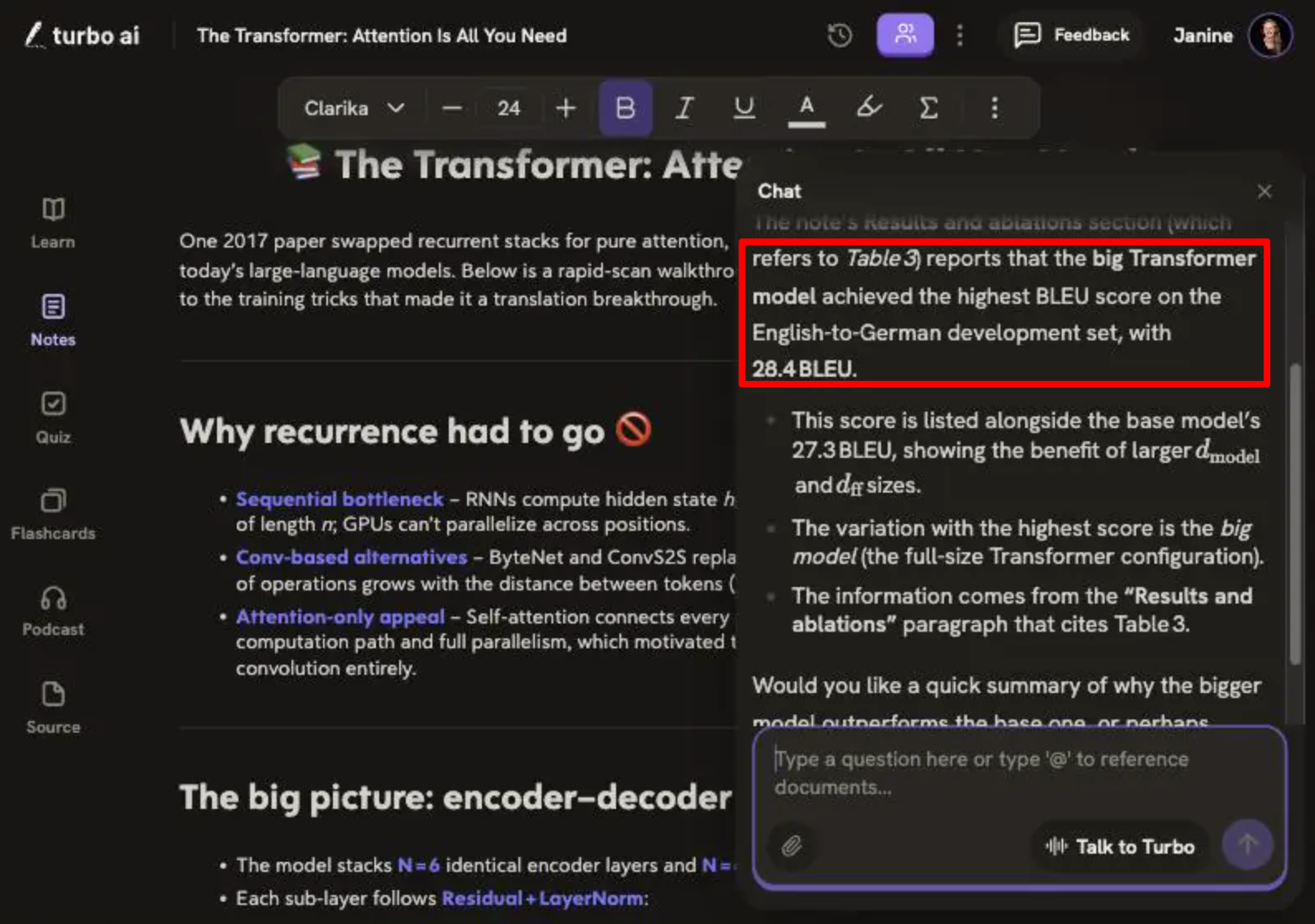
- Which variation in Table 3 got the highest BLEU score on the English-to-German dev set?
- A trick question: what ImageNet accuracy did the authors report? (They didn’t test on ImageNet).
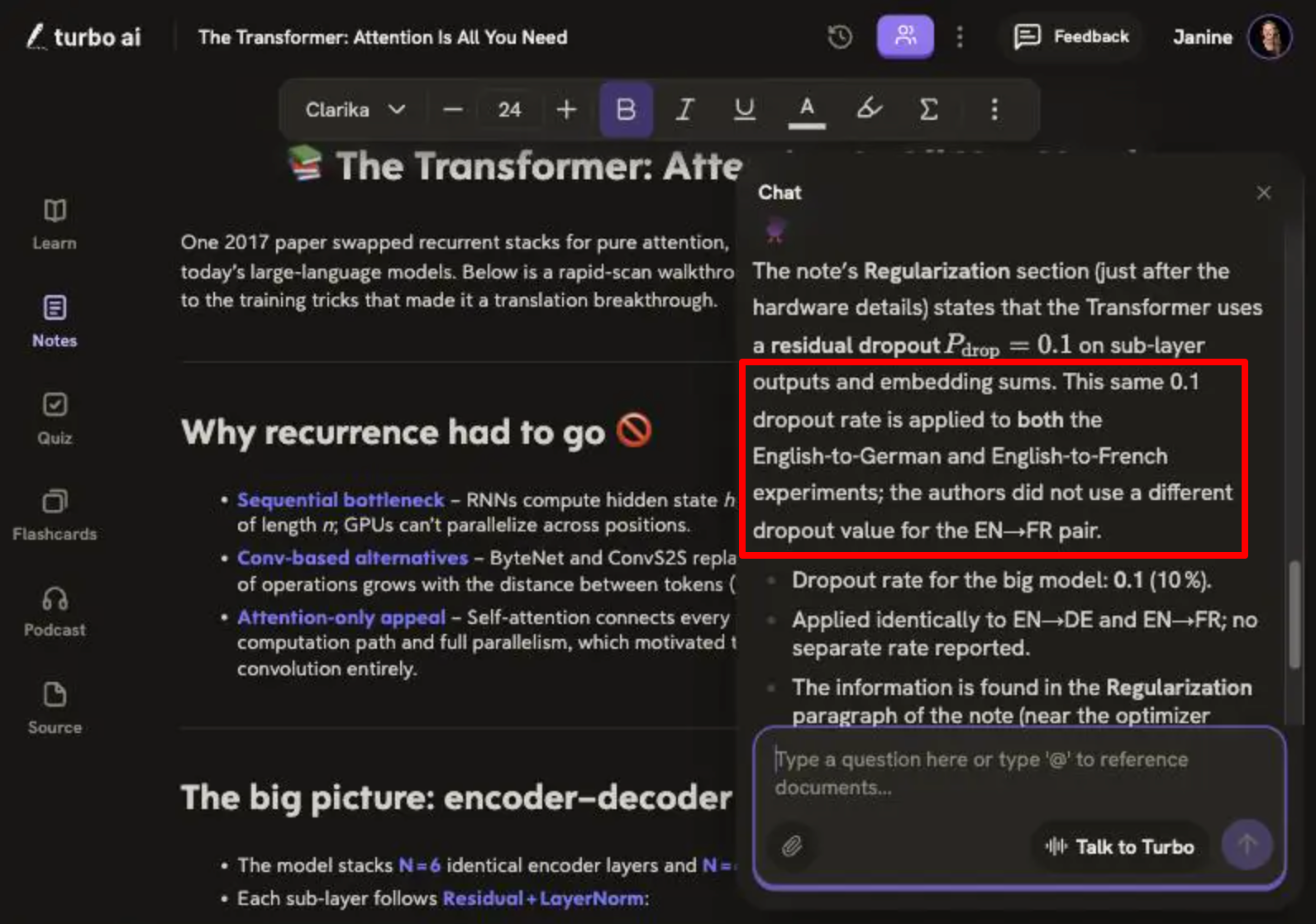
- What dropout rate did the big model use for English-to-French, and was it different from English-to-German?

The podcast was ready in under three minutes and ran 4 minutes and 14 seconds, split into six chapters. It stayed beginner-friendly throughout and ended with the correct BLEU scores (28.4 for English-German and 41.8 for English-French). Rachel and Cam sounded incredibly realistic, and neither voice came across as robotic.
The chatbot results were mixed:
- Table 3: It named the right model (the “big” Transformer) but gave the wrong score. It said 28.4, which is the test-set score from Table 2. The dev-set score in Table 3 is 26.4.
- ImageNet: It passed. It said the paper reported translation results and never tested the model on ImageNet, then pointed me to later Vision Transformer work.
- Dropout: It said the big model used 0.1 for both language pairs and that “no separate rate [was] reported.” Only half of that is right. The English-French model did use 0.1, but the paper says that was “instead of 0.3,” the rate used for English-German.
My Take
The podcast followed most of my instructions, but not all of them. I asked for one everyday analogy for attention and got three analogies overall: reading a book word by word, a group project, and highlighting. The group-project analogy actually describes parallel processing rather than attention. And at the end, Rachel thanks her co-host as “Kim” instead of Cam.
The chatbot was the bigger concern. Both of its wrong answers said they came from Turbo’s own notes, not the PDF. When a detail isn’t in the notes, it doesn’t say “I’m not sure.” It fills the gap with a confident wrong answer. For a student, that’s worse than no answer.
Results & Output Quality
Across all three tests, Turbo AI’s notes, quizzes and flashcards were much more reliable than its chatbot.
- Accuracy: The notes and quizzes were impressively accurate. Every example from the lecture and every quiz answer key I checked was correct. The errors appeared in places where Turbo summarized or interpreted: rounding “less than 1/4” down to “one-tenth,” and the chatbot mixing up tables.
- Speed: Lessons took under a minute for the lecture and about a minute for the paper. The podcast took under three minutes.
- Professionalism: The math formatting is the best I’ve seen in an AI note-taker. The notes from the lecture could be handed to a classmate as they are. The notes Turbo made from the research paper showed some formulas as code blocks rather than rendered math, so they didn’t look quite as clean.
- Editing required: For the lecture notes, almost none. For the paper notes, I’d fix the two overstatements. For quizzes, every answer was correct. However, I’d want a better mix of questions with fewer calculations.
- Consistency: The quiz repeated the same few calculation types, and the podcast ignored the “one analogy” instruction. It gives you good results right away, but getting exactly what you want takes a bit more work.
- Reliability: This is where Turbo AI falls short. Like many AI chatbots, it sounds sure of itself even when it’s wrong. Two of my three questions came back wrong, and nothing in the answers signaled any uncertainty. Use the notes and quizzes, but check anything important the chatbot tells you against the source.
How to Use Turbo AI

Here’s the Turbo AI workflow that gave me the best results:
- Add your source. Paste a YouTube link or drop a file onto the dashboard. If you only care about part of it, type that in before generating.
- Generate the lesson. Click “Generate Lesson” and wait about a minute. Skim the Contents list to make sure the sections match your material.
- Read the notes first. Open Notes and check any numbers or claims you’ll need for an exam. Fix anything that’s off directly in the editor.
- Quiz yourself. Start the quiz, use the hints sparingly, and open the explanations whenever you guess. Use Quiz Settings if you want more conceptual questions.
- Drill with flashcards and podcasts. Generate flashcards for definitions, then a podcast with instructions for review on the go.
Top 3 Turbo AI Alternatives
Here are the best Turbo AI alternatives I’ve tried that I’d recommend.
NotebookLM
NotebookLM (renamed Gemini Notebook in July 2026) is the best alternative if accuracy matters more than structure. Its chat is grounded in your sources and links its answers back to the exact passage. That’s what Turbo’s chatbot was missing: it cited its own notes instead of the paper, and gave me a Table 2 score when I asked about Table 3.
NotebookLM can also make flashcards, quizzes, audio and video overviews, mind maps, and slide decks. It handles up to 50 sources per notebook for free, so it’s better for a course than a single lecture. What it doesn’t have is Turbo’s guided lesson or adaptive quiz flow.
Choose NotebookLM if you want to research and question your material, and Turbo if you want to be taught and tested on it.
Read my NotebookLM review or visit NotebookLM!
Quizlet
My next Turbo AI alternative is Quizlet. It’s a solid choice if your main goal is memorizing key terms and drilling yourself with flashcards and practice questions.
Its Learn mode uses different question formats, like multiple choice, true or false, and written questions, to help you test your knowledge and remember what you’ve learned. Its library of user-made study sets means someone has often already built flashcards for your exact course or textbook.
Quizlet can generate study material from your notes and documents, but it doesn’t take a YouTube lecture and rebuild it into structured notes with rendered equations the way Turbo did in my first test.
Choose Quizlet for long-term memorization on a budget, and Turbo for turning raw lectures into complete study packages.
StudyFetch
StudyFetch is Turbo AI’s closest competitor. Like Turbo, it turns PDFs, slides, YouTube videos, and lecture recordings into notes, flashcards, and quizzes. It even has an AI tutor named Sparky to keep you motivated.
Sparky answers from your uploaded material and can talk with you by voice. StudyFetch also offers an essay grader and AI explainer videos that Turbo doesn’t have. Turbo’s advantage is its guided lesson format and the clean math formatting I saw in my tests.
Choose StudyFetch if you want an AI tutor you can ask questions anytime and help while you’re in class. Otherwise, choose Turbo if you prefer structured lessons and quizzes.
Turbo AI Review: The Right Tool For You?
After testing Turbo AI on a math lecture and a dense research paper, I came away impressed with the parts that matter most for studying.
The notes from Strang’s lecture were accurate down to every matrix and solution. Every quiz answer key I recalculated was correct, and the explanations walked through the math properly.
What surprised me most was the new lesson format. Turbo doesn’t just summarize your material anymore. It teaches it back to you in order, with checkpoints along the way.
What disappointed me was the chatbot. It answered two of my three questions with confident mistakes. That’s because it relied on its own notes instead of the paper. I also didn’t like the quiz’s heavy focus on calculations, and I found that the free plan barely lets you try the product.
I’d recommend Turbo AI to college and AP students in lecture-heavy or STEM courses who will actually use the lessons and quizzes every week. At that level of use, the accuracy of the notes and quizzes justifies the price.
Thanks for reading my Turbo AI review! I hope you found it helpful. If you want to try Turbo AI for yourself, you can sign up for free and see what it can build for you.
Frequently Asked Questions
Is Turbo AI the same as TurboLearn AI?
Yes. TurboLearn AI rebranded as Turbo AI and moved to turbo.ai. Your account, notes, and apps carried over, and old turbolearn.ai links redirect automatically.
Is Turbo AI free?
Turbo AI has a free plan, but it seems to be quite limited. In my testing, the free account let me generate one lesson with notes and study tools before asking me to upgrade.
Is Turbo AI accurate?
In my tests, the notes and quizzes were very accurate. Every example from the MIT lecture I gave it and every quiz answer key I checked was correct. However, the chatbot was less reliable. It answered two of my three questions about a research paper incorrectly. Double-check anything important it tells you.
Is Turbo AI better than NotebookLM?
It depends on how you study. Turbo AI is better for guided lessons, adaptive quizzes, and math-heavy notes. NotebookLM is better for questioning your sources, because its answers cite the exact passage.