
AI Tools 101
Sloyd AI Review: Ditched Blender, Got 3D Models in Minutes

Unite.AI is committed to rigorous editorial standards. We may receive compensation when you click on links to products we review. Please view our affiliate disclosure.
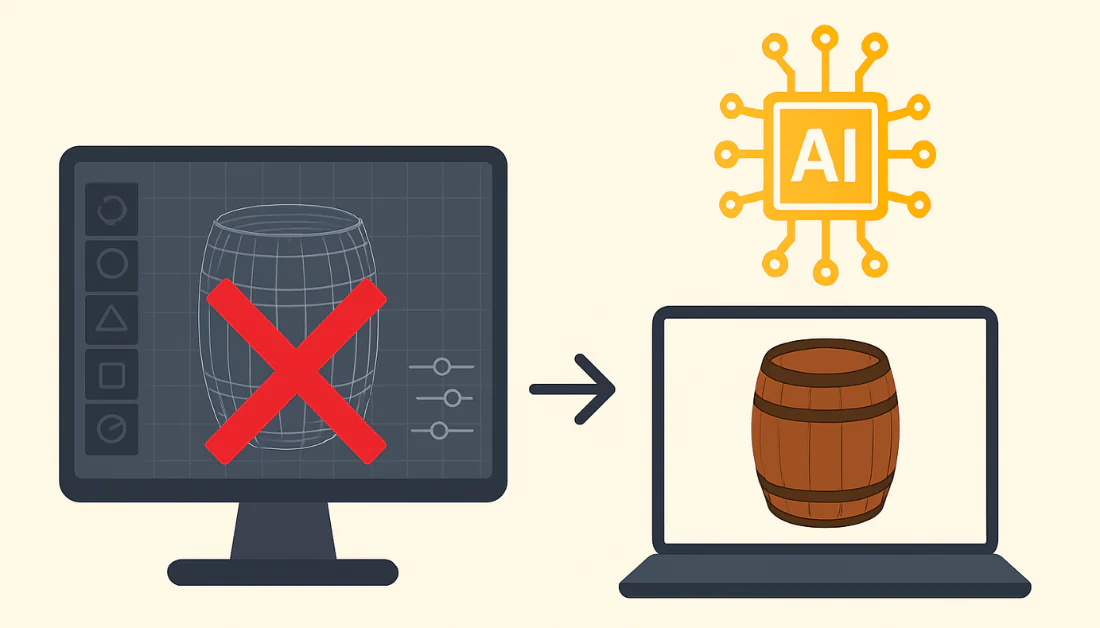
If you’ve ever tried learning Blender from scratch as I have, you know just how brutal the learning curve can be. I spent countless hours adjusting shapes, fixing surfaces, and trying to make everything look right, only to end up frustrated and exhausted.
That’s why I was excited to try Sloyd AI. Unlike Blender, Sloyd lets you skip the technical headaches. Just type what you want, and in minutes you’ll have a clean game-ready 3D model. It’s fast, easy to use, and perfect for anyone who wants high-quality 3D assets without the training.
In this Sloyd AI review, I’ll discuss the pros and cons, what it is, who it’s best for, and its key features. Then, I’ll show you how I used it to generate a detailed 3D model of a treasure chest.
I’ll finish the article by comparing Sloyd with my top three alternatives (Tripo, Meshy, and Spline). By the end, you’ll know if it’s right for you!
Verdict
Sloyd AI makes creating high-quality 3D models quick and easy for anyone. However, it’s less suitable for detailed edits, and the free version is limited.
Pros and Cons
- Creates high-quality 3D models quickly, even with simple prompts
- Clean topology, UVs, LODs, and PBR materials
- Easy to use in a browser with sliders to make edits
- Exports to OBJ, GLB, and STL
- Supports SDK and API for integration
- Hundreds of templates to customize
- The free version is limited
- Challenging for more detailed, specific edits
- More limited than traditional tools like Maya or Blender
What is Sloyd AI?

Sloyd AI is an online tool that uses AI to quickly create high-quality 3D models. Rather than manually pushing vertices around for hours, you’re working with AI that understands what you’re trying to create from the start.
The platform was founded in Oslo, Norway, in 2021 by Andreas Edesberg, Avi Latner, and Øyvind Sørøy. They identified a problem: 3D modeling was too time-consuming and technical for many creatives who just wanted assets for their projects. That’s why they built Sloyd AI.
Sloyd AI vs. Blender & Maya
Here’s where Sloyd separates itself from programs like Blender or Maya. Those traditional tools are powerful, but they’re designed for manual modeling. You’re sculpting every detail and adjusting every parameter.
Sloyd flips that entire approach. Rather than starting with a blank canvas, you type in what you want (e.g., “wooden barrel”), and the machine learning algorithms generate something game-ready in seconds.
Sloyd AI Mission
Sloyd’s entire mission is about democratizing 3D content creation. In other words, creatives shouldn’t need to become technical experts just to bring their ideas to life.
It may not replace professional 3D artists who are doing high-end work, but it’s a game-changer for rapid prototyping and game development.
Who is Sloyd AI Best For?
Here’s who Sloyd AI is best for:
- Game developers can use Sloyd AI to quickly make low-poly assets and environments.
- Architects and interior designers can use Sloyd AI to visualize buildings, furniture, and room layouts.
- Product designers can use Sloyd AI to create 3D prototypes.
- 3D printers can use Sloyd AI to generate print-ready models and export them as STL files.
- VR/AR developers can use Sloyd AI to add 3D content through its APIs.
- Educators and students can use Sloyd AI to learn and teach 3D design.
- Hobbyists and beginners can use Sloyd AI to try 3D creation and turn ideas into models using text prompts.
Sloyd AI Key Features
Here are Sloyd AI’s key features:
- Creates 3D models with AI using text prompts
- Builds models in under two minutes
- Adjust models with sliders
- Automatically adjusts UVs
- Automatically creates LODs
- Includes PBR (Physically Based Rendering) materials
- A large library of templates
- 10+ styles from realistic to stylized
- Exports to OBJ, GLB, and STL
- Works with game engines, AR/VR, and 3D printing
- Provides an SDK and API for adding it to apps
- Turns images into 3D models
- Uses AI to texture models
How to Use Sloyd AI
Here’s how I used Sloyd AI to generate a detailed 3D model of a treasure chest:
- Access the Text-to-3D Tool
- Adjust the Settings
- Generate a Model
- View the Object as a Wireframe
- View the Details
- Export, Animate, Auto Rig
Step 1: Access the Text-to-3D Tool
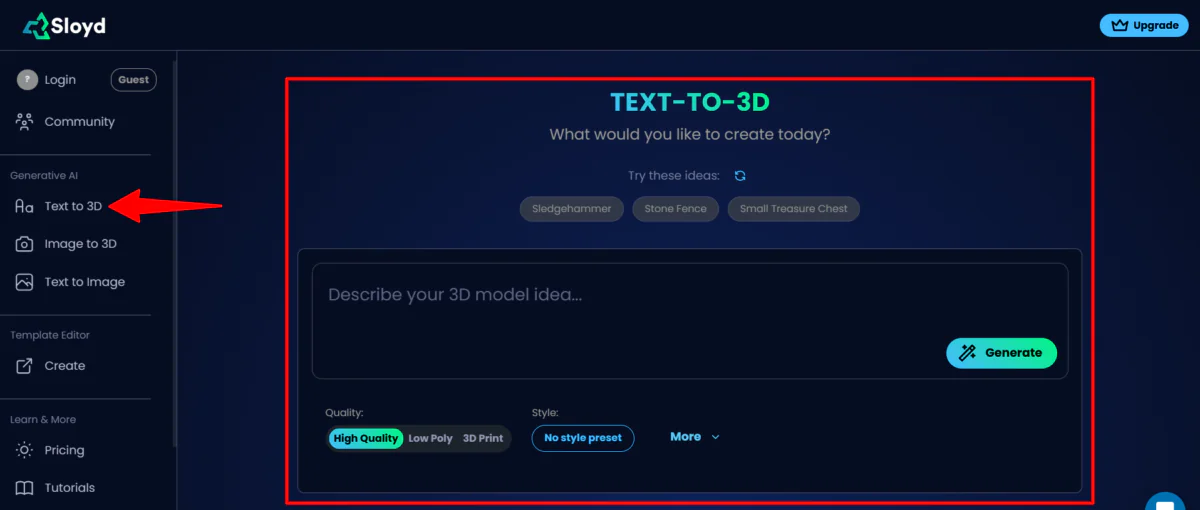
I started by going to app.sloyd.ai, where I was immediately directed to the Text-to-3D tool. I could create an account or start generating as a guest. I decided to start generating immediately.
Step 2: Adjust the Settings
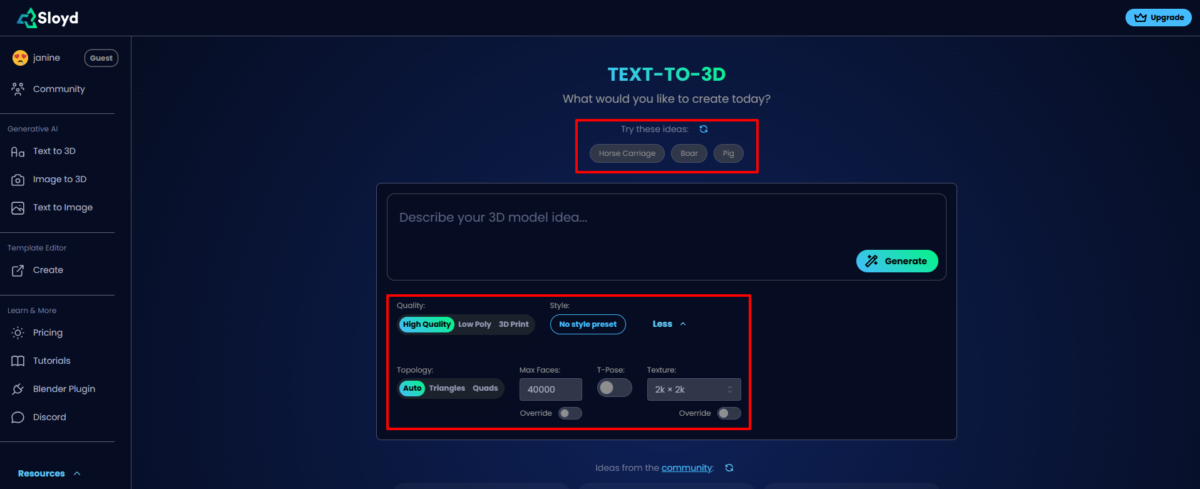
At the top were some prompt ideas. Below the prompt field were different quality levels, styles, topologies, and textures.
Step 3: Generate a Model

I kept everything on default, added “Small Treasure Chest” to the prompt field, and hit “Generate.” Feel free to be as descriptive as you want (the 3D models will come out looking great even if you only give them a few words).

Immediately, Sloyd got to work.

About a minute or two later, my treasure chest had been generated. It came out looking great, and I was impressed by how detailed it was. I clicked and dragged it with my mouse to see all the angles.
Step 4: View the Object as a Wireframe

At the bottom left was a toggle to switch the chest from a 3D model to a wireframe. This helps you see the structure more clearly.
Step 5: View the Details

On the right panel were the numbers of vertices and faces, along with a detailed version of the prompt.
Step 6: Export, Animate, Auto Rig

Below that was the option to download the 3D model as a GLB file immediately (along with the option to download as STL, FBX, open Sloyd with the Blender plugin, or access web embeds). There was also the option to “Animate” and “Auto Rig” my object.
To export the 3D model and access the editing toggles (LOD, Taper, Size, etc.), you’ll need to upgrade to one of the paid plans. But that’s how easy it is to start generating 3D models with text prompts using Sloyd!
Overall, Sloyd AI made creating a 3D model quick and easy. The process of generating and viewing the treasure chest was smooth and surprisingly detailed. It shows how powerful Sloyd is for quick 3D design.
Top 3 Sloyd AI Alternatives
Here are the best Sloyd AI alternatives:
Tripo
The first Sloyd AI alternative I’d recommend is Tripo. It’s another 3D AI tool that allows you to generate, segment, edit, texture, and rig models.
On the one hand, Tripo stands out with its advanced editing tools: Intelligent Segmentation, Magic Brush texturing, Low-Poly Optimization, and Uni-Rig. It gives you far more control over refining your assets than Sloyd.
Meanwhile, Sloyd focuses on speed and simplicity. It offers quick generation, clean topology, UVs, LODs, and sliders that make customizing models easy.
Choose Tripo for a workspace that lets you generate, edit, and rig in one place. Otherwise, choose Sloyd AI for quick, clean, customizable models with an easy workflow.
Read my Tripo Review or visit Tripo!
Meshy
The next Sloyd AI alternative I’d recommend is Meshy. It delivers fast, high-quality 3D generation with a smooth workflow.
Meshy stands out with its wide range of generation modes: Text to 3D, Image to 3D, and Text to Texture. It also offers realistic PBR maps and the ability to handle complex geometry. Meanwhile, Sloyd excels at maintaining clean topology, UVs, LODs, and easy editing.
For fast AI-generated 3D models with impressive texturing and styles, choose Meshy. For cleaner meshes, tighter control, and quick browser editing, choose Sloyd AI.
Read my Meshy AI Review or visit Meshy!
Spline
The final Sloyd AI alternative I’d recommend is Spline. Spline is a platform where you can build interactive 2D and 3D experiences. You can design, animate, and ship scenes across the web, iOS, and Android.
Spline is a full creative environment. It comes with modeling tools, real-time rendering, animation timelines, and more. It also integrates with plenty of platforms like Webflow, Figma, and Notion. The best part is that you can create full interactive experiences, not just single models.
Meanwhile, Sloyd AI focuses on fast, clean asset generation. It generates 3D models from simple prompts, complete with topology, UVs, LODs, and PBR materials.
Choose Sloyd AI for quick 3D models made with AI. Otherwise, Spline is an excellent choice for interactive websites, product demos, and 3D experiences.
Sloyd AI Review: The Right Tool For You?
Overall, Sloyd AI surprised me with its simplicity. I’ve tried other 3D modelling tools (Tripo, Meshy, and Blender, to name a few). Sloyd is by far the easiest to use, producing detailed results.
I loved how quickly I could go from a single prompt to a detailed model without any of the usual headaches. The treasure chest I generated looked polished, the mesh was tidy, and the entire process felt smooth.
Sloyd is perfect for quick generations, testing ideas, or building assets without getting stuck in technical steps. But for heavy sculpting or high-level detail, I’d still recommend using traditional 3D tools or some of these alternatives:
- Tripo is best if you want full control with segmentation, texturing, and rigging in one space.
- Meshy is best for fast text-to-3D, image-to-3D, and strong texturing options.
- Spline is best for building interactive websites, product demos, or real-time 3D experiences.
Thanks for reading my Sloyd AI review! I hope you found it helpful.
Sloyd allows you to start generating with or without an account for free. Try it for yourself and see how you like it!
Frequently Asked Questions
Is Sloyd AI legit?
Yes, Sloyd AI is a legitimate company and software tool used for generating 3D models.
Is Sloyd AI free?
Yes, Sloyd AI is free. It offers a free Guest plan to try its features, but this plan has limitations. Upgrade to a paid plan for more features.
Is there an AI that can generate 3D models?
Yes, several AI tools can generate 3D models from text prompts or images. Some popular options include Sloyd AI, Meshy AI, Tripo AI, and Spline.
What is the best AI 3D model generator?
Sloyd AI is an excellent 3D generator that makes high-quality models quickly.



