
Генератори відео
Огляд InVideo: Я створив відео за допомогою агента штучного інтелекту за хвилини

 Додайте Unite.AI до бажаних джерел у Google
Unite.AI може отримувати винагороду, коли ви використовуєте посилання на переглянуті нами продукти. Це не впливає на наші редакційні оцінки. Читайте розкриття про партнерські зв’язки.

Більше 8 мільйонів відео створюються на цій платформі кожен місяць. Це не просто зростання, це сигнал, на який варто звернути увагу.
Якщо у вас колись була хороша ідея відео і ви спостерігали, як вона повільно вмирає десь між написанням сценарію, монтажем, пошуком кадрів і записом голосу, ви не самі.
Більшість людей не мають проблем з ідеями; вони мають проблеми зі швидкістю виконання. Саме в цьому місці вступає в дію InVideo.
Декілька підказок, і у вас є повністю структуроване відео: сценарій, візуальні ефекти, музика, субтитри, голос, все.
Краще всього? Не потрібно боротися з редакторською смугою, не потрібно вивчати складне програмне забезпечення, і немає розчарувальної кривої навчання, яка забирає ваш післяобідній час. Те, що раніше займало півдня, тепер реально може зайняти 20 або 30 хвилин.
У цьому огляді InVideo я обговорюватиму переваги і недоліки, що це таке, для кого воно найкраще, і його ключові функції. Потім я покажу, як я співпрацював з агентом штучного інтелекту для генерації короткого відео для YouTube про майбутнє штучного інтелекту.
Я закінчу статтю порівнянням InVideo з моїми трьома альтернативами (Pictory, Synthesys і Synthesia). У кінці ви будете знаєте, який інструмент найкраще підходить вам.
Вердикт
Загалом, InVideo – це швидкий, дружній до початківців інструмент штучного інтелекту, який перетворює підказки у відео. Це добре для швидкої генерації контенту, але обмежена контроль, повільна генерація на довгих проєктах і обмеження кредитів можуть бути розчаровуючими.
Переваги та недоліки
- Перетворіть підказки у повні відео за хвилини (сценарій, голос, візуальні ефекти, музика)
- Мільйони стокових матеріалів для використання у ваших відео
- Голоси штучного інтелекту говорять 50+ мовами/акцентами
- Дружній до початківців інтерфейс з шаблонами
- Автосубтитри, дублювання, клонування голосу та швидкі текстові редагування
- Безкоштовний план доступний з доступними платними варіантами
- Немає завантажень
- Не має просунутих інструментів, яких можна побачити в інших відео-редакторах
- Повільна генерація на довгих/складних проєктах
- Залежить від браузера
- Відео можуть виглядати схожими
- Безкоштовний план швидко закінчується кредитами
- Обмежена творча свобода
Що таке InVideo?
InVideo – це браузерний генератор відео штучного інтелекту, який перетворює ваші ідеї у відео. Це включає в себе рекламу, erkläнери, контент соціальних мереж, музичні відео, UGC-стиль рекламу, все, що ви можете уявити, фактично. Ви вводите підказку, і агент штучного інтелекту починає роботу.
Він генерує все, включаючи голос, музику, стокові кадри і переходи. Це популярно серед творців контенту, маркетологів і ютуберів для оптимізації робочих процесів, таких як пояснювальні відео, реклама і контент соціальних мереж.
Звітність та рейтинги
Цифри підтверджують це. Більше 50 мільйонів користувачів у 190 країнах, і більше 8 мільйонів відео створюються на платформі кожен місяць.
І справжні користувачі на платформі кажуть речі, такі як перехід від першого відео до монетизованого каналу YouTube за менш ніж два місяці, або скорочення часу виробництва відео з півдня до 30 хвилин. Одна маркетингової агенції сказала, що її продажі подвоїлися після переходу.
InVideo також має рейтинг 4,6 з 5 на Capterra і G2. Високі рейтинги там фактично означають щось. Це також було названо Продуктом місяця на Product Hunt, що має вагу у світі SaaS.
Повністю браузерний
InVideo – це браузерний, тому немає проблем з сумісністю, немає оновлень, які порушують ваш робочий процес, і ви можете технічно працювати з будь-якого пристрою з підключенням до Інтернету.
Чи це ідеально? Ні, жодний інструмент не є. Але як початкова точка створення відео штучного інтелекту (особливо якщо традиційне програмне забезпечення для монтажу завжди здавалося вам стіною), InVideo – це один з найкращих варіантів зараз.
Для кого підходить InVideo?
InVideo підходить для початківців, зайнятих творців контенту і малоскальних маркетологів, які віддають пріоритет швидкості і простоті над ручним контролем у виробництві відео:
- Менеджери соціальних мереж можуть швидко змінити контент для різних платформ соціальних мереж (Instagram, TikTok, YouTube Shorts) і генерувати привабливий контент для безликих каналів соціальних мереж.
- Блогери та творці контенту можуть використовувати текст-відео-переробку статей/сценаріїв у erkläнери або рекламу.
- Маркетологи та малий бізнес можуть швидко створювати рекламні кліпи, рекламу і UGC-відео з шаблонами і stock активами.
- Початківці та ютубери можуть генерувати і редагувати відео без кривої навчання.
- Фрілансери та агенції можуть швидко створювати відео-чернетки для клієнтів кількома мовами.
- Освітячі та команди HR можуть записати тренувальне відео один раз англійською і дублювати його на 50+ мов.
Ключові функції InVideo
Ключові функції InVideo центруються навколо його інструментів генерації відео штучного інтелекту і редагування:
- Генератор зображень штучного інтелекту перетворює текстові підказки у зображення за секунди.
- Генератор відео штучного інтелекту перетворює текстові підказки у повні відео і кліпи, включаючи сценарії, сцени, голос, музику, переходи і субтитри. Працює на моделях, таких як GPT-4.1, Sora 2 і Veo 3.1.
- Генератор фільмів штучного інтелекту генерує повнометражні фільми з сценаріїв. Він генерує персонажів, додає голос, субтитри, фонову музику і звукові ефекти.
- Редактор відео штучного інтелекту редагує відео за допомогою текстових команд, а не складного програмного забезпечення. Редагуйте стиль відео, замініть медіа або змініть сцени.
- Генератор аватарів штучного інтелекту для перетворення тексту у UGC-рекламу, erkläнери, персоналізовані відео і продуктивну рекламу.
- Клонування голосу штучного інтелекту для створення клону вашого голосу за секунди завантажуючи 30-секундний фрагмент.
- Перекладач відео штучного інтелекту для перекладу відео на 50+ мов.
- Генератор субтитрів штучного інтелекту для додавання субтитрів у різних стилях до завантаженого відео.
- Генератор сценаріїв штучного інтелекту для створення привабливих сценаріїв з вашої теми і економії годин на написанні.
- Голосові надписи штучного інтелекту для доступу до голосів, подібних до людських, у 50+ мовах/акцентах.
- 16М+ бібліотека stock для безкоштовних фотографій, відео і треків, автоматично підібраних до вашої підказки, які ви можете змінити в будь-який момент.
Як використовувати InVideo
Ось як я співпрацював з агентом штучного інтелекту в InVideo для генерації короткого відео для YouTube про майбутнє штучного інтелекту:
- Зареєструйтесь в InVideo
- Виберіть режим агента
- Надішліть підказку
- Дайте проєкту назву
- Назвіть агента штучного інтелекту
- Генеруйте голос, сценарій і кліпи
- Отримайте кредити
- Зробіть корективи
- Генеруйте відео
- Завантажте файли
Крок 1: Зареєструйтесь в InVideo

Я почав з переходу на invideo.io і вибрав “Генерувати відео зараз.”
Крок 2: Виберіть режим агента

Після створення облікового запису мене відразу перенесли до генератора відео InVideo. Там були два варіанти:
- Автопілот: Дайте InVideo детальну підказку, і воно згенерує відео до 30 хвилин тривалістю. Штучний інтелект вибирає стокові кадри, пише сценарій і додає голос автоматично, і ви можете редагувати з цього місця.
- Режим агента: Почніть розмову з агентом штучного інтелекту для створення відео, яке ви хочете. Агент пам’ятає контекст ваших попередніх запитів.
Хоча перший варіант (Автопілот) – це найшвидший, я вибрав “Режим агента”. Це найпросунутіший досвід створення відео InVideo, який дозволяє співпрацювати з штучним інтелектом в режимі реального часу для уточнення вашого відео по ходу справи.
Крок 3: Надішліть підказку

Я дав йому наступну підказку:
“Виступайте як вірусний творець контенту. Створіть 45-секундне коротке відео для YouTube про ‘Майбутнє штучного інтелекту в 2026 році’. Почніть з високоенергетичної підказки. Використовуйте швидкий монтаж з кінематографічними stock кадрами. Використовуйте впевнений північноамериканський чоловічий голос. Переконайтеся, що фонова музика – ‘футуристичний лоу-фай’ і робіть субтитри сміливими і кольоровими. Закінчіть зверненням до дії для підписки.”
Крок 4: Дайте проєкту назву
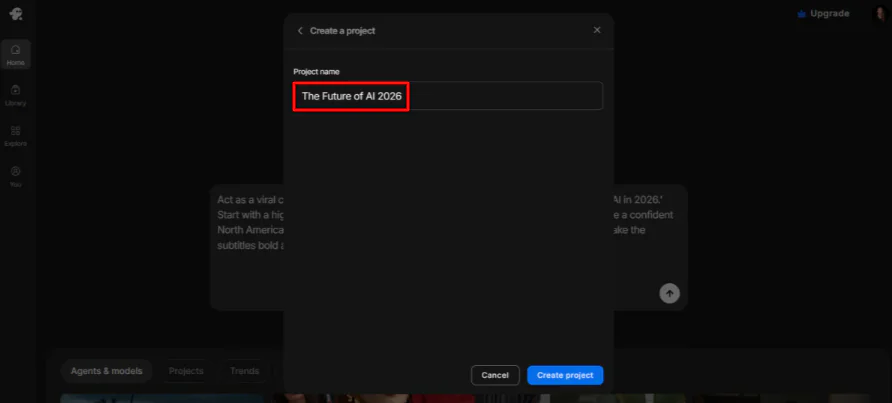
Після назви проєкту (“Майбутнє штучного інтелекту 2026”), я вибрав “Створити проєкт.”
Крок 5: Назвіть агента штучного інтелекту

Далі агент штучного інтелекту попросив мене дати йому ім’я і колір. Я дав йому:
“Ваше ім’я – ‘Створитель-агент’ у Електричному Синьому”, щоб збігатися з високоенергетичним настроєм вірусного відео, яке ми будемо створювати.
Це не тільки для естетики. Це допомагає вам залишатися організованими при переключенні між різними брендовими стилями.
Крок 6: Генеруйте голос, сценарій і кліпи

Агент штучного інтелекту слідував моїм інструкціям ідеально. Він назвав себе “Створитель-агент” і вибрав Електричній Синій як свій колір.
Після ідентифікації себе він негайно почав генерувати голос, сценарій і відео-кліпи.
Крок 7: Отримайте кредити

На жаль, я закінчив кредити під час генерації відео і мав додати кредити. Хоча InVideo пропонує безкоштовний план, кредити можуть бути недостатніми для того, що ви хочете створити.
Крок 8: Зробіть корективи

Через кілька хвилин моє відео було готове. Агент штучного інтелекту дав мені огляд того, що він створив, описавши голос, візуальні ефекти і фонові музику. Все було точним до моєї підказки.
Він також дав мені деякі пропозиції щодо того, як продовжувати:
- Генеруйте відео-кліпи з кожного ключового кадру з Seedance 2.0. Додайте речі, такі як рух камери і анімація частинок.
- Змінюйте будь-який візуальний ефект. Наприклад, інший кут, тісніше обрізання, більше деталей щодо чогось конкретного.
- Коригуйте голос за допомогою таких речей, як темп, акцент і різні тони.

Я вирішив піти за першою пропозицією, відповівши цим:
“Це виглядає добре. Давайте піти з Seedance 2.0, щоб згенерувати відео-кліпи для всіх ключових кадрів. Зробіть рух камери ‘динамічними зумами’, щоб зберегти енергію для соціальних мереж.”
Крок 9: Генеруйте відео

InVideo почав обробку, і через кілька хвилин зміни були застосовані.
З остаточними штрихами на місці, було час згенерувати відео. Я дав агенту штучного інтелекту цю підказку:
“Зберіть кінцеве 45-секундне відео. Синхронізуйте ‘Раян’ голос (8.1) з візуальними ефектами, накладіть ‘футуристичний лоу-фай’ музику (14.1) і додайте сміливі, кольорові субтитри, які ми обговорювали. Переконайтеся, що переходи між кліпами Seedance 2.0 гладкі і швидкі.”
Крок 10: Завантажте файли

Агент штучного інтелекту мав деякі збої. Він повідомив мені, що інструмент динамічних субтитрів мав труднощі з обробкою цього відео, і шарування аудіо не підтримувалося вбудованими інструментами.
Я дав йому наступну підказку, щоб вирішити остаточну суміш вручну:
“Будь ласка, згенеруйте посилання для завантаження повного 9:16 відео (22.1) і треку лоу-фай музики (14.1).”
Топ-3 альтернативи InVideo
Ось найкращі альтернативи InVideo, які я спробував.
Pictory
Перша альтернатива InVideo, яку я рекомендую, – це Pictory. Це побудовано навколо використання контенту, який у вас вже є (скрипти, статті, URL-адреси, презентації PowerPoint, аудіофайли) і перетворення його у відео автоматично.
Після реєстрації в Pictory я опинився в панелі управління на безкоштовній пробній версії. Інтерфейс був легким для навігації відразу. Я пішов прямо до інструменту “Текст у відео” і ввів підказку:
Перший чернетка був прийнятним, але трохи загальним. Деякі кліпи не збігалися з сценарієм, і вийшло дві хвилини, хоча я просив одну.
Але заміна кліпів і додавання голосу штучного інтелекту в редакторі зайняло мало часу, і кінцевий результат виглядав значно краще:
У порівнянні з InVideo, Pictory – це більш автоматичний інструмент. Ви надаєте йому контент, він створює відео, ви робите легкі редагування, і публікуєте. Тоді як InVideo надає вам більш ручний контроль через свого агента штучного інтелекту.
Для швидкої, масштабної переробки контенту виберіть Pictory. Для більш інтерактивного, колаборативного досвіду редагування виберіть InVideo.
Прочитайте мій огляд Pictory або відвідайте Pictory!
Synthesys
Друга альтернатива InVideo, яку я рекомендую, – це Synthesys. Це комплексний інструмент, який охоплює відео, голос, аватари і візуальні ефекти. Те, що відрізняє його, – це реалізм: реалістичні аватари штучного інтелекту, клонування голосу і підтримка 140+ мов.
Панель управління дав мені три типи проєктів відразу:
Я вибрав AI VSL, вставив посилання на одну зі своїх статей, налаштував параметри і натиснув “Згенерувати”. Через кілька хвилин відео було готове:
Виходило краще, ніж я очікував. Якість була хорошою, структура була привабливою, і воно навіть закінчилося зверненням до дії. Єдина річ, яку було потрібно зробити, – виправити друкарські помилки в тексті на екрані.
Виберіть InVideo для швидкої генерації соціального контенту з великою бібліотекою stock-медіа. Виберіть Synthesys для відео з аватарами, контенту голосу і презентацій з ведучим.
Прочитайте мій огляд Synthesys або відвідайте Synthesys!
Synthesia
Моя остання альтернатива InVideo – це Synthesia. Це побудовано для бізнесів, яким потрібні корпоративні відео з аватарами штучного інтелекту і мультилінгвальними можливостями. Воно підтримує 160+ мов, інструменти колаборації, експорт SCORM і аналітику.
Це не інструмент для швидких інстаграм-роликів. Це для тренувальних відео, демонстрацій продукту і професійних презентацій, які повинні виглядати так, якби вони прийшли з реальної студії.
Коли я спробував його, я вибрав платний план, щоб належним чином протестувати його. Як тільки я потрапив всередину, я згенерував це відео:
Мене вразило, наскільки реально виглядав аватар штучного інтелекту і звучав. Відео також виглядало дуже професійно.
Але редактор був тим, де Synthesia справді виділилася для мене. Воно вийшло за рамки базових редагувань. Я міг додавати жести до аватара (наприклад, підняття брови на певному слові), вставляти паузи і навіть коригувати окремі слова.
Виберіть InVideo для загального створення відео, особливо для безликого контенту соціальних мереж. Виберіть Synthesia для професійних, масштабних, мультилінгвальних бізнес-відео з аватарами штучного інтелекту.
Прочитайте мій огляд Synthesia або відвідайте Synthesia!
Огляд InVideo: Правильний інструмент для вас?
Після тестування InVideo шляхом генерації короткого відео для YouTube з агентом штучного інтелекту, найбільшою річчю, яку я помітив, є те, як швидко воно перетворює ідею у структуроване відео. Я перейшов від однієї підказки до повністю відредагованого чернетки за хвилини, і агент допоміг уточнити моє відео по ходу справи.
З тим сказано, досвід не був ідеальним. Виконання кредитів під час генерації відео і необхідність окремого редактора для остаточних редагувань зробили ясним, що InVideo є потужним, але ще не повністю “автоматичним”, якщо ви хочете ідеальний остаточний експорт.
Загалом, InVideo – це найкращий інструмент для швидкої, асистованої штучним інтелектом генерації контенту, особливо для соціальних мереж і безликих відео, де ви можете швидко уточнити вивід. Але якщо вам потрібна глибока творча свобода або довгий формат виробництва, вам, можливо, варто розглянути одну з цих альтернатив:
- Pictory – це найкращий інструмент для перетворення існуючого контенту (блогів, скриптів або статей) у прості відео з мінімальними зусиллями.
- Synthesys – це найкращий інструмент для відео з аватарами штучного інтелекту, клонування голосу і рекламних роликів.
- Synthesia – це найкращий інструмент для професійних відео з корпоративним стилем.
Дякую за прочитання мого огляду InVideo! Я сподіваюсь, вам він був корисним. Зареєструйтесь безкоштовно і побачите, як вам сподобається.
Часто задавані питання
Чи є InVideo повністю безкоштовним?
Хоча InVideo не є повністю безкоштовним, воно пропонує безкоштовний план з обмеженими кредитами.
Який краще, CapCut чи InVideo?
CapCut загалом краще підходить для редагування соціальних мереж, тоді як InVideo – це краще для генерації відео штучного інтелекту і маркетингового контенту.
Чи безпечно використовувати InVideo AI?
Так, InVideo AI – це безпечно використовувати з точки зору безпеки даних і законності. Це широко використовувана платформа.
Чи є щось краще, ніж InVideo AI?
Так, декілька альтернатив InVideo AI пропонують кращі функції залежно від ваших потреб. Наприклад, Synthesia і Synthesys – це кращі для генерації професійних відео з аватарами, тоді як Pictory – це краще для переробки довгого контенту.
Чи краще Canva, ніж InVideo?
Canva загалом краще підходить для початківців, менеджерів соціальних мереж і графічного дизайну, тоді як InVideo – це краще для спеціалізованого виробництва відео штучного інтелекту.



