
Herramientas de IA 101
Reseña de Vista Social: Cómo controlar el caos de las redes sociales con IA

Unite.AI está comprometida con rigurosos estándares editoriales. Podemos recibir una compensación cuando hace clic en los enlaces a los productos que revisamos. Por favor vea nuestro divulgación de afiliados.

If you’ve ever felt overwhelmed staring at multiple social media accounts, juggling posts, messages, and rendimiento simultaneously, plenty of others are in your shoes. In fact, 52% de los estrategas de marketing say that the time and budget required for maintaining multiple social platforms is their primary ROI concern.
Por eso decidí probar. Vista Social. It’s an all-in-one social media management platform that makes programación, engagement, analytics, and content creation simple and surprisingly affordable.
In this Vista Social review, I’ll discuss the pros and cons, what it is, who it’s best for, and its key features. Then, I’ll show you how I used it to create and schedule a new post so you can do the same.
Terminaré el artículo comparándolo con mis tres alternativas principales (Hootsuite, Circleboom y StoryChief) ¡Al final sabrás qué herramienta es la adecuada para ti!
Veredicto
Vista Social is a reliable, all-in-one AI social media tool featuring a unified inbox, smart scheduling, analytics, and helpful características del equipo, all presented in a clean dashboard. It can feel overwhelming at first, and there are some limitations, but it’s a solid choice for team growth.
Pros y contras
- Unified inbox for DMs, comments, mentions, and reviews
- Calendario de contenido visual con programación masiva y sincronización óptima
- Multi-platform composer with AI captions and hashtags
- Built-in AI tools for faster content creation
- Análisis, escucha social e informes personalizados
- Team collaboration with approvals and role permissions
- Creador de páginas de enlaces en la biografía
- Integrations with platforms like Bluesky, Reddit, and Threads
- Panel de control limpio e intuitivo
- Guided tutorials and onboarding resources
- Atención al cliente receptiva
- Prueba gratuita de 24 días sin necesidad de tarjeta de crédito
- The number of tools and features might overwhelm beginners
- The AI-generation tools can produce errors
- The mobile app has formatting glitches and missing features
- Los planes limitan la cantidad de miembros del equipo y los créditos de IA en la mayoría de los planes, que pueden agotarse para los usuarios intensivos.
¿Qué es Vista Social?

Vista Social Es una plataforma de gestión de redes sociales que planifica, publica y analiza contenido en las redes sociales. Ofrece programación, una bandeja de entrada compartida, análisis, escuchar en redes sociales, review tracking, and AI tools into one place.
It supports an impressive number of social networks: Facebook, Instagram, LinkedIn, TikTok, X (formerly Twitter), YouTube, Reddit, Snapchat, Threads, and even Bluesky. They’re even being used by over 30,000 brands and agencies worldwide.
They’ve also racked up some pretty impressive recognition on G2, which, if you’re not familiar, is basically like Yelp for software tools. When a platform is consistently winning awards on G2 for things like ease of use and best atención al cliente, meaning real users are vouching for it.
Consideraciones sobre la experiencia del usuario
Another thing that stands out about Vista Social is that it doesn’t just keep bolting on new features without considering the user experience. It feels modern and user-friendly.
La interfaz de usuario es limpia, el proceso de incorporación no es abrumador y realmente escuchan los comentarios de los usuarios.
¿Para quién es mejor Vista Social?
Aquí está quién Vista Social es mejor para:
- Agencies and social media managers can use Vista Social to manage multiple clients and profiles with bulk scheduling, reporting, and a shared inbox.
- Brands and businesses can use Vista Social to track reviews, DMs, and analytics in one place while coordinating consistent posting at scale.
- Creators and small businesses can use Vista Social to save time with AI content assistance, smart scheduling, and templates.
- Enterprises can use Vista Social to streamline collaboration, mantener la consistencia de la marca across departments, automate approvals, and gain insights from advanced analytics at scale.
Características principales de Vista Social
Aquí están Vista Social’s características principales:
- Use AI to create posts, notes, and ideas
- Programación automatizada de publicaciones
- Customize content per platform with the composer
- Calendario de contenido integrado para planificar, organizar y visualizar las próximas publicaciones de un vistazo
- Asistencia de IA para subtítulos y títulos
- Bandeja de entrada todo en uno para responder a comentarios, mensajes y reseñas de perfiles conectados
- Track performance and engagement metrics of your publicaciones en redes sociales to see what works and what doesn’t
- Run, schedule, and build customizable reports, focusing on different types of performance and analysis (competitor and sentiment)
- Media library to sube tu media and use it in your content
- Social listening tools to monitor network conversations on specific keywords (like your brand name)
- Muchas integraciones like Zapier and Slack
- Páginas de enlaces en la biografía y marca blanca options for agencies
How to Use Vista Social
Así es como usé Vista Social to create and schedule a new post:
- Comience una prueba gratuita
- Connect Social Profiles
- Explora el panel
- Crear una nueva publicación
- Elige tus perfiles
- Descubrir contenido
- Seleccionar contenido
- Generate a Video Title
- Choose the Mode
- Add the Content, Tone, & Format
- Select a Title
- Generar contenido de publicación
- Send the Content to the Composer
- Agregar etiquetas
- Añadir un primer comentario
- Activar Crear primero Me gusta
- Programar contenido
Paso 1: inicie una prueba gratuita

Empecé yendo a vistasocial.com and selecting “Start Your Free Trial.” Vista Social offers 14-day free trials of the Professional, Advanced, and Scale plans.
Step 2: Connect Social Profiles

After signing up and choosing my plan (I didn’t have to provide credit card credentials, which was nice), I was asked to connect my social profiles.
Vista Social integrates with a wide range of social media platforms, including Instagram, Facebook, TikTok, and more. Feel free to connect as many social profiles as you want.
Paso 3: Explora el panel

Once I connected my social media accounts, I was taken to my dashboard. At the top were some guides and recursos útiles.

On the left, I could see the social media accounts I’d connected. In the middle were my recent and scheduled posts, and on the right were my activities and alerts.
Paso 4: Crear una nueva publicación
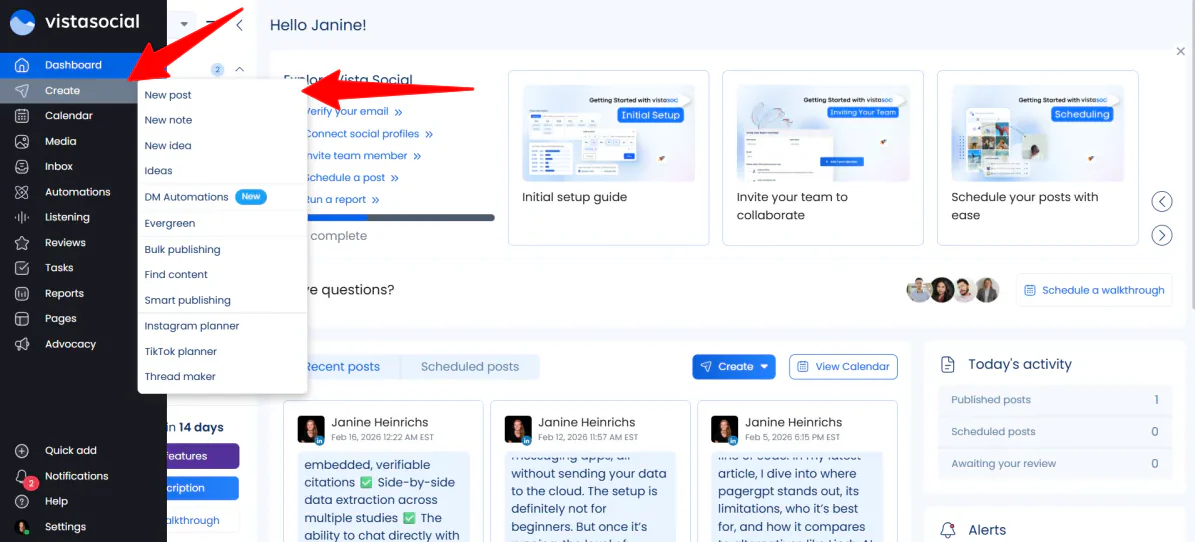
I wanted to explore the types of content Vista Social could create. In the far left navigation panel (where I could access all my features), I went to “Create” and selected “New post.”
Step 5: Choose Your Profiles

On the left, I could select any of the social media profiles I connected to Vista Social. I connected my LinkedIn and YouTube accounts, but only kept my YouTube account selected.
Step 6: Discover Content
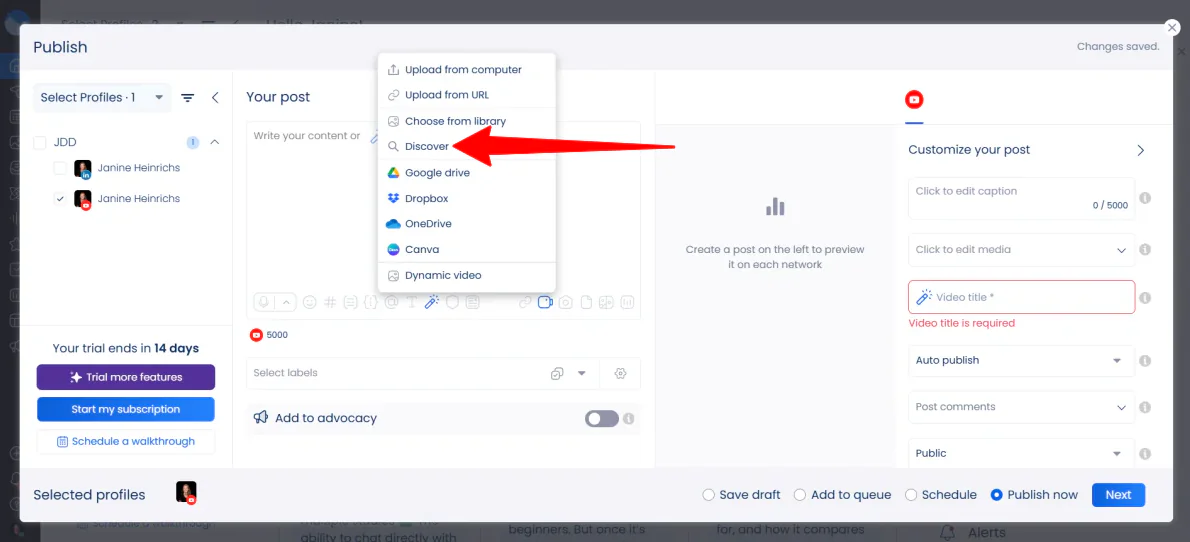
A continuación subí un vídeo.
Vista Social Me dio muchas opciones (desde dispositivo, URL, biblioteca y más). Elegí "Descubrir", lo que me dio acceso a... Pexels media library.
Paso 7: Seleccionar contenido

I searched “city aerial” and uploaded one I thought looked cool and had a vertical 9:16 aspect ratio.
Paso 8: Generar un título de video

I wanted to get Vista Social’s AI to generate the title for me rather than having to think of one myself. In the “Video title” field, I clicked on the magic wand icon.
Step 9: Choose the Mode

Immediately, the AI assistant window opened.
There were two modes: Guided and Advanced. I went with “Guided” because it’s more user-friendly, but feel free to choose “Advanced” to generate a title with a prompt.
Step 10: Add the Content, Tone, & Format

Next, I added the following for the original content:
Genera un título para tu video de YouTube basado en el siguiente mensaje: Una vista aérea cinematográfica del horizonte de una ciudad moderna. Úsalo para presentar nuestra nueva guía sobre "El futuro de la IA en el marketing" y explicar por qué el futuro de los negocios está sucediendo ahora.
También elegí “Catchy” como tono y “Expand” como formato.

As I filled in the blanks and selected my preferences, Vista Social automatically generated different video titles.
Si bien los títulos en general fueron un buen comienzo, eran demasiado extensos. Además, uno de ellos cometió el error de añadir "Además, por favor, proporcionen el mensaje que necesito convertir en un título atractivo para el video" al final.

Rather than settling for one, I gave Vista Social a new prompt that was more specific:
“Write a short, punchy YouTube title (under 60 characters) about the Future of AI in Marketing. Use a city aerial video as the visual hook.”
Step 11: Select a Title

These titles were much more concise. I selected “Aerial View: Skyrocketing Future of AI in Marketing!” and went to “Use as video title” in the bottom right.
Paso 12: Generar contenido para la publicación

Luego, todavía tenía que generar el contenido of my post. In the empty content field, I selected “Use the AI Assistant.”

Generar contenido fue el mismo proceso que generar títulos.
Agregué lo siguiente al campo vacío “contenido original”:
“Write a detailed YouTube video description for a video featuring a cinematic city aerial view. The video introduces our new guide: ‘The Future of AI in Marketing.’ Explain that the world of business is moving fast, and this guide helps you stay ahead. Remind viewers to click the link in the first comment to download the guide and to subscribe to more marketing tech updates.”
También seleccioné “Catchy” para el tono y “Shorten” para el formato.
Step 13: Send the Content to the Composer

As I made my selections, Vista Social Generé el contenido de la derecha. Seleccioné el que más me gustó y pulsé "Enviar al compositor" abajo a la derecha.
Step 14: Add Hashtags

Once you have the caption, feel free to make any direct edits and add hashtags at the end.
Step 15: Add a First Comment

With the content set, I added the finishing touches.
Rather than cluttering my description with a long URL, I used Vista Social’s First Comment feature. I would paste a link to “The Future of AI in Marketing” guide here, but I just added a placeholder link.
This ensures that as soon as the video goes live, the link is pinned and ready for viewers to click.
Paso 16: Activa la opción "Crear primero me gusta"

I also made sure the “Create First Like” toggle was turned on. It’s a subtle trick that ensures your post doesn’t sit at zero engagement for those first few critical minutes.
Last but not least, I selected “Schedule” and hit “Next” to continue.
Step 17: Schedule Content

Al seleccionar “Programar” en lugar de publicar inmediatamente, no tuve que adivinar cuándo mi audiencia estaría en línea. Vista Social gave me an optimal time for posting based on engagement, so I could set it and forget it.
Una vez que estuve conforme con todo, hice clic en "Programar". Inmediatamente, mi contenido quedó programado para su publicación y se agregó a mi calendario.
Overall, once I clarified my prompts, I appreciated how quickly Vista Social allowed me to move from idea to scheduled post without juggling multiple tools. It saved me time on both brainstorming and publishing content.
Vista Social provides all the tools needed to plan, create, optimize, and schedule content in one streamlined workspace, making it far more efficient than switching between separate apps.
Top 3 Vista Social Alternatives
Aquí están los mejores Vista Social alternativas:
Hootsuite
El Primer Vista Social alternative I’d recommend is Hootsuite. It’s been around since 2008, eventually evolving into an established platform that focuses on real-time social insights. It also offers the ability to create content with AI, seguimiento de tendencias y análisis de medios sociales in one unified dashboard.
En comparación con Vista Social, Hootsuite se destaca por sus herramientas de descubrimiento de tendencias, OwlyGPT IA (a social media AI assistant), 100+ integracionesy una larga reputación. También destaca los informes de rendimiento y las excelentes funciones de seguridad.
Mientras tanto, Vista Social se destaca con sus herramientas de enlace en la biografía, funciones de gestión de reseñas y generous free trial Sin necesidad de tarjeta de crédito. Es mucho más adecuado y accesible para autónomos y equipos pequeños.
Choose Hootsuite for deeper trend insights, competitor tracking, and advanced AI tools. Otherwise, choose Vista Social for a more affordable platform with strong inbox and publishing features.
Leer mi Revisión de Hootsuite o visite Hootsuite!
Circleboom
El próximo Vista Social alternative I’d recommend is Circleboom. It focuses on simple social media tools designed to help creators, brands, and SMBs grow their accounts.
En realidad, se divide en dos productos diferentes: uno que se centra específicamente en X (anteriormente Twitter) y otro donde puedes administrar todas tus plataformas de redes sociales en un solo lugar.
En comparación con Circleboom, Vista Social destaca por su bandeja de entrada unificada para mensajes directos, comentarios, menciones y reseñas. También ofrece funciones de colaboración más avanzadas, como aprobaciones. permisos de rol, social listening, and AI content generation tools.
Meanwhile, Circleboom leans into simplicity. It emphasizes ease of use, focused feature sets, and platform-specific tools (particularly for X). You’ll also get straightforward publishing across channels like LinkedIn, Instagram, and Pinterest.
Para funciones avanzadas de equipo, una bandeja de entrada unificada y un panel de control todo en uno, elige Vista Social. Para una herramienta más sencilla con una gestión de X eficaz y publicación multiplataforma, elige Circleboom.
StoryChief
Las Vista Social alternative I’d recommend is StoryChief. It’s a centralized content marketing hub that helps teams plan, create, and publish blog posts, social media content, and campaigns with AI and Herramientas de SEO.
StoryChief stands out with its focus on SEO content marketing, specifically its AI & SEO Content Editor. It also comes with content audits, LLM citation insights, plagiarism checks, and website publishing en plataformas como WordPress, Webflow y Shopify.
Meanwhile, Vista Social is more social-first. With it, you’ll get access to a unified inbox for DMs and reviews, stronger social engagement management, and platform integrations like Bluesky, Reddit, and Threads.
Choose StoryChief for more SEO-focused content, blog publishing, and team collaboration. Otherwise, choose Vista Social for social media management, engagement tracking, and unified inboxes.
Leer mi Reseña de StoryChief o visite StoryChief!
Vista Social Review: The Right Tool For You?
En general, mi experiencia con Vista Social was pretty seamless. Once I clarified my AI prompts, I was able to schedule my post quickly without having to juggle multiple tools.
Its unified inbox, AI-assisted content creation, scheduling features, and analytics make it a solid platform for social media management. It’s particularly useful for small teams, creators, and agencies that want to streamline publishing and engagement in one place.
Sin embargo, Vista Social isn’t the best solution for everyone. If that’s the case for you, consider these alternatives:
- Hootsuite is best for teams that want trend tracking, competitor insights, and social media analytics.
- Circleboom is best for creators or SMBs seeking simplicity, easy X (Twitter) management, and posting on multiple platforms.
- StoryChief is best for content that needs to be SEO-optimized, blog publishing, and structured editorial collaboration.
Thanks for reading my Vista Social review! I hope you found it helpful.
Vista Social offers a free 14-day trial on any of the plans, no credit card required. Try it for yourself and see how you like it!
Preguntas Frecuentes
What does Vista Social do?
Vista Social es una plataforma de gestión de redes sociales para que las marcas y agencias agilicen la programación, publicación, análisis y participación de contenido en múltiples redes.
Who owns Vista Social?
Vista Social fue encontrado por Vitaly Veksler, quien se desempeña como director ejecutivo y fundador.
¿Es Vista Social bueno para las pequeñas empresas?
Sí, Vista Social is an excellent and affordable social media management tool for small businesses with rich features.
¿Es Vista Social legítimo?
Sí, Vista Social es un legítimo, altamente calificado, y una plataforma de gestión de redes sociales ampliamente utilizada.
¿Es Vista Social bueno para las agencias?
Sí, Vista Social is a great tool for agencies. It’s a robust, modern, and affordable platform for managing multiple clients.



