
AI Tools 101
Windsurf Review: Is This AI IDE the Game-Changer You Need?

Unite.AI is committed to rigorous editorial standards. We may receive compensation when you click on links to products we review. Please view our affiliate disclosure.

If you’ve ever stared at a messy codebase wondering where to start, you’re not the only one.
Coding today isn’t just about writing functions; it’s about managing sprawling projects, juggling multiple files, and keeping everything secure and consistent.
That’s where Windsurf comes in. It’s more than just another AI assistant; it’s a coding platform built to understand your entire project, keep your workflow smooth, and help you code in plain language.
In this Windsurf review, I’ll discuss the pros and cons, what it is, who it’s best for, and its key features. Then, I’ll show you how I used Windsurf to create and edit this website, showing the date and time:

I’ll finish the article by comparing Windsurf with my top three alternatives (Replit, Cursor, and Bolt). By the end, you’ll know if it’s right for you!
Verdict
Windsurf is an AI coding platform that understands your entire project, handles multiple file updates, and lets you code in plain language. However, there may be occasional bugs and a learning curve.
Pros and Cons
- Understands your whole project and can update multiple files simultaneously
- Simple chat interface that lets you write and edit code using plain language
- Works with dev containers and multiple IDEs like VS Code and JetBrains
- Build, preview, and launch your codeectly
- Advanced AI models for smart code generation
- Flexible pricing with free, Pro, and Team options
- Keeps your code private with encryption
- Fast startup and responsive UI
- Occasional delays or bugs, especially with large projects
- Steeper learning curve for developers used to traditional IDEs
- Limited project management features compared to mature IDEs
- Smaller plugin ecosystem and community due to being newer
- AI can make multi-file changes too aggressively, requiring careful review
- Some reports of slow or unresponsive support, especially for free-tier users
- Chat mode is not available on the free version
What is Windsurf?

Windsurf (formerly Codeium) is an Integrated Development Environment (IDE) that uses AI to keep developers in their flow while coding. It’s built on a foundation that deeply understands your entire codebase.
Windsurf stands out by combining AI code generation with real-time chat. That means you can seamlessly switch between getting AI to write the code for you and chat with AI for guidance and explanations without changing the code.
Ultimately, Windsurf is a comprehensive platform for professional software development. It streamlines coding, design, and collaboration into a single workflow.
The Technology Behind Windsurf
The real innovation behind Windsurf lies in Cascade. It’s Windsurf’s AI agent that goes beyond simple code completion.
While tools like Copilot are great at predicting your next line of code, Cascade actually understands your entire project context. It tracks what you’re working on across multiple files and maintains that context throughout longer coding sessions.
Windsurf supports multiple AI models, including the latest GPT-5 and Claude Sonnet 4. You can easily switch between different models depending on whether you need quick suggestions or deep problem-solving assistance.
Brief History & Market Position
Codeium launched Windsurf in 2024 as its flagship product, building on years of experience with its popular autocomplete extension.
Recent updates show Windsurf is serious about this market. The August 2025 update alone included over 100 bug fixes, a complete UI redesign, and support for development containers. That kind of quick improvement shows the company is focused on earning developer trust.
Windsurf’s combination of powerful AI, user-friendly design, and fair pricing gives it a good shot at capturing significant market share. Whether it’ll overtake established players remains to be seen, but it’s worth watching (and trying).
Windsurf Integrations
One major pain point with new development tools is workflow disruption. Nobody wants to abandon their carefully crafted development environment for an AI assistant.
Windsurf tackles this head-on with plugins for VS Code, JetBrains, and more. You can keep your existing setup while adding Windsurf’s AI capabilities on top.
Who is Windsurf Best For?
Here are the types of people who get the most out of using Windsurf:
- Engineers can use Windsurf to work on large projects with multi-file context, access to the latest AI models, and features to enhance productivity.
- Teams and enterprises can use Windsurf for secure AI coding with advanced features, analytics, and deployment options.
- Intermediate to advanced developers can use Windsurf to streamline coding with AI through real-time interaction.
- Hobbyists and students can use Windsurf’s free tier to explore AI coding. However, its main focus is shifting toward professional and enterprise use.
Overall, Windsurf is designed for professional developers, teams, and enterprises who want an AI-powered coding environment that handles complex projects. Its focus is less on beginners or hobbyists than some competitors like Cursor or Replit.
Windsurf Key Features
Here are Windsurf’s key features to be aware of:
- Cascade: Windsurf’s core AI assistant. It understands your codebase, tracks your actions in real time, and works across multiple files. It makesect code changes and explains its process.
- Supercomplete: Coding goes beyond autocomplete by predicting intent.
- Multi-File Editing: Use AI to make consistent changes across multiple files simultaneously.
- Write Mode: AI makes code edits autonomously.
- Chat Mode: AI gives guidance, explanations, and suggestions without changing code.
- Terminal Integration: The AI debugs your code by executing terminal commands inside the editor.
- Live Previews: Preview your web app live in the IDE to test and update the UI with AI help.
- Cascade Memories: Consistent AI behavior across projects.
- Turbo Mode: Runs terminal commands automatically.
- Image-to-Code Conversion: Turns screenshots or mockups into HTML, CSS, and JavaScript.
- Auto Linting: Automatically fixes code to follow style rules.
- AI Model Selection: Choose between the latest AI models like GPT-5, Claude Sonnet 4, and Gemini 2.5 Pro.
- GitHub Integration: Fully own and manage project versions.
How to Use Windsurf
Here’s how I used Windsurf to create and edit a website showing the date and time:
- Download Windsurf
- Choose the Setup Flow
- Choose the Keybindings
- Select the Theme
- Create a Folder
- Give Windsurf a Prompt
- Generate the Code
- Access the Live Preview
- Make Edits
Step 1: Download Windsurf

I started by going to windsurf.com and selecting “Download for Windows.”
Step 2: Choose the Setup Flow

Once I had Windsurf downloaded, I could set up my flow in two ways:
- Import from Cursor
- Start fresh
There was also an option to add Windsurf as a terminal command to open Windsurf. I left this unchecked and hit “Start fresh.”
Step 3: Choose the Keybindings
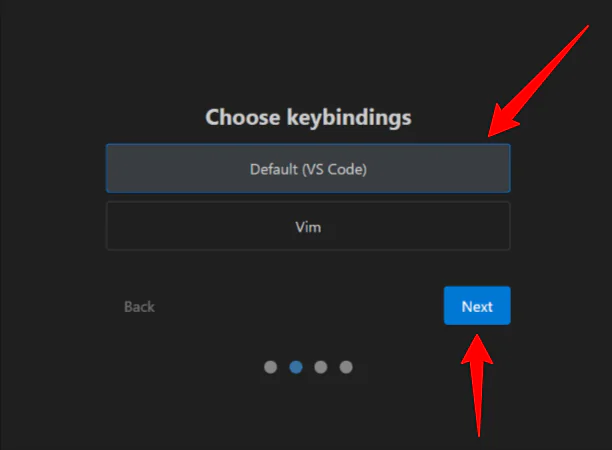
Next, I was asked to choose my keybindings. I chose the default option (VS Code) and clicked “Next.”
Step 4: Select the Theme

From there, Windsurf let me choose from eight editor theme types: four dark and four light themes. I went with the Dark theme (it’s easier on the eyes) and continued.
Step 5: Create a Folder

After setting everything up and creating an account, it was time to take Windsurf for a spin.
The first thing I did was select “Open Folder.” I made a new folder called “Test” on my desktop to save my code.
Step 6: Give Windsurf a Prompt

Next, I gave Windsurf a simple prompt in the Cascade window on the right:
“Create a single-page website that shows the current date and time, updating live every second.”
Step 7: Generate the Code

Immediately, Windsurf began generating the code and explaining its process. A few seconds later, the code was generated, and my website was complete!
Step 8: Access the Live Preview

I accessed a preview of the website Windsurf just made in the folder I created. It opened in my browser, and everything looked how I’d envisioned with the date, time, and location.
Step 9: Make Edits
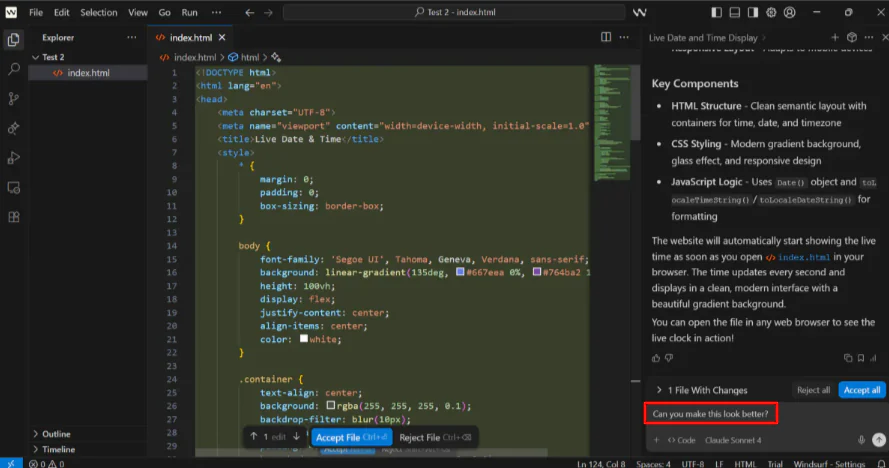
I wanted to see if Windsurf could make my website look better, so I gave it a very simple prompt to see what it would come up with:
“Can you make this look better?”
Windsurf immediately got to work and explained its enhancements. I opened the preview in my folder, and my live clock looked much better overall!
The colors, spacing, and typography had improved, and even the container in the center was floating up and down for a more dynamic feel.

I could continue chatting with Windsurf (Cascade) to make changes. Otherwise, I could highlight specific sections of the code and hit “Ctrl+I” to modify the code that had been highlighted.
Overall, Windsurf made it incredibly easy to create and edit a working website in just a few steps. I was impressed by how quickly it generated clean code, offered live previews, and improved the design with simple prompts.
Top 3 Windsurf Alternatives
Here are the best Windsurf alternatives I’d recommend.
Replit
The first Windsurf alternative I’d recommend is Replit. It’s a cloud-based, beginner-friendly platform that lets you code, collaborate, and deploy projects right in your browser.
Replit stands out with its simple cloud IDE and user-friendly setup for learning and prototyping. I’m no developer, and it took me minutes to generate, preview, and edit a fitness tracking app.
Meanwhile, Windsurf understands the entire context for large projects, offers the latest AI models like GPT-5, and comes with professional features for teams and enterprises.
Overall, I found Replit more user-friendly than Windsurf. I chose the project type rather than the AI model, approved the plan, and made visual editsectly in the preview.
Choose Replit for easy cloud-based AI coding and quick prototypes. Otherwise, choose Windsurf for bigger projects and more enterprise features.
Read my Replit AI review or visit Replit!
Cursor

The next Windsurf alternative I’d recommend is Cursor. Cursor is a powerful AI coding IDE that gives developers advanced tools and precise control over their code.
Cursor stands out with its extensive features, including debugging and overall workflow improvements. It’s made for developers who want full AI coding support and more control over their workspace.
Meanwhile, Windsurf focuses on ease of use for teams and professionals working on more complicated projects. As you generate code, you can approve or deny terminal commands one at a time to prevent unintended operations from running without your knowledge.
Choose Cursor for feature-packed AI coding tools. Otherwise, choose Windsurf for a user-friendly AI IDE with multi-file support.
Read my Cursor AI review or visit Cursor!
Bolt
The final Windsurf alternative I’d recommend is Bolt. It’s an AI coding assistant that boosts productivity with contextual code generation and terminal command suggestions.
On the one hand, Bolt emphasizes efficient coding assistance. It focuses on speed and ease of use within individual coding sessions.
Meanwhile, Windsurf stands out with its multi-file context awareness and support for the latest AI models like GPT-5. It’s designed for more complex projects and teams looking for a comprehensive AI coding environment.
Choose Windsurf for better team workflows and enterprise features. Otherwise, choose Bolt for quick and easy AI coding that fits standard IDEs.
Windsurf Review: The Right Tool For You?
Overall, my experience with Windsurf was great. Generating and editing a fully functional website was quick and easy, and approving or denying each terminal command gave me full control. I easily improved the overall look of my website by asking Cascade to do it for me!
Compared to competitors, Windsurf is best when working on more complex projects or collaborating with teams. However, it’s still a good tool for intermediate developers who want an AI-powered IDE. Its focus on professional and team workflows sets it apart from beginner-friendly tools.
If you’re interested in the best Windsurf alternatives, here’s what I’d recommend:
- Replit is best for beginners who want cloud-based coding, quick prototypes, and a user-friendly interface.
- Cursor is best for developers who want advanced AI coding tools, precise control, and extensive workflow features.
- Bolt is best for developers looking for fast, easy AI coding assistance.
Thanks for reading my Windsurf review! I hope you found it helpful.
Windsurf offers a free trial with 25 prompt credits per month. Try it for yourself and see how you like it!
Frequently Asked Questions
Is Windsurf AI free?
Yes, Windsurf offers a free plan that offers 25 prompt credits per month across the leading AI models.
Which is better, Cursor or Windsurf?
Windsurf is generally better for professional teams and large projects that need multi-file AI context. Cursor excels as a fast, precise AI coding tool ideal for individual developers seeking advanced workflow integrations.
Which AI model does Windsurf use?
Windsurf uses your choice of the latest AI models, including GPT-5, Claude Sonnet 4, and Gemini 2.5 Pro.
Has OpenAI bought Windsurf?
Yes, OpenAI agreed to acquire Windsurf for $3 billion in May 2025. However, the deal later fell apart, and the acquisition was not completed.
Is Windsurf AI safe to use?
Yes, Windsurf AI is safe to use. It has strong privacy controls, like encryption and SOC 2 Type II certification.



